Self-host Neural Inverse
Looking for a managed solution? Consider Neural Inverse Cloud maintained by the Neural Inverse team.
Neural Inverse is open source and can be self-hosted using Docker. This section contains guides for different deployment scenarios. Some add-on features require a license key.
When self-hosting Neural Inverse, you run the same infrastructure that powers Neural Inverse Cloud. Read "Why Neural Inverse?" to learn more about why this is important to us.
Deployment Options
Neural Inverse Cloud
Neural Inverse Cloud is a fully managed version of Neural Inverse that is hosted and maintained by the Neural Inverse team. Generally, it is the easiest and fastest way to get started with Neural Inverse at affordable pricing.
Low-scale deployments
You can run Neural Inverse on a VM or locally using Docker Compose. This is recommended for testing and low-scale deployments and lacks high-availability, scaling capabilities, and backup functionality.
Production-scale deployments
For production and high-availability deployments, we recommend one of the following options:
Architecture
Neural Inverse only depends on open source components and can be deployed locally, on cloud infrastructure, or on-premises.
Langfuse consists of two application containers, storage components, and an optional LLM API/Gateway.
- Application Containers
- Langfuse Web: The main web application serving the Langfuse UI and APIs.
- Langfuse Worker: A worker that asynchronously processes events.
- Storage Components:
- Postgres: The main database for transactional workloads.
- Clickhouse: High-performance OLAP database which stores traces, observations, and scores.
- Redis/Valkey cache: A fast in-memory data structure store. Used for queue and cache operations.
- S3/Blob Store: Object storage to persist all incoming events, multi-modal inputs, and large exports.
- LLM API / Gateway: Some features depend on an external LLM API or gateway.
Langfuse can be deployed within a VPC or on-premises in high-security environments. Internet access is optional. See networking documentation for more details.
Timezone Requirement
All infrastructure components (ClickHouse and Postgres) must run with their timezone set to UTC. Non-UTC timezones will cause queries to return incorrect or empty results. See the timezone troubleshooting FAQ for how to verify this.
Optimized for performance, reliability, and uptime
Neural Inverse self-hosted is optimized for production environments. It is the exact same codebase as Neural Inverse Cloud, just deployed on your own infrastructure. The Neural Inverse teams serves thousands of teams with Neural Inverse Cloud with high availability (status page) and performance.
Some of the optimizations include:
- Queued trace ingestion: All traces are received in batches by the Neural Inverse Web container and immediately written to S3. Only a reference is persisted in Redis for queueing. Afterwards, the Neural Inverse Worker will pick up the traces from S3 and ingest them into Clickhouse. This ensures that high spikes in request load do not lead to timeouts or errors constrained by the database.
- Caching of API keys: API keys are cached in-memory in Redis. Thereby, the database is not hit on every API call and unauthorized requests can be rejected with very low resource usage.
- Caching of prompts (SDKs and API): Even though prompts are cached client-side by the Neural Inverse SDKs and only revalidated in the background (docs), they need to be fetched from the Neural Inverse on first use. Thus, API response times are very important. Prompts are cached in a read-through cache in Redis. Thereby, hot prompts can be fetched from Neural Inverse without hitting a database.
- OLAP database: All read-heavy analytical operations are offloaded to an OLAP database (Clickhouse) for fast query performance.
- Multi-modal traces in S3: Multi-modal traces can include large videos or arbitrary files. To enable support for these, they are directly uploaded to S3/Blob Storage from the client SDKs. Learn more here.
- Recoverability of events: All incoming tracing and evaluation events are persisted in S3/Blob Storage first. Only after successful processing, the events are written to the database. This ensures that even if the database is temporarily unavailable, the events are not lost and can be processed later.
- Background migrations: Long-running migrations that are required by an upgrade but not blocking for regular operations are offloaded to a background job. This massively reduces the downtime during an upgrade. Learn more here.
If you have any feedback or questions regarding the architecture, please reach out to us.
Features
Neural Inverse supports many configuration options and self-hosted features. For more details, please refer to the configuration guide.
Authentication & SSO
Automated Access Provisioning
Caching
Custom Base Path
Encryption
Headless Initialization
Data Masking
Networking
Organization Creators (EE)
Instance Management API (EE)
Health and Readiness Check
Observability via OpenTelemetry
Transactional Emails
UI Customization (EE)
Subscribe to updates
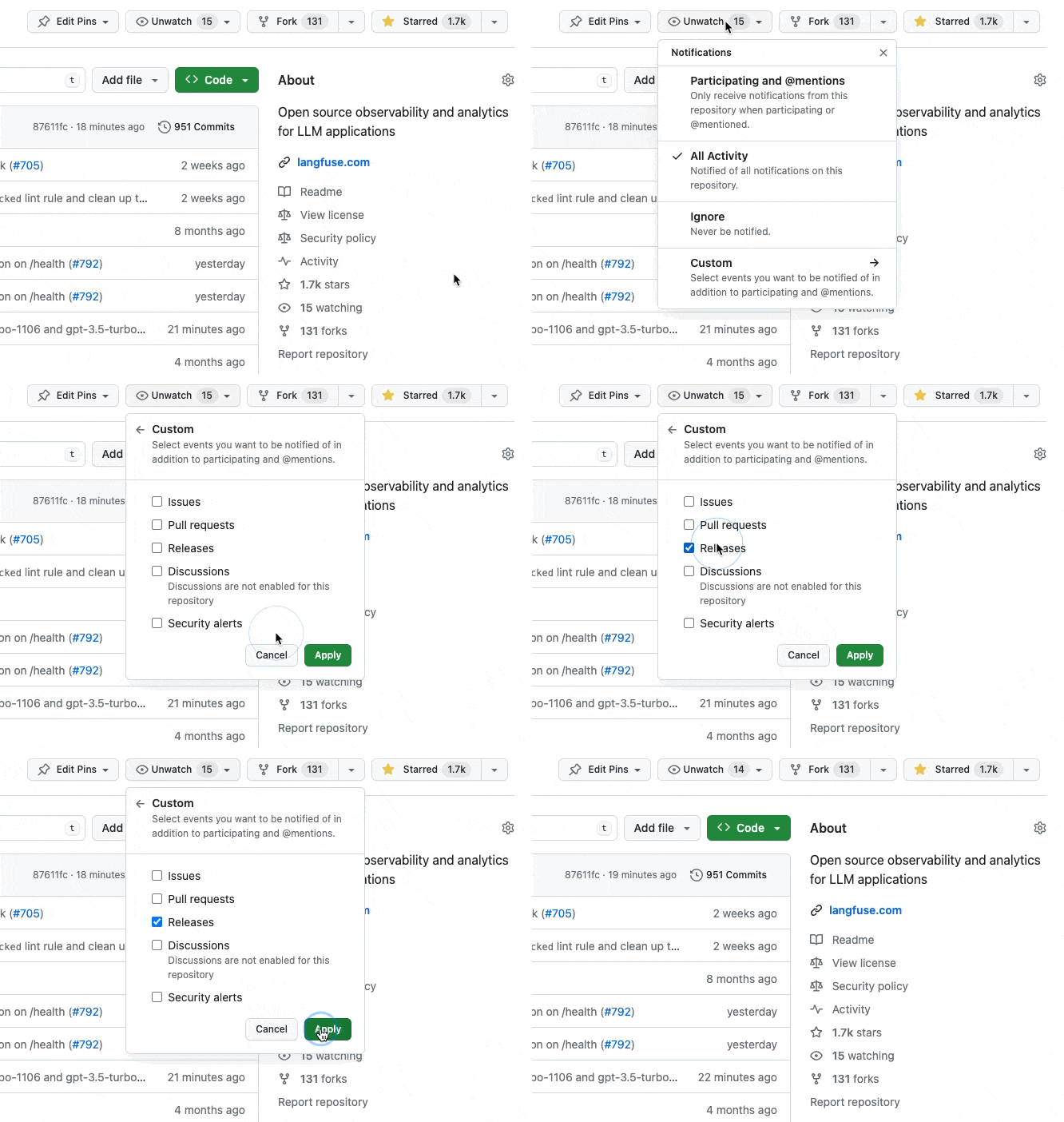
Release notes are published on GitHub. Neural Inverse uses tagged semver releases (versioning policy).
You can subscribe to our mailing list to get notified about new releases and new major versions.
You can also watch the GitHub releases to get notified about new releases:
Support
If you experience any issues when self-hosting Langfuse, please:
- Check out Troubleshooting & FAQ page.
- Use Ask AI to get instant answers to your questions.
- Ask the maintainers on GitHub Discussions.
- Create a bug report or feature request on GitHub.
To move data between a self-hosted instance and Neural Inverse Cloud (or between two instances), see the data migration cookbook for Python scripts to transfer traces, prompts, and datasets.
Last edited