Use Milvus with Neural Inverse
Thanks to the team at Milvus for developing this guide. These docs are adapted from their write up, which you can read here.
What is Milvus?
Milvus is an open-source vector database that powers AI applications with vector embeddings and similarity search. It offers tools for efficient storage and retrieval of high-dimensional vectors, making it ideal for AI and machine learning applications.
Trace your queries with the Neural Inverse LlamaIndex integration
In this quickstart, we'll show you how to set up a LlamaIndex application using Milvus Lite as the vector store. We'll also show you how to use the Neural Inverse LlamaIndex integration to trace your application.
Quick Start Guide
Step 1: Create a Neural Inverse Account
- Visit Neural Inverse and create an account.
- Create a new project and copy your Neural Inverse API keys.
Step 2: Install Required Packages
Make sure you have both llama-index and langfuse installed.
Note: This guide uses our Python SDK v2. We have a new, improved SDK available based on OpenTelemetry. Please check out the SDK v3 for a more powerful and simpler to use SDK.
$ pip install llama-index "langfuse<3.0.0" llama-index-vector-stores-milvus --upgradeStep 3: Initialize Neural Inverse
Visit Neural Inverse to create an account. Create a new project and copy your Neural Inverse API keys. This example uses OpenAI for embeddings and chat completions, so you also need to specify your OpenAI key in the environment variable.
import os

# Get keys for your project from the project settings page
os.environ["LANGFUSE_SECRET_KEY"] = "sk-..."
os.environ["LANGFUSE_PUBLIC_KEY"] = "pk-..."
os.environ["LANGFUSE_BASE_URL"] = "https://cloud.langfuse.com" # 🇪🇺 EU region
# Other Neural Inverse data regions include 🇺🇸 US: https://us.cloud.langfuse.com, 🇯🇵 Japan: https://jp.cloud.langfuse.com and ⚕️ HIPAA: https://hipaa.cloud.langfuse.com

# Your OpenAI key
os.environ["OPENAI_API_KEY"] = "sk-..."
Step 4: Set Up Neural Inverse Callback Handler
from llama_index.core import Settings
from llama_index.core.callbacks import CallbackManager
from langfuse.llama_index import LlamaIndexCallbackHandler

langfuse_callback_handler = LlamaIndexCallbackHandler()
Settings.callback_manager = CallbackManager([langfuse_callback_handler])
Step 5: Index Using Milvus Lite
from llama_index.core import Document
from llama_index.core import VectorStoreIndex
from llama_index.core import StorageContext
from llama_index.vector_stores.milvus import MilvusVectorStore

# Create documents
doc1 = Document(text="Your document text here.")
doc2 = Document(text="Another document text here.")

# Set up Milvus vector store
vector_store = MilvusVectorStore(
    uri="tmp/milvus_demo.db", dim=1536, overwrite=False
)
storage_context = StorageContext.from_defaults(vector_store=vector_store)

# Create index
index = VectorStoreIndex.from_documents(
    [doc1, doc2], storage_context=storage_context
)
Step 6: Query and Chat
# Query
response = index.as_query_engine().query("Your query here")
print(response)

# Chat
response = index.as_chat_engine().chat("Your chat message here")
print(response)
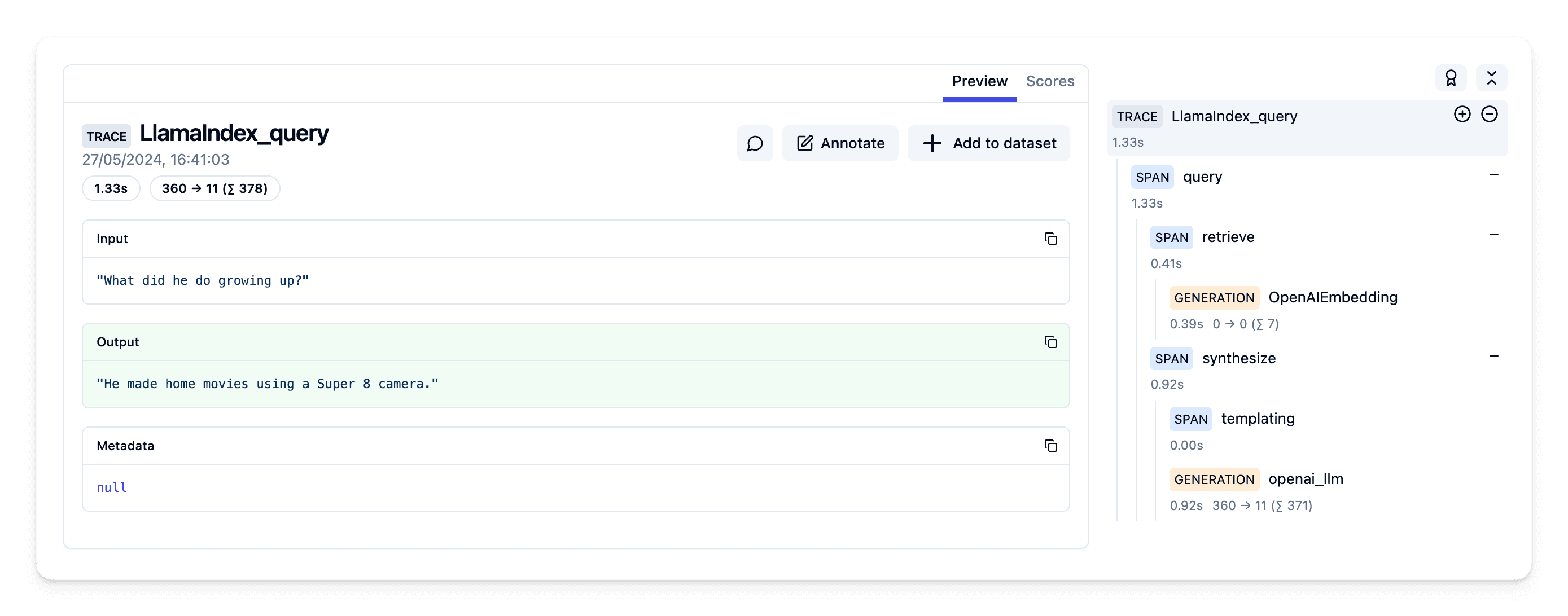
Step 7: Explore Traces in Neural Inverse
You can now see traces of your index and query in your Neural Inverse project.
Example traces in Neural Inverse (public links):
Last edited