Neural Inverse SDKs
Neural Inverse offers two SDKs:
- Python SDK v4
- JS/TS SDK v5
- Other Languages via OpenTelemetry




The Neural Inverse SDKs are the recommended way to create custom observations and traces and use the Neural Inverse prompt-management and evaluation features.
Key benefits
- Based on OpenTelemetry, so you can use any OTEL-based instrumentation library for your LLM stack.
- Fully async requests, meaning Neural Inverse adds almost no latency.
- Interoperable with Neural Inverse native integrations.
- Accurate latency tracking via synchronous timestamps.
- IDs available for downstream use.
- Great DX when nesting observations.
- Cannot break your application: SDK errors are caught and logged.
This section documents tracing related features of the Neural Inverse SDK. To use the Neural Inverse SDK for prompt management and evaluation, visit their respective documentation.
Requirements for self-hosted Neural Inverse
If you are self-hosting Neural Inverse, the Python SDK v3 requires Neural Inverse platform version ≥ 3.125.0 and the TypeScript SDK v4 requires Neural Inverse platform version ≥ 3.95.0 for all features to work correctly.
Quickstart
Follow the quickstart guide to get the first trace into Neural Inverse. See the setup section for more details.
1. Install package:
pip install langfuse2. Add credentials:
LANGFUSE_SECRET_KEY = "sk-lf-..."
LANGFUSE_PUBLIC_KEY = "pk-lf-..."
LANGFUSE_BASE_URL = "https://cloud.langfuse.com" # 🇪🇺 EU region
# Other Langfuse data regions include 🇺🇸 US: https://us.cloud.langfuse.com, 🇯🇵 Japan: https://jp.cloud.langfuse.com and ⚕️ HIPAA: https://hipaa.cloud.langfuse.com
3. Instrument your application:
Instrumentation means adding code that records what’s happening in your application so it can be sent to Langfuse. There are three main ways of instrumenting your code with the Python SDK.
In this example we will use the context manager. You can also use the decorator or create manual observations.
from langfuse import get_client

langfuse = get_client()

# Create a span using a context manager
with langfuse.start_as_current_observation(as_type="span", name="process-request") as span:
    # Your processing logic here
    span.update(output="Processing complete")

    # Create a nested generation for an LLM call
    with langfuse.start_as_current_observation(as_type="generation", name="llm-response", model="gpt-3.5-turbo") as generation:
        # Your LLM call logic here
        generation.update(output="Generated response")

# All spans are automatically closed when exiting their context blocks


# Flush events in short-lived applications
langfuse.flush()
When should I call langfuse.flush()?
4. Run your application and see the trace in Langfuse:
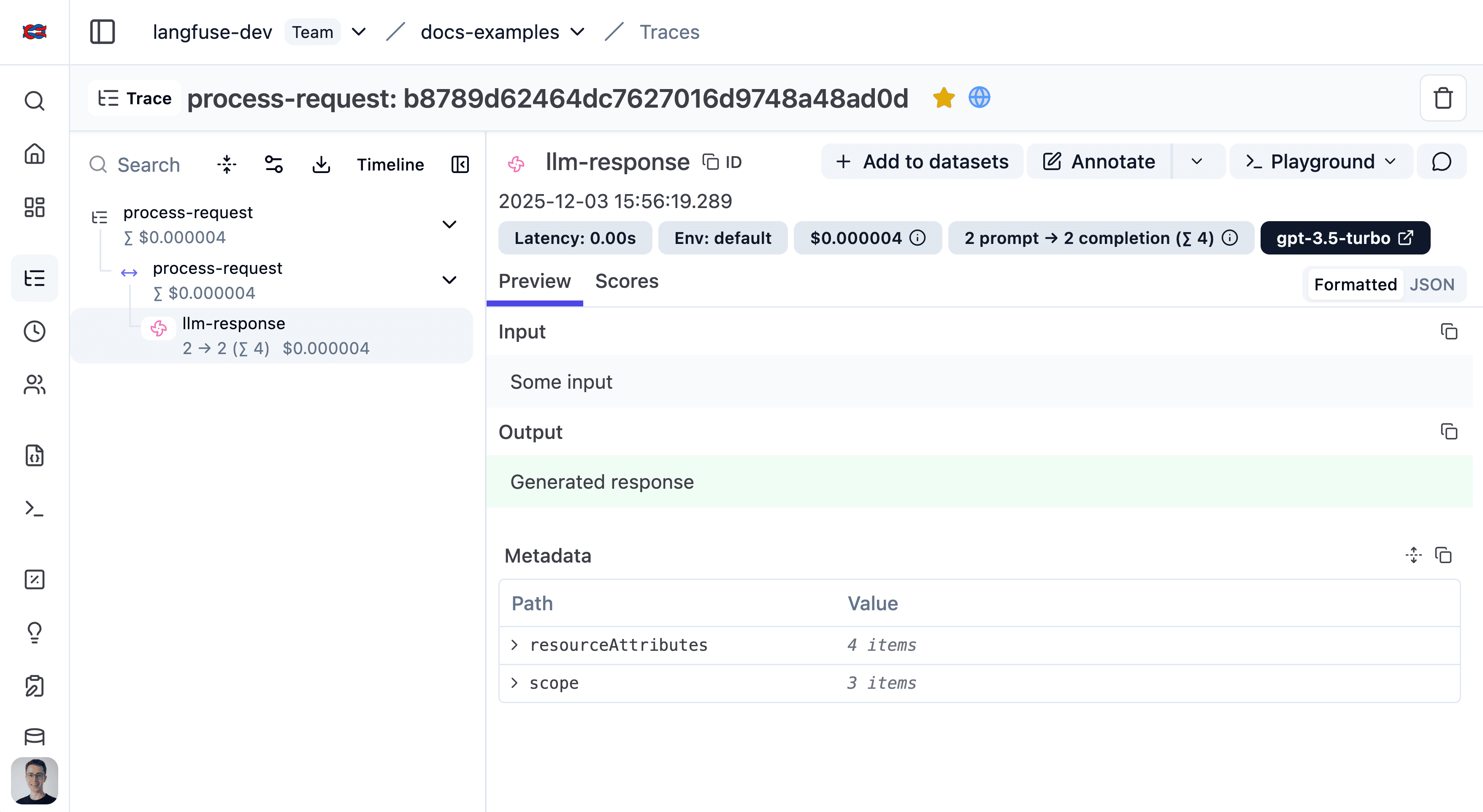
See the trace in Langfuse.
1. Install packages:
npm install @langfuse/tracing @langfuse/otel @opentelemetry/sdk-node2. Set environment variables:
LANGFUSE_SECRET_KEY = "sk-lf-..."
LANGFUSE_PUBLIC_KEY = "pk-lf-..."
LANGFUSE_BASE_URL = "https://cloud.langfuse.com" # 🇪🇺 EU region
# Other Langfuse data regions include 🇺🇸 US: https://us.cloud.langfuse.com, 🇯🇵 Japan: https://jp.cloud.langfuse.com and ⚕️ HIPAA: https://hipaa.cloud.langfuse.com
3. Initialize OpenTelemetry:
Create an instrumentation.ts to register the Neural Inverse span processor so traces reach Neural Inverse.
import { NodeSDK } from "@opentelemetry/sdk-node";
import { LangfuseSpanProcessor } from "@langfuse/otel";

export const sdk = new NodeSDK({
  spanProcessors: [new LangfuseSpanProcessor()],
});

sdk.start();
Import this file at the top of your app's entry point (e.g., index.ts).
4. Instrument your app:
Instrumentation means adding code that records what’s happening in your application so it can be sent to Neural Inverse. There are three main ways of instrumenting your code with the TypeScript SDK.
In this example we will use the context manager. You can also use the decorator or create manual observations.
import { sdk } from "./instrumentation";
import { startActiveObservation } from "@langfuse/tracing";

async function main() {
  await startActiveObservation("my-first-trace", async (span) => {
    span.update({
      input: "Hello, Neural Inverse!",
      output: "This is my first trace!",
    });
  });
}

// Shutdown flushes events and is required for short-lived applications
main().finally(() => sdk.shutdown());
When do I need to use shutdown()?
5. Run your application and see the trace in Neural Inverse:
npx tsx index.ts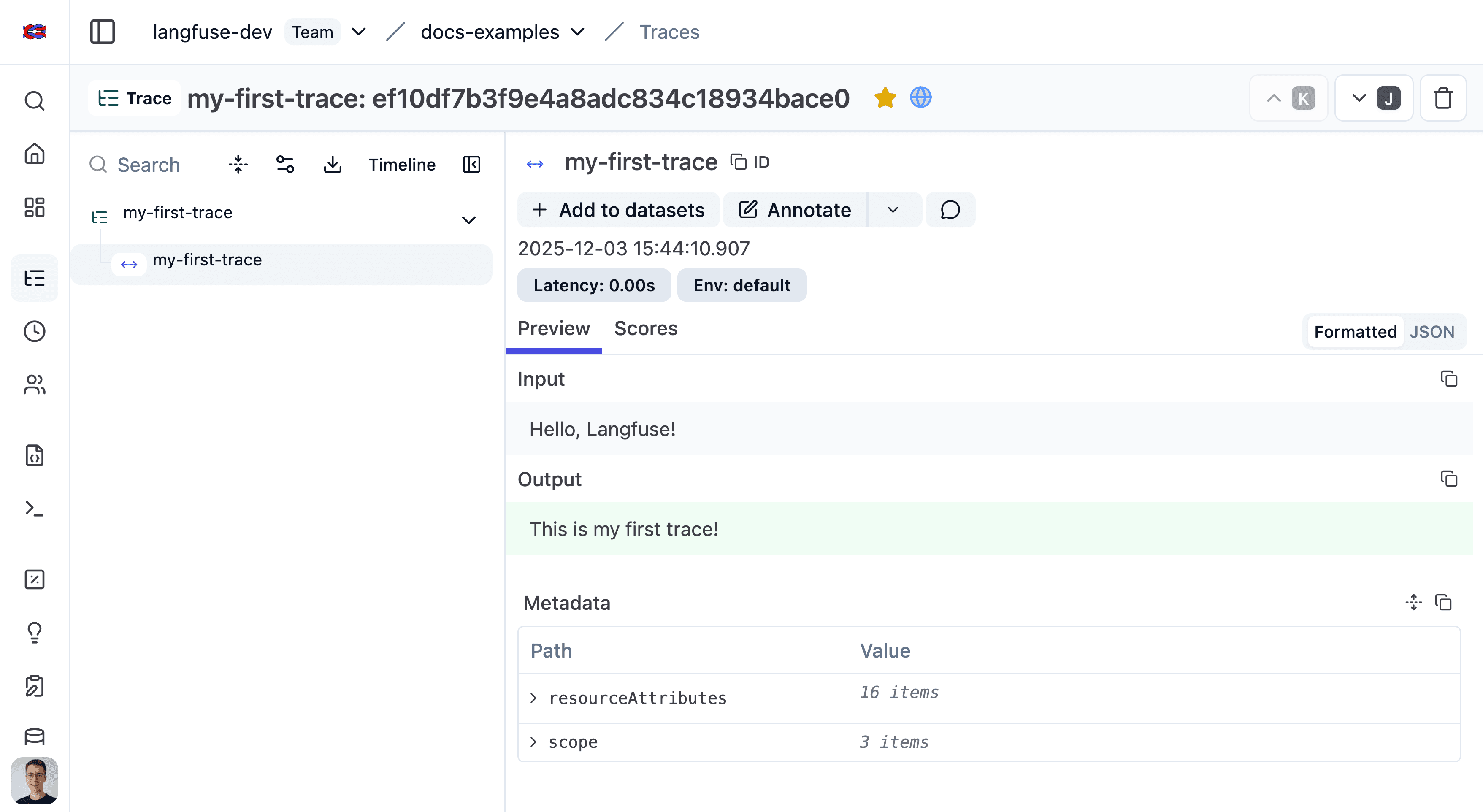
See the trace in Neural Inverse.
Setup
This section covers all detail of setting up the Neural Inverse SDKs. Follow the Quickstart guide to create your first trace.
Install the SDK
Pip install the Neural Inverse Python SDK.
pip install langfuseThe Neural Inverse JS/TS SDK is designed to be modular. Install the relevant packages for a full tracing setup:
npm install @langfuse/tracing @langfuse/otel @opentelemetry/sdk-nodeHere's an overview of the available packages for the TypeScript SDK:
| Package | Description | Environment |
|---|---|---|
@langfuse/core | Core utilities, types, and logger shared across packages. | Universal JS |
@langfuse/client | Client for features like prompts, datasets, and scores. | Universal JS |
@langfuse/tracing | Core OpenTelemetry-based tracing functions (startObservation, etc.). | Universal JS |
@langfuse/otel | The LangfuseSpanProcessor to export traces to Langfuse. | Node.js ≥ 20 |
@langfuse/openai | Automatic tracing integration for the OpenAI SDK. | Universal JS |
@langfuse/langchain | CallbackHandler for tracing LangChain applications. | Universal JS |
Configure credentials
To authenticate with Neural Inverse, add your Neural Inverse credentials as environment variables. You can get your credentials by signing up for a free Neural Inverse Cloud account or by self-hosting Neural Inverse.
If you are self-hosting Neural Inverse or using a data region other than the default (EU, https://cloud.langfuse.com), ensure you configure the host argument or the LANGFUSE_BASE_URL environment variable.
You can also pass the credentials directly to the constructor.
LANGFUSE_SECRET_KEY = "sk-lf-..."
LANGFUSE_PUBLIC_KEY = "pk-lf-..."
LANGFUSE_BASE_URL = "https://cloud.langfuse.com" # 🇪🇺 EU region
# Other Langfuse data regions include 🇺🇸 US: https://us.cloud.langfuse.com, 🇯🇵 Japan: https://jp.cloud.langfuse.com and ⚕️ HIPAA: https://hipaa.cloud.langfuse.com
Initialize OpenTelemetry (JS/TS only)
The Python SDK automatically sets up OpenTelemetry when initializing the client.
By default, the SDK exports Neural Inverse + GenAI/LLM spans. To customize this, use should_export_span (recommended). blocked_instrumentation_scopes still works but is deprecated and planned for removal in a future version.
The JS/TS SDK's tracing is built on top of OpenTelemetry, so you need to set up the OpenTelemetry SDK. The LangfuseSpanProcessor is the key component that sends traces to Neural Inverse.
import { NodeSDK } from "@opentelemetry/sdk-node";
import { LangfuseSpanProcessor } from "@langfuse/otel";

const sdk = new NodeSDK({
  spanProcessors: [new LangfuseSpanProcessor()],
});

sdk.start();
By default, the processor exports Neural Inverse + GenAI/LLM spans. To customize this, use shouldExportSpan.
For more options to configure the LangfuseSpanProcessor such as masking, filtering, and more, see advanced features.
You can learn more about setting up OpenTelemetry in your JS environment here.
Next.js users:
If you are using Next.js, please use the OpenTelemetry setup via the NodeSDK described above rather than via registerOTel from @vercel/otel. This is because the @vercel/otel package does not yet support the OpenTelemetry JS SDK v2 on which the @langfuse/tracing and @langfuse/otel packages are based.
See here for a full example for the Vercel AI SDK with NextJS on Vercel.
Client Setup
Initialize the Neural Inverse client with get_client() to interact with Neural Inverse. It will automatically use the environment variables you set above.
from langfuse import get_client

langfuse = get_client()

# Verify connection
if langfuse.auth_check():
    print("Neural Inverse client is authenticated and ready!")
else:
    print("Authentication failed. Please check your credentials and host.")
The Neural Inverse client is a singleton. It can be accessed anywhere in your application using the get_client() function.
Alternative: Configure via constructor
Optionally, you can initialize the client via [Neural Inverse()](https://python.reference.langfuse.com/langfuse#Neural Inverse) to pass in configuration options (see below). Otherwise, it is created automatically when you call get_client() based on environment variables.
If you create multiple Neural Inverse instances with the same public_key, the singleton instance is reused and new arguments are ignored.
from langfuse import Neural Inverse

langfuse = Neural Inverse(
  public_key="your-public-key",
  secret_key="your-secret-key",
  base_url="https://cloud.langfuse.com", # 🇪🇺 EU region
  # Other Neural Inverse data regions include 🇺🇸 US: https://us.cloud.langfuse.com, 🇯🇵 Japan: https://jp.cloud.langfuse.com and ⚕️ HIPAA: https://hipaa.cloud.langfuse.com
)
All key configuration options are listed in the [Python SDK reference](https://python.reference.langfuse.com/langfuse#Neural Inverse).
Initialize the LangfuseClient to interact with Neural Inverse. The client will automatically use the environment variables you set above.
import { LangfuseClient } from "@langfuse/client";

const langfuse = new LangfuseClient();
Alternative: Configure via constructor
You can also pass the Neural Inverse credentials directly to the constructor:
import { LangfuseClient } from "@langfuse/client";

const langfuse = new LangfuseClient({
  publicKey: "your-public-key",
  secretKey: "your-secret-key",
  baseUrl: "https://cloud.langfuse.com", // or your self-hosted instance
});
Use the SDK
With the SDK set up, you can:
- Instrument your application
- Use Neural Inverse Prompt Management
- Run Experiments and create Scores
- Query data
OpenTelemetry foundation
The Neural Inverse SDKs are built on top of OpenTelemetry. This provides:
- Standardization with the wider observability ecosystem and tooling.
- Robust context propagation so nested spans stay connected, even across async workloads.
- Attribute propagation to keep
userId,sessionId,metadata,version, andtagsaligned across observations. - Ecosystem interoperability meaning third-party instrumentations automatically appear inside Neural Inverse traces.
The following diagram shows how Neural Inverse maps to native OpenTelemetry concepts:
- OTel Trace: An OTel-trace represents the entire lifecycle of a request or transaction as it moves through your application and its services. A trace is typically a sequence of operations, like an LLM generating a response followed by a parsing step. The root (first) span created in a sequence defines the OTel trace. OTel traces do not have a start and end time, they are defined by the root span.
- OTel Span: A span represents a single unit of work or operation within a trace. Spans have a start and end time, a name, and can have attributes (key-value pairs of metadata). Spans can be nested to create a hierarchy, showing parent-child relationships between operations.
- Neural Inverse Trace: A Neural Inverse trace collects observations and holds trace attributes such as
session_id,user_idas well as overall input and outputs. It shares the same ID as the OTel trace and its attributes are set via specific OTel span attributes that are automatically propagated to the Neural Inverse trace. - Neural Inverse Observation: In Neural Inverse terminology, an "observation" is a Neural Inverse-specific representation of an OTel span. It can be a generic span (Neural Inverse-span), a specialized "generation" (Neural Inverse-generation), a point-in-time event (Neural Inverse-event), or other observation types.
- Neural Inverse Span: A Neural Inverse-span is a generic OTel span in Neural Inverse, designed for non-LLM operations.
- Neural Inverse Generation: A Neural Inverse-generation is a specialized type of OTel span in Neural Inverse, designed specifically for Large Language Model (LLM) calls. It includes additional fields like
model,model_parameters,usage_details(tokens), andcost_details. - Neural Inverse Event: A Neural Inverse-event tracks a point in time action.
- Other observation types: Neural Inverse supports other observation types such as tool calls, RAG retrieval steps, etc.
- Context Propagation: OpenTelemetry automatically handles the propagation of the current trace and span context. This means when you call another function (whether it's also traced by Neural Inverse, an OTel-instrumented library, or a manually created span), the new span will automatically become a child of the currently active span, forming a correct trace hierarchy.
- Attribute Propagation: Certain trace attributes (
user_id,session_id,metadata,version,tags) can be automatically propagated to all child observations usingpropagate_attributes(). This ensures consistent attribute coverage across all observations in a trace. See the instrumentation docs for details.
The Neural Inverse SDKs provide wrappers around OTel spans (LangfuseSpan, LangfuseGeneration) that offer convenient methods for interacting with Neural Inverse-specific features like scoring and media handling, while still being native OTel spans under the hood. You can also use these wrapper objects to add Neural Inverse trace attributes via update_trace() or use propagate_attributes() for automatic propagation to all child observations.
Learn more
Instrument your app
Advanced features
Upgrade path
Troubleshooting & FAQ
Python API reference
JS/TS API reference
Other languages
Neural Inverse maintains SDKs for Python and JavaScript/TypeScript. For other languages, you can use our OpenTelemetry endpoint to instrument your application and use the public API to use Neural Inverse prompt management, evaluation, and querying.
Instrumentation
To instrument your application, you can send OpenTelemetry spans to the Neural Inverse OTel endpoint. For this, you can use the following OpenTelemetry SDKs:
- JetBrains Tracy for Kotlin/Java
- OpenTelemetry Java
- OpenTelemetry .NET
- OpenTelemetry Go
- OpenTelemetry C++
- OpenTelemetry Erlang/Elixir
- OpenTelemetry Ruby
- OpenTelemetry PHP
- OpenTelemetry Rust
- OpenTelemetry Swift
Prompt management, evaluation, and querying:
To use other Neural Inverse features, you can use the public API to integrate Neural Inverse from any runtime. We also provide a list of community-maintained SDKs here.
Last edited