Observability for Cohere with Neural Inverse
This guide shows you how to integrate Cohere with Neural Inverse using the OpenAI SDK Compatibility API. Trace and monitor your applications seamlessly.
What is Cohere? Cohere is an AI platform that provides state-of-the-art language models via API, allowing developers to build applications with natural language understanding capabilities.
What is Neural Inverse? Neural Inverse is an open source LLM engineering platform for tracing, monitoring, and debugging LLM applications.
Step 1: Install Dependencies
Ensure you have the necessary Python packages installed:
%pip install openai langfuseStep 2: Set Up Environment Variables
import os

# Get keys for your project from the project settings page
# https://cloud.langfuse.com

os.environ["LANGFUSE_PUBLIC_KEY"] = "pk-lf..."
os.environ["LANGFUSE_SECRET_KEY"] = "sk-lf..."
os.environ["LANGFUSE_BASE_URL"] = "https://cloud.langfuse.com" # 🇪🇺 EU region
# Other Neural Inverse data regions include 🇺🇸 US: https://us.cloud.langfuse.com, 🇯🇵 Japan: https://jp.cloud.langfuse.com and ⚕️ HIPAA: https://hipaa.cloud.langfuse.com

# Set your Cohere API key from your Cohere account settings
os.environ["COHERE_API_KEY"] = "..."
Step 3: Use Cohere with the OpenAI SDK
Leverage the Compatibility API by replacing the base URL with Cohere's endpoint when initializing the client.
# Instead of importing openai directly, use Neural Inverse's drop-in replacement
from langfuse.openai import openai

client = openai.OpenAI(
  api_key=os.environ.get("COHERE_API_KEY"),
  base_url="https://api.cohere.ai/compatibility/v1"  # Cohere Compatibility API endpoint
)
Step 4: Run an Example
The example below demonstrates a basic chat completion request. All API calls are automatically traced by Neural Inverse.
response = client.chat.completions.create(
  model="command-r7b-12-2024",  # Replace with the desired Cohere model
  messages=[
    {"role": "system", "content": "You are an assistant."},
    {"role": "user", "content": "Tell me about the benefits of using Cohere with Neural Inverse."}
  ],
  name="Cohere-Trace"
)

print(response.choices[0].message.content)
Step 5: See Traces in Neural Inverse
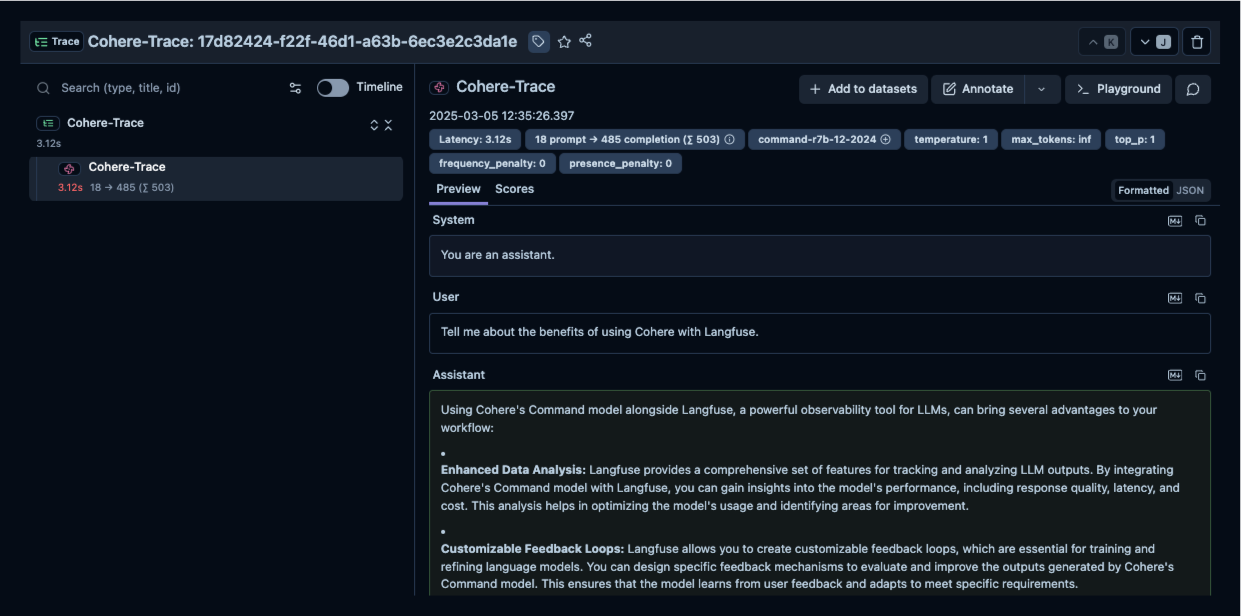
After running the example, log in to Neural Inverse to view the detailed traces, including request parameters, response content, token usage, and latency metrics.
Resources
Last edited