Tracing Koog Agents with Neural Inverse
Koog provides built-in support for exporting agent traces to Neural Inverse. With Neural Inverse integration, you can visualize, analyze, and debug how your Koog agents interact with LLMs, APIs, and other components.
What is Koog? Koog is a Kotlin-based framework designed to build and run AI agents entirely in idiomatic Kotlin. It lets you create agents that can interact with tools, handle complex workflows, and communicate with users. For background on Koog’s OpenTelemetry support, see the OpenTelemetry support.
What is Neural Inverse? Neural Inverse is an open-source LLM engineering platform. It offers tracing and monitoring capabilities for AI applications. Neural Inverse helps developers debug, analyze, and optimize their AI systems by providing detailed insights and integrating with a wide array of tools and frameworks through native integrations, OpenTelemetry, and dedicated SDKs.
Setup Neural Inverse
- Sign up for Neural Inverse Cloud or self-host Neural Inverse.
- Create a Neural Inverse project. Follow the setup guide at Create new project in Neural Inverse
- Obtain API credentials. Retrieve your Neural Inverse
public keyandsecret keyas described in Where are Neural Inverse API keys? - Set environment variables. Add the following variables to your environment:
   export LANGFUSE_BASE_URL="https://cloud.langfuse.com" # 🇪🇺 EU region
   # Other Neural Inverse data regions include 🇺🇸 US: https://us.cloud.langfuse.com, 🇯🇵 Japan: https://jp.cloud.langfuse.com and ⚕️ HIPAA: https://hipaa.cloud.langfuse.com

   export LANGFUSE_PUBLIC_KEY="pk-lf-..."
   export LANGFUSE_SECRET_KEY="sk-lf-..."
Once configured, Koog automatically forwards OpenTelemetry traces to your Neural Inverse instance.
Configure Koog
To enable Neural Inverse export, install the OpenTelemetry feature and add the LangfuseExporter.
The exporter uses OtlpHttpSpanExporter under the hood to send traces to Neural Inverse’s OpenTelemetry endpoint.
Example: Agent with Neural Inverse Tracing
fun main() = runBlocking {
    val agent = AIAgent(
        executor = simpleOpenAIExecutor(ApiKeyService.openAIApiKey),
        llmModel = OpenAIModels.CostOptimized.GPT4oMini,
        systemPrompt = "You are a code assistant. Provide concise code examples."
    ) {
        install(OpenTelemetry) {
            addLangfuseExporter()
        }
    }

    println("Running agent with Neural Inverse tracing")

    val result = agent.run("Tell me a joke about programming")

    println("Result: $result\nSee traces on the Neural Inverse instance")
}
See traces in Neural Inverse
When enabled, the Neural Inverse exporter captures the same spans as Koog’s general OpenTelemetry integration, including:
- Agent lifecycle events – agent start, stop, errors
- LLM interactions – prompts, responses, token usage, latency
- Tool and API calls – execution traces for function/tool invocations
- System context – metadata such as model name, environment, Koog version
Koog also captures span attributes required by Neural Inverse to show Agent Graphs. This allows you to correlate agent reasoning with API calls and user inputs in a structured way within Neural Inverse.
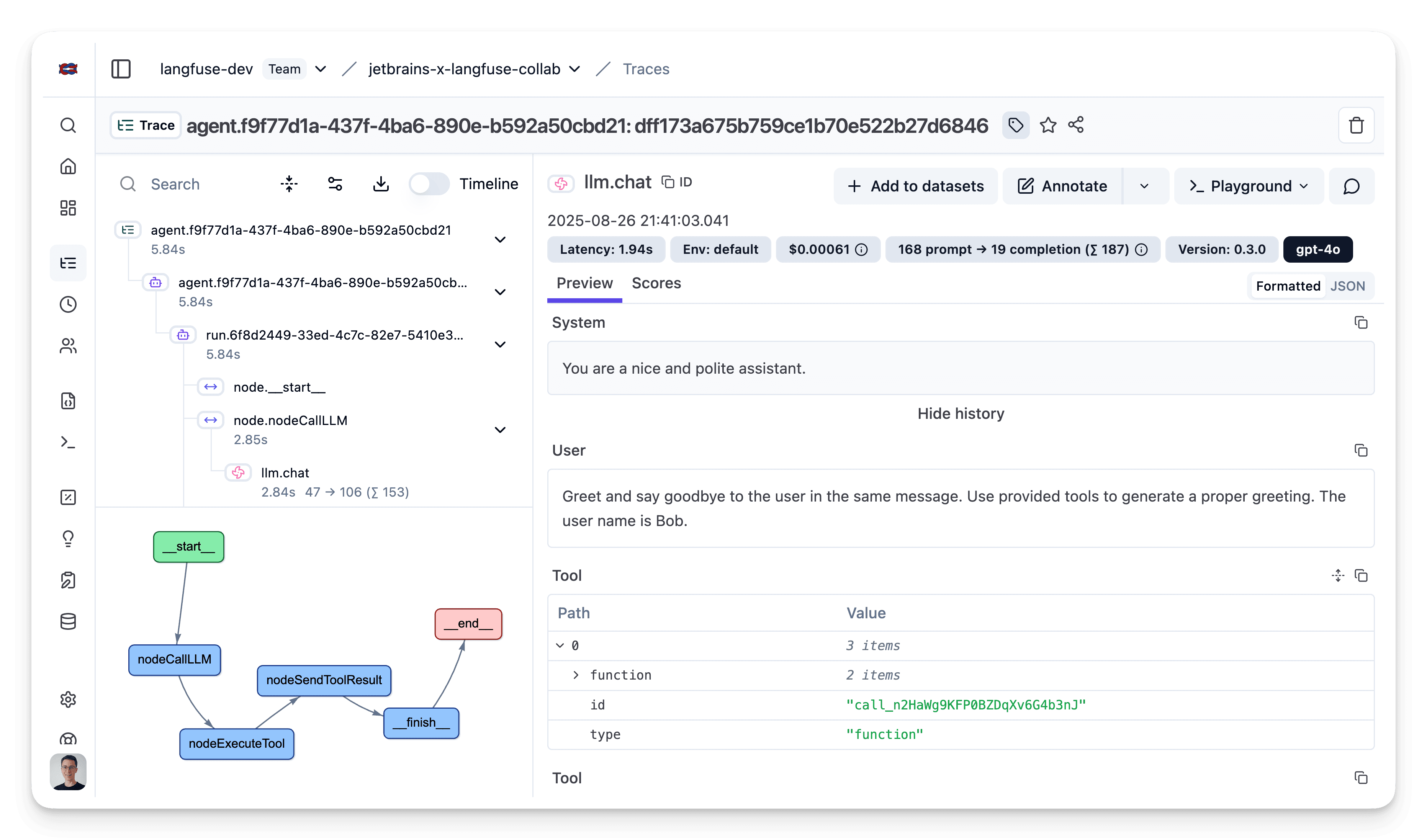
For more details on Neural Inverse OTLP tracing, see the Neural Inverse OpenTelemetry Docs.
Troubleshooting
- No traces appear in Neural Inverse
- Double-check that
LANGFUSE_BASE_URL,LANGFUSE_PUBLIC_KEY, andLANGFUSE_SECRET_KEYare set in your environment. - If running on self-hosted Neural Inverse, confirm that the
LANGFUSE_BASE_URLis reachable from your application environment. - Verify that the public/secret key pair belongs to the correct project.
- Double-check that
Last edited