Observability for Mastra With Neural Inverse
This guide shows you how to integrate Neural Inverse with Mastra for observability and tracing. By following these steps, you'll be able to monitor and debug your Mastra agents in the Neural Inverse dashboard.
What is Mastra? Mastra is the TypeScript agent framework designed to provide the essential primitives for building AI applications. It enables developers to create AI agents with memory and tool-calling capabilities, implement deterministic LLM workflows, and leverage RAG for knowledge integration.
What is Neural Inverse? Neural Inverse is an open-source LLM engineering platform. It offers tracing and monitoring capabilities for AI applications.
Integration
Create a Mastra project
If you don't have a Mastra project yet, you can create one using the Mastra CLI:
npx create-mastraMove into the project directory:
cd your-mastra-projectYou can get the full Mastra installation instructions here
Set up Neural Inverse project
Create a project in Neural Inverse and get your API keys from the project settings page.
Add environment variables
Create or update your .env.development (or .env) file with the following variables:
# Your LLM API key
OPENAI_API_KEY=your-api-key

# Neural Inverse credentials
LANGFUSE_SECRET_KEY=sk-lf-...
LANGFUSE_PUBLIC_KEY=pk-lf-...
LANGFUSE_BASE_URL=https://cloud.langfuse.com # Optional. Defaults to https://cloud.langfuse.com
Install the @mastra/langfuse package
Add the @mastra/langfuse package to your project:
npm install @mastra/langfuseSet up an agent
Create an agent in your project. For example, create a file agents/chefAgent.ts:
import { Agent } from "@mastra/core/agent";
import { openai } from "@ai-sdk/openai";

export const chefAgent = new Agent({
  name: "chef-agent",
  instructions:
    "You are Michel, a practical and experienced home chef " +
    "You help people cook with whatever ingredients they have available.",
  model: openai("gpt-4o-mini"),
});ai-sdk.Register agent and configure Neural Inverse
Create or update your Mastra instance configuration to register the agent and configure Neural Inverse integration. For example, create a file mastra.ts:
import { Mastra } from "@mastra/core";
import { LangfuseExporter } from "@mastra/langfuse";
import { chefAgent } from "./agents/chefAgent";

export const mastra = new Mastra({
  agents: { chefAgent },
  observability: {
    configs: {
      langfuse: {
        serviceName: "my-service",
        exporters: [
          new LangfuseExporter({
            publicKey: process.env.LANGFUSE_PUBLIC_KEY!,
            secretKey: process.env.LANGFUSE_SECRET_KEY!,
            baseUrl: process.env.LANGFUSE_BASE_URL,
            options: {
              environment: process.env.NODE_ENV,
            },
          }),
        ],
      },
    },
  },
});
Run mastra dev server
Start the Mastra development server:
npm run devHead over to the developer playground with the provided URL and start chatting with your agent.
View traces in Neural Inverse
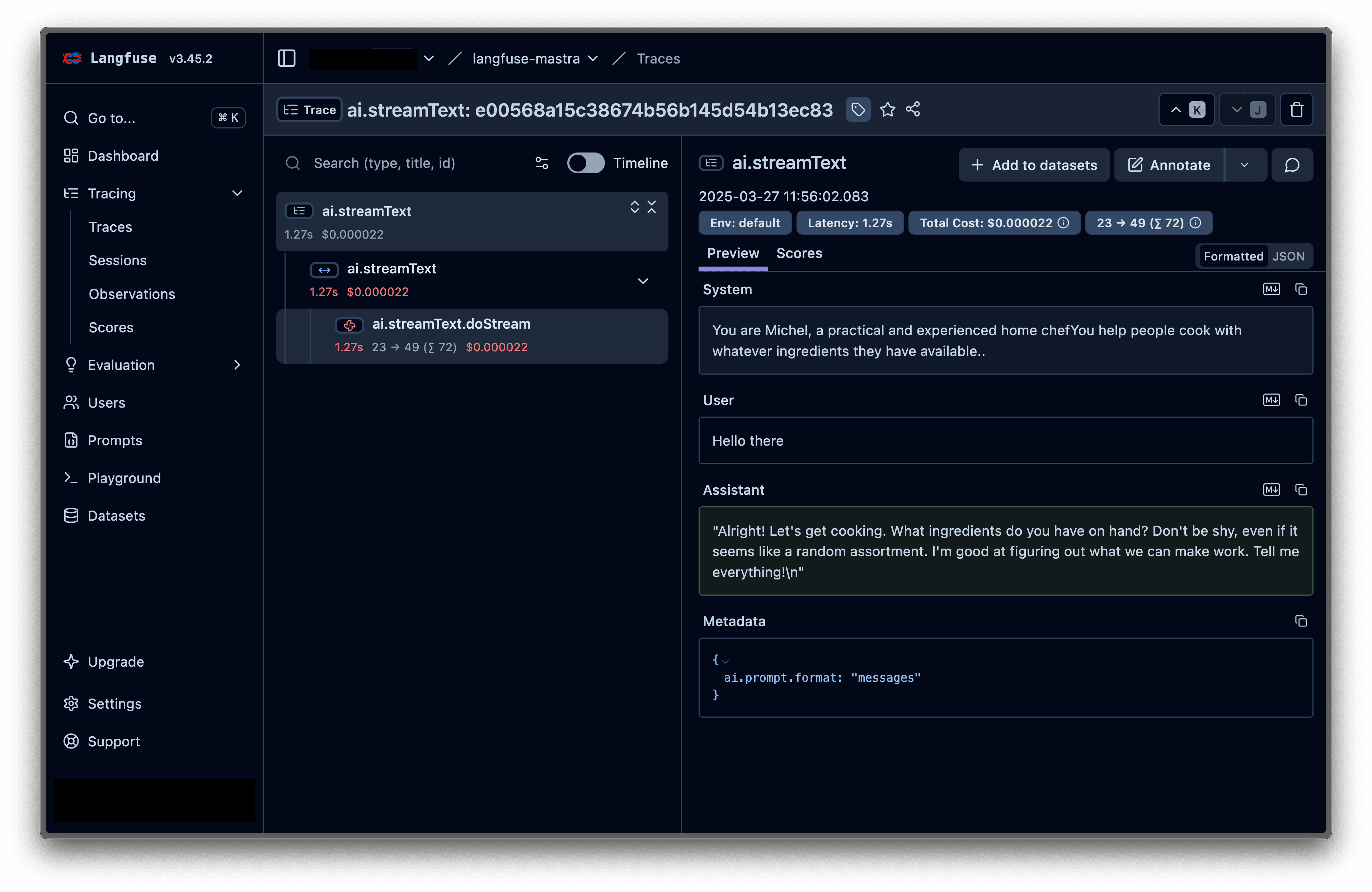
Head over to your Neural Inverse dashboard and you'll see the traces from your agent interactions. You can analyze the prompts, completions, and other details of your AI interactions.
Here's an example of a trace:
Configuration Options
Realtime vs Batch Mode
The Neural Inverse exporter supports two modes for sending traces:
- Realtime (development): Flushes after each event for immediate visibility.
new LangfuseExporter({
  publicKey: process.env.LANGFUSE_PUBLIC_KEY!,
  secretKey: process.env.LANGFUSE_SECRET_KEY!,
  realtime: true, // Flush after each event
})- Batch (production, default): Buffers and sends in batches for better throughput.
new LangfuseExporter({
  publicKey: process.env.LANGFUSE_PUBLIC_KEY!,
  secretKey: process.env.LANGFUSE_SECRET_KEY!,
  realtime: false, // Default behavior
})
Complete Configuration
new LangfuseExporter({
  // Required credentials
  publicKey: process.env.LANGFUSE_PUBLIC_KEY!,
  secretKey: process.env.LANGFUSE_SECRET_KEY!,

  // Optional settings
  baseUrl: process.env.LANGFUSE_BASE_URL, // Defaults to https://cloud.langfuse.com
  realtime: process.env.NODE_ENV === "development",
  logLevel: "info", // debug | info | warn | error

  // Neural Inverse-specific options
  options: {
    environment: process.env.NODE_ENV,
    version: process.env.APP_VERSION,
    release: process.env.GIT_COMMIT,
  },
})
Troubleshooting
- NextJS Integration Issues: If you encounter issues when using Mastra with Neural Inverse in NextJS applications, refer to the Mastra NextJS tracing documentation for NextJS-specific configuration and setup instructions.
- No Traces in Neural Inverse: Ensure that your credentials are correct and follow this troubleshooting guide
References
- Mastra Neural Inverse Exporter: Docs, npm
- Mastra Documentation
- Neural Inverse Documentation
Last edited