These commands are in the Command Palette, the Explorer's context menu on a .dbc or .arxml file, and the CAN Database view's editor title menu. Agents use them through exportCommunicationMatrix and importCommunicationMatrix.
Start a database from a template
Run New CAN Database... (also File > New File... > CAN Database (DBC)), pick the network and where to save. The file opens in the CAN Database view, where you add nodes, messages and signals as forms.
| Template | What it defines |
|---|---|
| CAN | BusType, set to "CAN" on the network |
| CAN FD | CANFD_BRS, DBName, BusType, NodeLayerModules, ECU, the CANoe jitter, drift and start delay attributes and VFrameFormat with StandardCAN_FD and ExtendedCAN_FD; BusType "CAN FD", DBName the file's name |
| SAE J1939 | The signal, message and node attributes of J1939 databases, including SPN, VFrameFormat (default J1939PG), NmStationAddress (default 254) and the NmJ1939 NAME fields; ProtocolType "J1939" |
| From Another CAN Database... | The attribute definitions, defaults and network values of a DBC you pick, such as your OEM's template; its nodes and messages are not taken |
The layout is the one CANdb++ gives a new database: VERSION "", the NS_ symbols, BS_:, BU_:, then the definitions, defaults and network values. A definition is in a template only when published files of at least two publishers define it for that kind of network; Vector's own template files were not read.
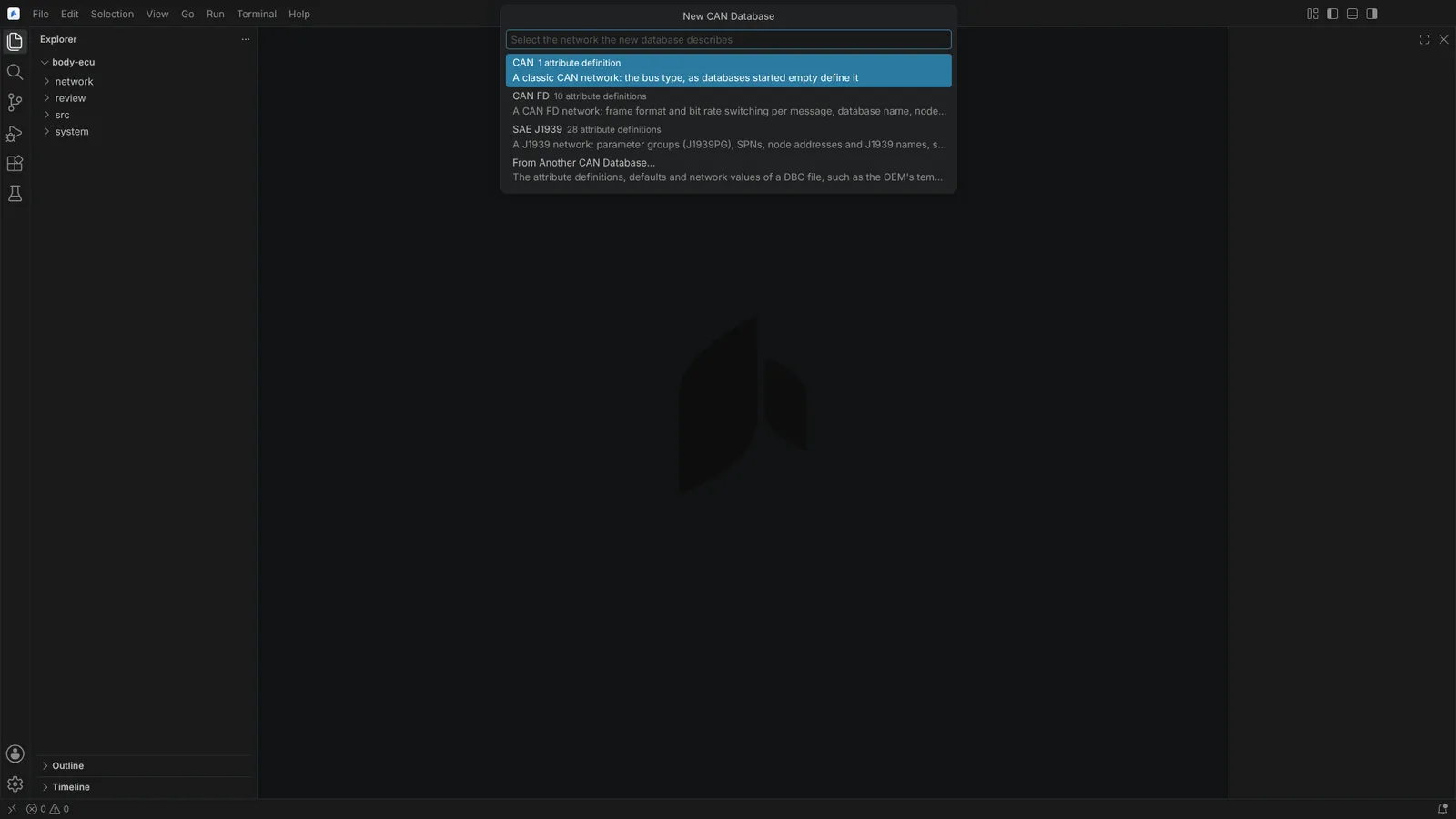 New CAN Database offering CAN, CAN FD and SAE J1939 templates, or another database as the start.
Export for a review
Export CAN Database... writes a DBC, or one CAN channel of an AUTOSAR file, as:
| Format | What it holds |
|---|---|
| Excel workbook (.xlsx) | Four sheets: communication matrix, nodes, attribute definitions and value tables, each with a frozen header row, a filter and set column widths |
| Communication Matrix (CSV) | The matrix sheet, which Import Communication Matrix reads back |
| Nodes, Attribute Definitions, Value Tables (CSV) | One sheet each |
The communication matrix has one row per signal (a message without signals has a row of its own) with fixed English headers: message columns (Message, ID, ID Format, Length [Byte], Transmitter, Cycle Time [ms], Message Comment), signal columns (Signal, Start Bit, Length [Bit], Byte Order, Value Type, Factor, Offset, Minimum, Maximum, Unit, Multiplexor, Multiplexed By, Multiplexor Values, Receivers, Value Descriptions, Signal Comment), one column per message and signal attribute (BO_ <name>, SG_ <name>) and one per node with Tx, Rx or Tx, Rx. CSV is RFC 4180, UTF-8 with a byte order mark and CRLF line ends. The workbook is written by the module itself.
What a table cannot hold is named in the notification: signals of no message, environment variables, relation attribute values and signal groups.
Import a communication matrix
Import Communication Matrix... reads a matrix CSV into a new or existing DBC.
- The delimiter is found from the header line (comma, semicolon or tab; with a semicolon or tab, decimal commas are read), and the encoding from the byte order mark, else UTF-8 when valid, else Windows-1252. Only the Message, ID and Signal columns are required.
- Messages are matched by identifier and signals by name. New nodes, messages, signals, comments, value descriptions, value types, attribute values and multiplexing are added; fields that differ are changed; nothing is deleted.
- Nothing is guessed: a name used by another identifier, rows of one message that disagree, Tx or Rx marks that contradict the Transmitter or Receivers column, a value the attribute's definition does not allow, a new object without a field it needs or an identifier or length the format cannot hold is reported with its line, and that object is left out.
- A confirmation lists what the import adds and changes, the first conflicts and how many new problems the checks would find.
- The import is applied as one edit, undone in one step, and left unsaved. The full report goes to the Automotive output.
Save an AUTOSAR CAN channel as DBC
Save CAN Database as DBC... converts one CAN channel of an AUTOSAR file into a new DBC through the same import, starting from the CAN or CAN FD template, and opens it in the CAN Database view. Every message, signal, node and attribute value the channel gives is written, every ECU that sends or receives on the channel is declared in BU_, and DBName is the file's name. What is not carried goes to the Automotive output. A defect of the source, such as a 64-byte frame sent as classic CAN, is carried and flagged by the DBC's checks.
State of the four commands above: verified on vendor samples: the 15 vendor DBC files and 205 community ones exported and read by cantools, canmatrix and LibreOffice Calc; each database's own matrix imports into it without a change; converted channels read by cantools and canmatrix as the module read the AUTOSAR file. No file made here has been opened in CANdb++, Excel or CANoe. An OEM's own K-matrix layout is not mapped: bring it into these columns first. A workbook is not imported: save its matrix sheet as CSV.
Generate C code
Generate C Code from CAN Database writes a C99 header and source for ECU software into the folder you choose:
- per message, identifier, length, extended, CAN FD and cycle time macros, a struct of raw fields in the smallest fitting fixed-width types, and pack, unpack and init functions (start values from
GenSigStartValue); - per signal, encode, decode and range checks; value descriptions as macros; plain, extended and cascaded multiplexing;
- byte-at-a-time access independent of the target's byte order, no bit-fields, no dynamic allocation, no undefined shifts.
Existing files are replaced only after confirmation. The generated files say they are yours to use, modify and ship without restriction.
State: verified: code generated from the vendor samples compiled with gcc 13.3 and clang 18.1 and compared with the codec. No ECU cross-compiler (IAR, TASKING, Green Hills, HighTec) has been run.