State: modelled against the UDS ECU simulator on CAN and over DoIP through a DoIP test entity. ODX-F is modelled on containers written with odxtools' own writer: no OEM or supplier container is public. The OEM seed-key library is kit shipped. No real ECU, flash bootloader or production line's flash station hardware has been used. Only on a bench ECU, with a way to recover it if programming stops halfway.
Reprogram an ECU from an image
- Load the image (Intel HEX, S-record or binary with its address) in the Reprogramming view.
- Set the sequence with Configure Reprogramming Sequence...: sessions, DTC setting and communication off, unlock, erase, download in blocks, transfer exit, check routine, verification, reset, and optionally Wait for Restart.
- Run Dry Run, then program. The confirmation names the ECU, its interface, the file and its SHA-256, and every step that will be sent.
- Follow each step with its request, timing and result.
The HEX and S-record readers match GNU objcopy.
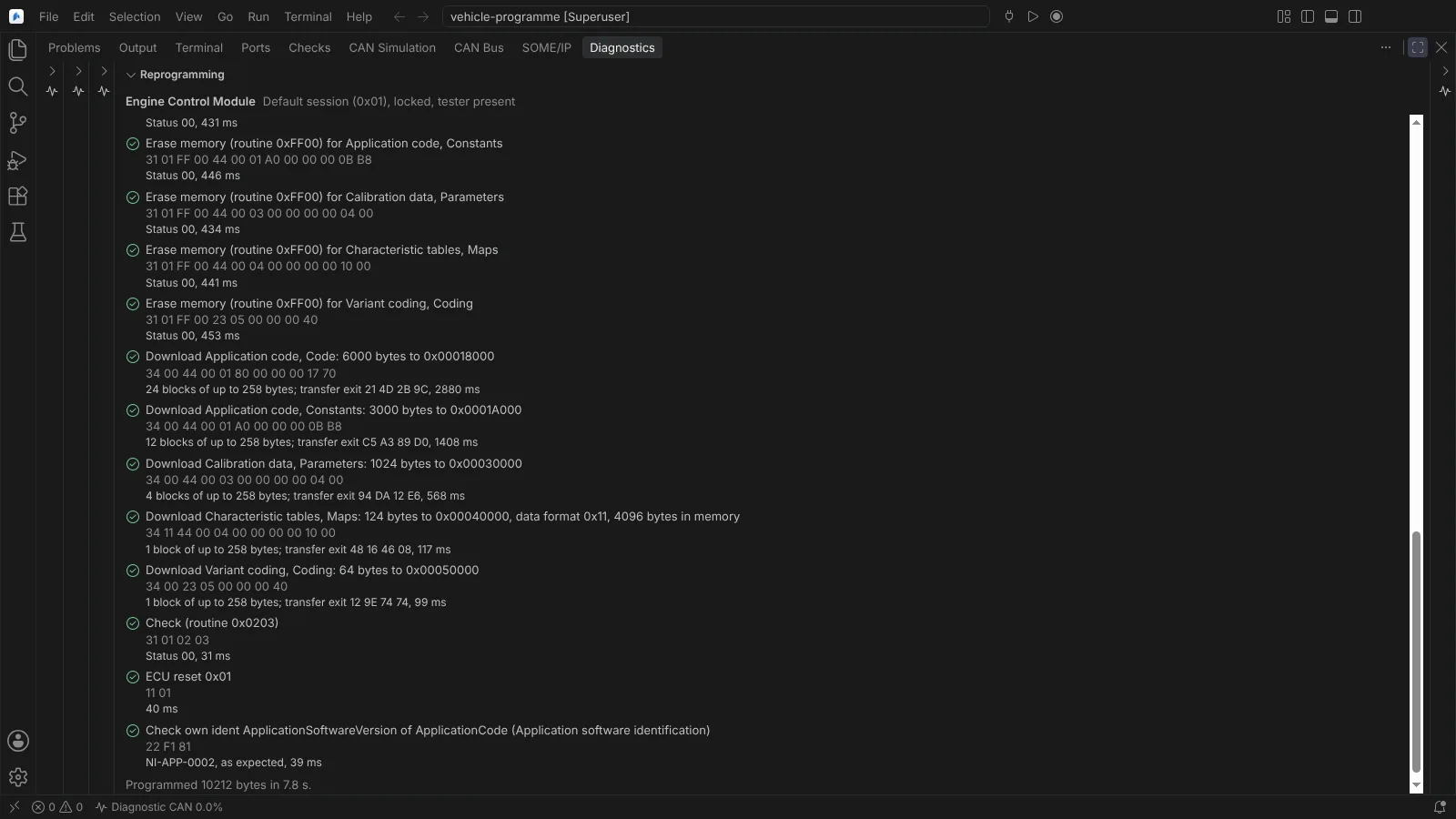 Reprogramming steps with each request, its result and timing, ending with the own ident checked after the reset.
Reprogram from an ODX-F container
Open Flash Container... in the Reprogramming view takes a PDX archive, or an ODX-F document with the ODX documents of its folder. Pick the variant (named by the ECU's description, identified with the container's own patterns, or chosen) and the download session. Before anything is sent, the view shows:
- each data block (type, logical block, flash data inside the document or in a data file, in Intel HEX, Motorola S or binary) and each segment with its source and target address, size in memory and bytes sent;
- the physical memory segments every target must lie in;
- the checksums, verified for CRC-32, CRC-16/CCITT-FALSE and SHA-256, reported as not computed otherwise;
- the expected idents read before anything is changed (a different value stops the sequence), and the own idents read before and checked after the reset;
- the security method, firmware signature and checksum.
A checksum that does not match, a target outside physical memory, a missing data file or a format that cannot be sent keeps the session from being programmed, each named at its place. Compressed or encrypted data is sent as the container holds it, never decompressed or decrypted.
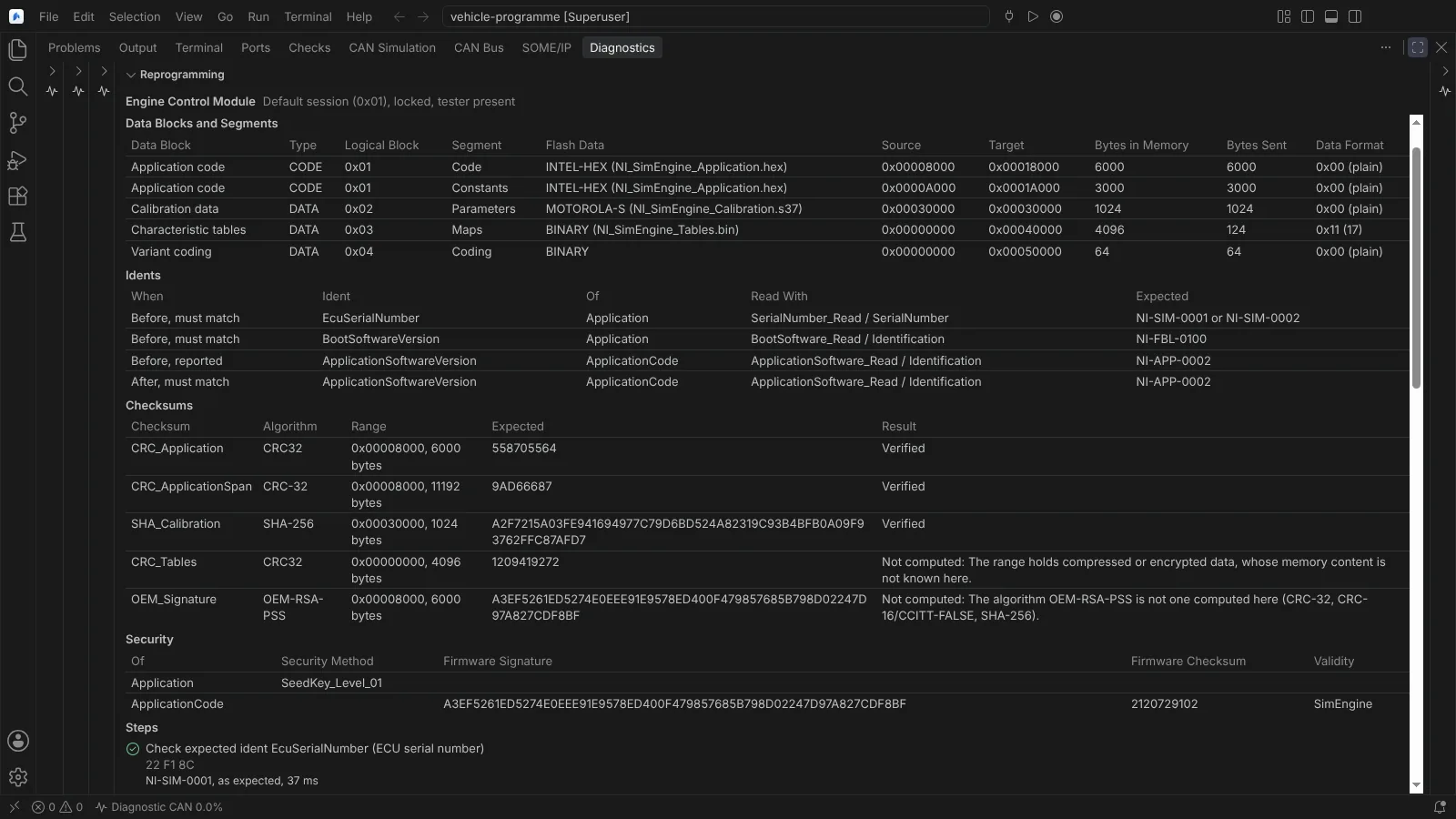 An ODX-F container in the Reprogramming view: data blocks and segments, expected idents, checksums with their results, and security.
The container's flash job. The single-ECU job a session names (Java or Python code a vendor tester runs) is never run here. The view's Flash Job section shows what the description establishes: the program files with their size and SHA-256, the declared parameters with each default checked against its data object property, and every related service mapped onto the module's own steps (the same, another value, not in the sequence, or not a reprogramming step). The ECU definition's sequence runs instead, and the confirmation, job report and agent tool say so.
Verification of the programmed memory
After the downloads and the check routine, before the reset, each download is read back with ReadMemoryByAddress and compared byte for byte; every run of differing bytes is reported at its address with the bytes programmed and read back.
- Data sent compressed or encrypted is verified through the container's checksums computed over the memory read back.
- Where the ECU refuses the read, the sequence's verification routine runs per download, with the placeholders
${alfid},${address},${size},${crc32},${checksum}and${signature}. - A download that cannot be verified either way is reported as not verified, with the reason. A difference fails the run before the reset.
Waiting for a slow restart
Wait for Restart (in Configure Reprogramming Sequence, stored as reprogramming.waitForRestart in the ECU definitions) waits after the reset before the identification is read: a fixed delay, a request sent until the ECU answers positively (such as 3E 00, or 22 F1 81 for its application to run), or both, within a time limit counted from the reset. It is its own step, showing the time waited and the requests sent; every request goes to the Operation Log. A time limit that runs out fails the sequence at that step, naming what was waited for.
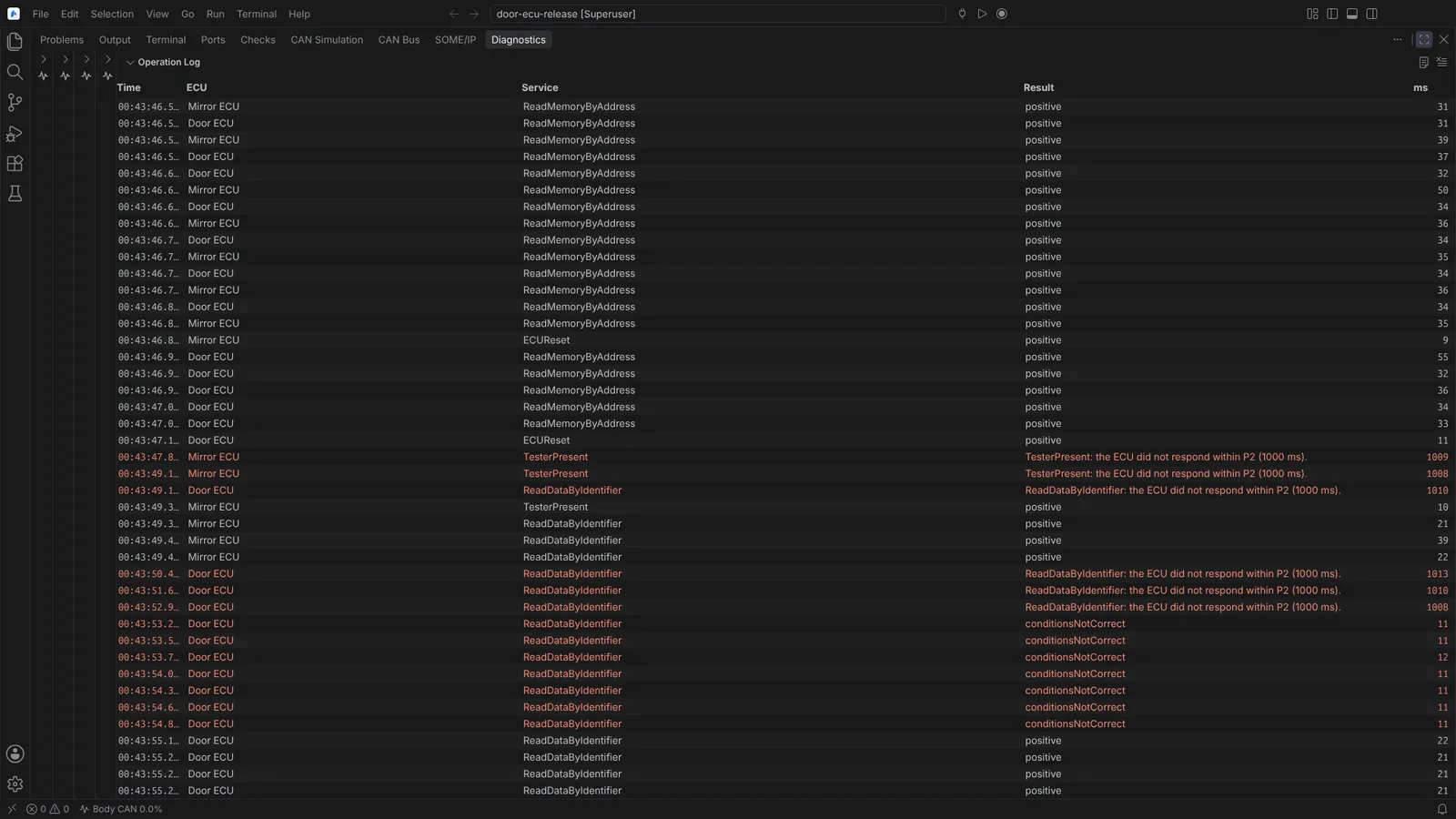 The Operation Log after each ECU reset: timeouts, then conditionsNotCorrect while the ECU starts, then the positive reads and the identification.
Flash several ECUs: flash jobs
The Flash Job view programs several ECUs at once, on several CAN channels and DoIP entities, from a *.flashjob.json file (files relative to it): New Flash Job..., Open Flash Job..., Add ECU to Flash Job..., Save Flash Job As....
- Each entry names its image or container (variant, session), the identifiers read before and after for the record, and optionally its own
waitForRestartand an end-of-line sequence ("endOfLine"). - Run Flash Job... prepares every ECU and asks once, naming each ECU, its interface, the file and its SHA-256, the bytes and steps, any end-of-line sequence's changes, and the ECUs that cannot be programmed and why.
- The ECUs are programmed in parallel, each with its own step, progress (bytes written and read back), cancel and result; a failure stops only that ECU. Cancel Flash Job stops it.
- Save Flash Job Report... writes the production record (JSON): per ECU its interface, ISO-TP settings, file and SHA-256, variant and session, identification before and after, verification, every step with outcome and duration, and the tool's name, version and commit.
Each ECU keeps its own ISO-TP block size and STmin; isoTp.sendStMin sets the least gap the tester keeps between the frames it sends. ECUs of a job are not sequenced (for example a gateway before the ECUs behind it).
End-of-line sequences
An end-of-line sequence is a workspace file in the module's documented format (*.eol.json, "format": "neuralInverse.endOfLineSequence", "formatVersion": 1). Its steps: enter a session, unlock, write an identifier (the VIN, variant coding: as bytes, ASCII or physical values through the description), run a routine with its expected status, read an identifier and check it, clear DTCs, check that no DTC matches a status mask, reset and wait for the restart, and wait. Problems in the file are named at their place before anything is sent.
- Run Run End-of-Line Sequence... (End of Line view, Command Palette, or agent tool
runEndOfLineSequence). - It asks once per run, naming the ECU, its interface, the file and its SHA-256 and every change. A sequence that only reads, checks and waits asks nothing.
- The steps run in order with tester present kept up. The line stops at the first step the ECU refuses or whose check does not hold, with the reason; later steps are reported as not run. Cancel End-of-Line Sequence stops it.
- Save End-of-Line Report... writes the production record (JSON) with the sequence and description SHA-256, the tool version, the changes confirmed, the identification before and after, and every step with its request, outcome and duration.
A flash job entry can name a sequence to run after programming, under the job's one confirmation.
Calibration into the ECU
To put a calibrated image into the ECU, save it with Save Calibrated ECU Image As... (see Calibration data and the A2L update) and program it here over UDS.
Not verified: a real bootloader, whose read-back rules and verification routines are the OEM's (signatures are handed to the ECU's routine, never checked here); compression and encryption with a real bootloader's data format; an OEM end-of-line tester's format (the sequence format is the module's own); a vFlash Station report format (the job report is the module's own).