State: reading verified on files written by Kvaser's Memorator Config Tool (ASC, BLF, MF4) and a CSS Electronics CANedge (MF4) against python-can; TRC reading checked against PEAK's own format document. Writing, the editor, the ISO-TP annotation and replay are modelled. No file written by CANoe, CANalyzer, PCAN-View, INCA or CANape has been read, and no vendor tool has opened a file written here.
Formats
| Format | Read | Written |
|---|---|---|
| Vector ASC (classic and CAN FD, error and remote frames, decimal or hex base, absolute or relative time) | By the module | By the module |
candump logs and display forms (.candump, candump-*.log) | By the module | By the module |
| PEAK TRC 1.0 to 2.1 | By the module, as PEAK's document defines each version | Every version from 1.0 to 2.1 |
| BLF | Through your python-can | Through your python-can |
| MF4 bus logging | Through your python-can and asammdf | Through your python-can and asammdf |
Text formats are streamed into a compact store with random access and time lookup; malformed lines are reported with their line numbers and never stop the read. An .mf4 opens by what it holds: bus logging in the CAN Trace editor, measurements in the measurement file editor (see Calibration over XCP), FlexRay frames with Open as FlexRay Trace (see FlexRay).
PEAK TRC. Each version is written as PEAK's document describes it, so a PCAN-View or PCAN-Explorer user receives recordings in their own format: 1.0 (one bus, no direction, milliseconds), 1.1 (Rx and Tx, $FILEVERSION and $STARTTIME), 1.2 (buses 1 to 16, microseconds), 1.3, 2.0 (CAN FD, $COLUMNS) and 2.1 (bus and reserved columns), with CR LF line ends. CAN FD frames carry their type (FD, FB, FE, BI) in 2.x. What a version cannot hold is left out and said: CAN FD frames in 1.x, buses above 16, and error frames without PEAK's error information.
Open and analyse a trace
Traces open in the CAN Trace editor by default; use Open as CAN Trace for other files. They stream in with progress and cancel, then stay smooth at millions of frames.
- A table with time, channel, identifier, name, direction, DLC, flags, data and decoded signals with units and value names; chronological or fixed per identifier (Toggle Trace Fixed and Chronological Mode).
- Databases chosen per channel from the workspace's DBC and ARXML files by how many frames they decode, or picked (Choose Trace Databases...).
- Filters in the bus monitor's language, with arithmetic over signals, fields and bytes; Find in Trace; Go to Time in Trace.
- Toggle Trace Statistics: per-message counts, cycle times and jitter, bus load per channel over time, error frames, and E2E and SecOC results.
- Toggle Trace Graphics: the signal plot below the table, its cursor following the selected row and back.
- A State Tracker under the frame list (Add Signal to State Tracker...), its cursor following the selected frame.
- J1939 parameter groups, NM PDUs and container PDUs are decoded as on the live bus.
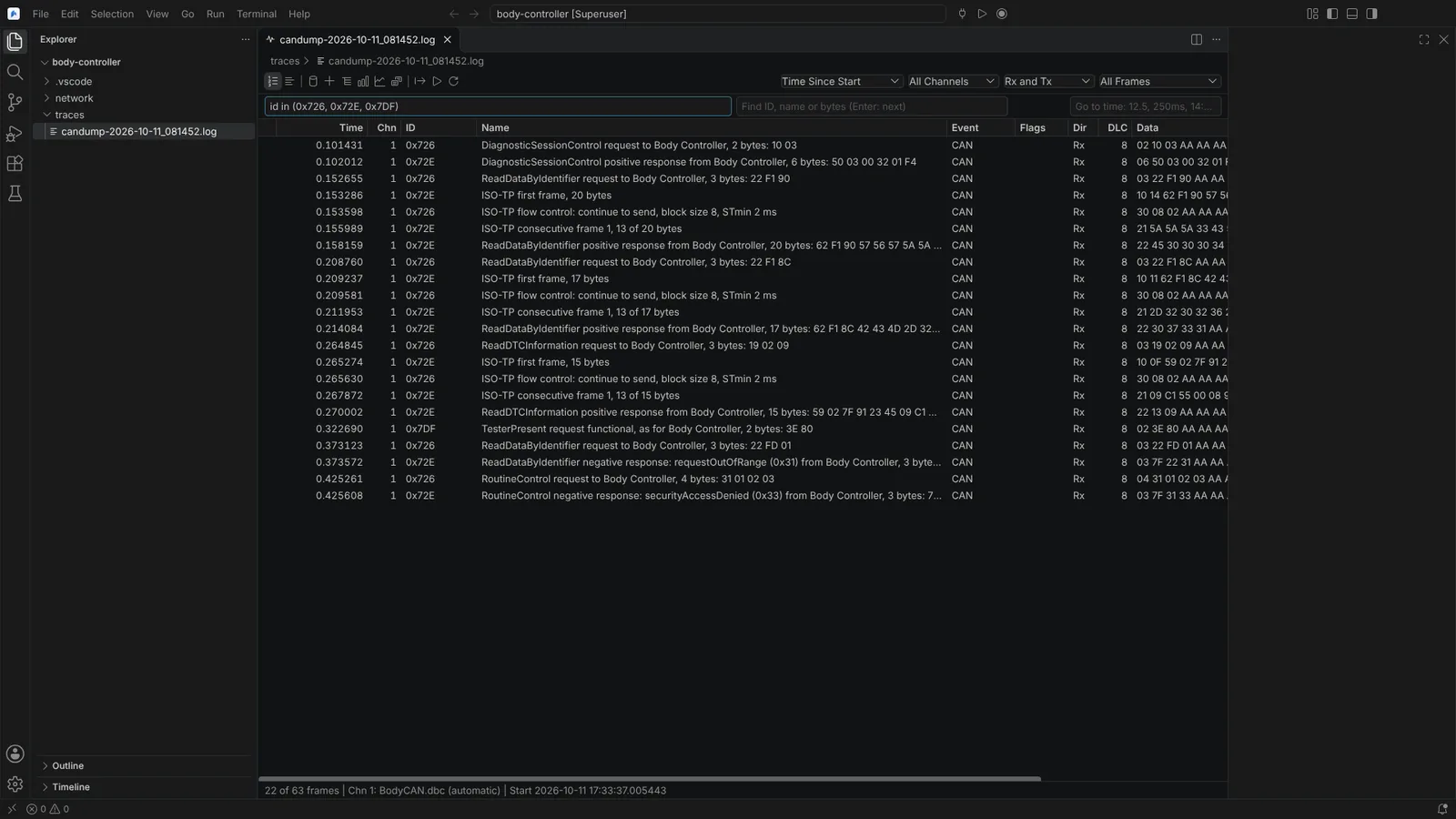 A candump trace in the CAN Trace editor, filtered to diagnostic identifiers, with ISO-TP frames named and UDS requests and responses decoded.
ISO-TP and UDS in traces
In the CAN Trace editor, and live in the CAN Bus panel's Trace view, each ISO-TP frame no database message names is named in the Name column: single frame with its length, first frame with the message length, consecutive frame with its sequence number and bytes so far, flow control with its status, block size and STmin.
- The frame that completes a message shows it reassembled: length and first bytes in the column, all of it (up to 256 bytes) in the hover with the number of frames.
- For an ECU definition's identifiers, the UDS service is named with the direction and the ECU, for example
ReadDataByIdentifier negative response: requestOutOfRange (0x31) from Engine. - A message that does not complete is said so at the frame that ends it.
- Which frames are ISO-TP is not guessed: the identifiers of the ECU definitions, and the 29-bit normal fixed and mixed addressing formats ISO-TP defines (annotated without a UDS service).
State: modelled, against can-isotp's segmentation; not run on a trace from a vendor tool or a real ECU.
Export
Export Trace Frames or Signals... writes the selected or filtered frames to ASC, BLF, MF4, PEAK TRC (you choose the version, each named with the PEAK tool that introduced it) or candump, or the decoded signals to CSV, where you choose.
Replay a trace
In the trace editor, run Replay Trace onto CAN Bus..., the equivalent of CANalyzer's Replay block:
- Map trace channels to open channels.
- Filter, choose Rx and Tx and a time range.
- Play once or in a loop, at a speed from 0.01 to 1000.
Pause Trace Replay, Resume Trace Replay and Stop Trace Replay control it, with progress above the table. The bus host times each channel's frames on its own clock; a frame that arrives late still goes out in order and is counted late with its lateness. There is no limit on the trace's length. On a real bus every replay asks first.
State: modelled, replayed onto the virtual bus only. On a real bus, arbitration and the adapter's queue add delay that the lateness figures do not include.