Debugging runs GDB against the GDB server of the probe software (J-Link GDB Server, ST-LINK GDB server, TRACE32 as GDB back end, OpenOCD, NXP LinkServer, PEmicro) or against QEMU's GDB stub, through the Editor's own debug adapter. You need GDB for Arm: arm-none-eabi-gdb or gdb-multiarch. No marketplace debug extension is needed.
Verification state: debugging has run against QEMU (QEMU 8.2.2 with gdb-multiarch 15.1 on Linux for the later views), never on a board through a probe. No debug session has run against J-Link, the ST-LINK GDB server or TRACE32 (kits jlink, stlink-gdbserver, trace32). The DAP requests, GDB/MI parsing and GDB server command lines are unit-tested against a fake GDB.
Debug with F5, no launch.json
- Open a firmware project and build it.
- Press F5, or click Flash and Debug in the title bar (Ctrl+D in the IAR keymap, F11 in the Eclipse keymap).
- Confirm the flash. The module flashes the image through the probe the probe server setting chooses, resets, runs to
mainand stops.
Without a launch.json, the session uses the image of the active CMake preset, IAR configuration, Keil target or STM32CubeIDE configuration, and the SVD file of the device. Start or Stop Firmware Debugging (Ctrl+F5 in the Keil keymap) starts a session or stops the running one.
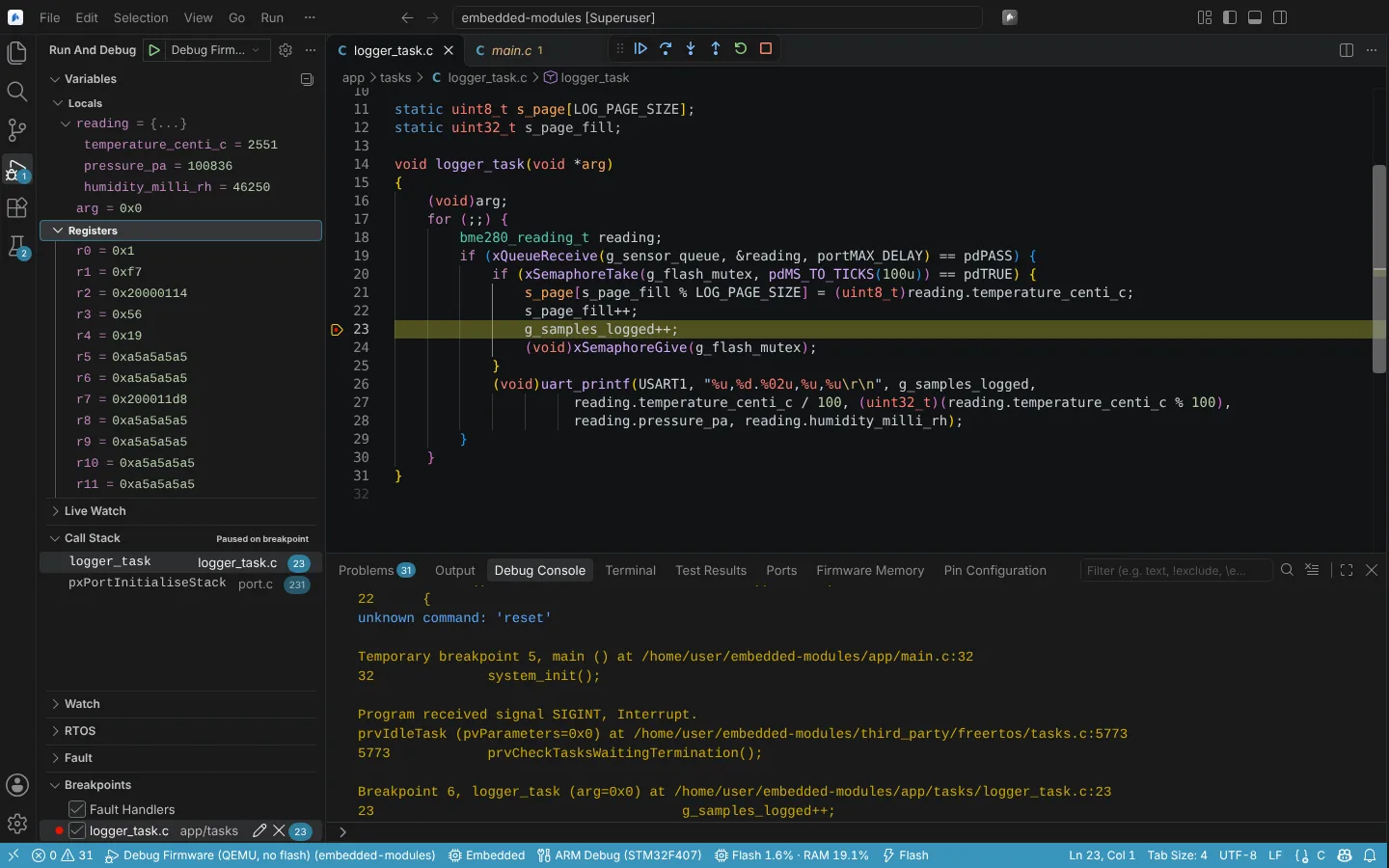 A debug session stopped at a breakpoint, with locals, core registers and the call stack.
What you can do in a session
| Vendor IDE window | Here |
|---|---|
| Call Stack and Locals | Call Stack and Variables in Run and Debug |
| Registers (core) | The Registers scope in Variables, editable |
| System Viewer, SFRs, Peripherals | The Peripherals scope in Variables, from the SVD file, writable; see Peripheral registers |
| Watch | Watch; for values while the core runs, Live Watch (Memory, live values and buffers) |
| Breakpoints (execution and access) | Function, conditional and hit-count breakpoints, instruction breakpoints and data breakpoints (read, write or access) |
| Log or trace breakpoints | Log points; see Log a value without halting |
| Disassembly | The Disassembly view, with instruction stepping |
| Memory | Memory windows; see Memory, live values and buffers |
| Fault reports, Fault Analyzer | The Fault view, below |
| RTOS and kernel-aware views | The RTOS view; see RTOS and OS awareness |
Other views of a session: Heap and Stack, Benchmark Counters and the cycle stopwatch (Timing, profiling, heap and stack), TRACE32 Breakpoints (Lauterbach TRACE32). Output from semihosting, RTT and SWO appears in the Debug Console (Target output and serial monitor).
Launch configurations
The debug type is ni-embedded. Add a configuration from these snippets: Embedded: Flash and Debug Firmware, Embedded: Attach to Running Firmware (no flash, no reset), Embedded: Debug Firmware in Emulator, Embedded: Flash and Debug Firmware with TRACE32.
{
  "type": "ni-embedded",
  "request": "launch",
  "name": "Flash and Debug Firmware",
  "runToEntryPoint": "main"
}| Attribute | Meaning |
|---|---|
program | The firmware image. Defaults to the image of the active configuration |
flash | Flash before debugging (default true); the flash is confirmed like every flash |
runToEntryPoint | Run to this function after reset (default main); empty stops at the reset handler |
probe | server (jlink, stlink, trace32, openocd, linkserver, pemicro), serial, and for J-Link jlinkDevice, jlinkInterface, jlinkSpeed, instead of the settings |
svdFile | SVD file for peripheral registers |
ortiFile | ORTI file of an OSEK or AUTOSAR OS |
rtos | RTOS awareness in the GDB server (auto, FreeRTOS, ThreadX, Zephyr, uCOS-III, ChibiOS, embKernel, mqx, nuttx, RIOT, eCos, hwthread, embOS, none) |
gdbPort | OpenOCD's GDB port (default 3333); its TCL port is the next and its RTT port the one after |
semihosting, rtt, rttChannel, swo, swoCpuClock | Output in the Debug Console; default to the matching settings |
setupScript | A Keil uVision debug initialisation file (.ini) or an IAR C-SPY setup macro file (.mac), translated into GDB commands and run once connected; see Debug state from Keil, IAR and Ozone |
connectCommands, resetCommands | GDB commands after connecting and after every Restart; monitor commands reach the GDB server unchanged |
target, machine | "target": "emulator" runs the image in QEMU; machine names the QEMU machine (Emulator and continuous integration) |
servertype, cpu, t32Script, t32FlashScript, t32Attach, t32Connection, t32Node, t32DebugPort | TRACE32 sessions (Lauterbach TRACE32) |
The GDB server settings (neuralInverse.embedded.debug.gdbPort, debug.rtos) are on the reference page.
Attach to running firmware
Embedded: Attach to Running Firmware connects to the target without flashing or resetting it, for a unit that is already running in the lab.
Existing Cortex-Debug configurations
Configurations of "type": "cortex-debug", with servertype openocd, jlink, stlink or qemu, run with the built-in debugger; no extension is needed. Their attributes are translated to the ni-embedded session. State: translation verified with fakes only.
Diagnose a fault
After a HardFault, MemManage, BusFault or UsageFault, the Fault view in Run and Debug fills in:
- Fault Status: CFSR (MMFSR, BFSR, UFSR) and HFSR decoded into their causes, with MMFAR and BFAR shown as the faulting address only when their valid bit is set;
- Stacked Registers: R0 to R3, R12, LR, PC and xPSR from the exception frame, basic or floating-point, from MSP or PSP as EXC_RETURN says;
- Backtrace to the faulting line.
If the firmware keeps a fault record from before its last reset (in a .noinit section), set its symbol in neuralInverse.embedded.fault.recordSymbol (default g_fault_record). The view reads it as Fault Record and checks its CRC-32; a record whose CRC does not match is marked untrustworthy. Read the Fault State Again refreshes the view.
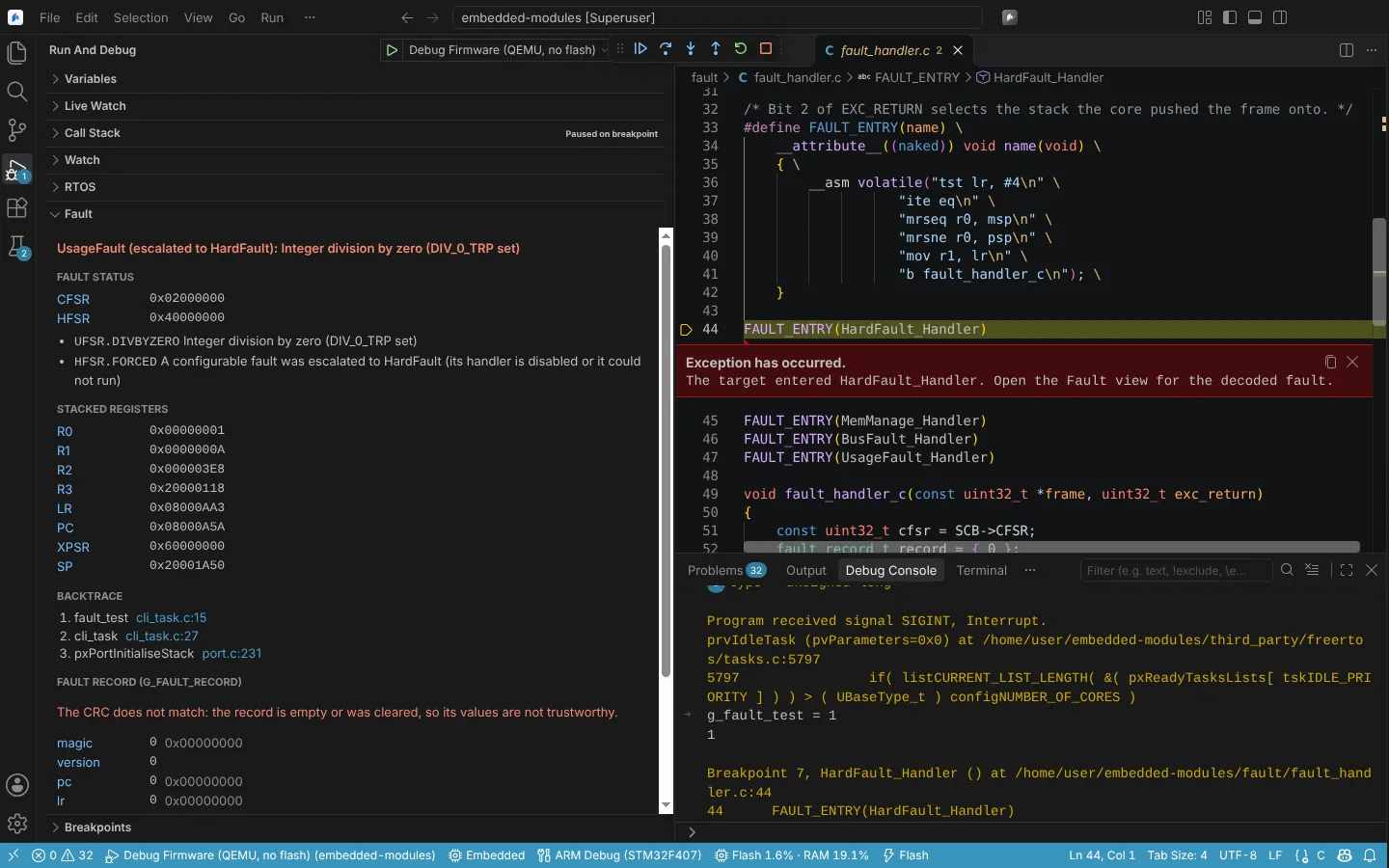 The Fault view decoding a divide by zero: CFSR and HFSR, the stacked registers and a backtrace to the line.
State: decoding unit-tested against the ARMv7-M Architecture Reference Manual; the QEMU integration test is written. No fault on a real target.