Yosys elaborates the design shortly after each save; the views on this page are drawn from that, or from a build's synthesised netlist. The Yosys views are verified on Linux; the vendor netlist views are kit shipped or modelled. Nothing is verified on Windows.
Design Hierarchy
The Design Hierarchy view in the HDL side bar shows the instances from the top, each with its module and the parameters it has, leading to where it is instantiated and where its module is defined. Refresh Design Hierarchy elaborates again.
State: verified (Linux) with Yosys. Vendor IP and block design contents are not elaborated, so they do not appear inside the tree.
RTL schematic
Show RTL Schematic (from the hierarchy, the editor title or the Command Palette) draws any module as Yosys elaborates it, with processes turned into the multiplexers and registers they describe:
- ports, operators, multiplexers, registers and instances; buses drawn bold, the bits a wire takes where it is not the whole bus, constants at the pins they drive;
- laid out left to right by our own layout, with wires at right angles that branch from shared trunks and pass no symbol;
- double-click an instance to open its module's schematic, or any other cell to open its source line; a breadcrumb (Up) leads back;
- click a cell to see what it is, its parameters and where it is written; click a net to see its name, width and loads.
The schematic is drawn again after each save.
State: verified (Linux) with Yosys. Vivado's and Quartus's elaborated netlists are not read.
Synthesised schematic (open flow)
Show Synthesized Schematic (or from a path in the Timing Analysis editor) draws the netlist a target's last open-flow build synthesised: the vendor primitives (LUTs, flip-flops, carries, block RAM, I/O) with the nets between them, flat, up to 3000 cells. Opened from a timing path, it highlights the path's cells.
State: verified (Linux) on iCE40 and ECP5 builds: every cell of their critical paths is found.
State machines
Show State Machines (from the hierarchy view or the Command Palette) lists the design's state machines as Yosys finds them, including those it would not recode for synthesis. For each:
- a diagram of its states, named as the source names them (SystemVerilog enumeration values, or the localparams the state register is used with), with the reset state marked;
- its transitions with their conditions written as minimal expressions of the inputs, as the source writes them (such as
!rst && tick && (index == 7)); - a table of every transition;
- Go to the state register in the source.
VHDL state machines are extracted through the GHDL Yosys plugin, with states named after the VHDL enumeration type.
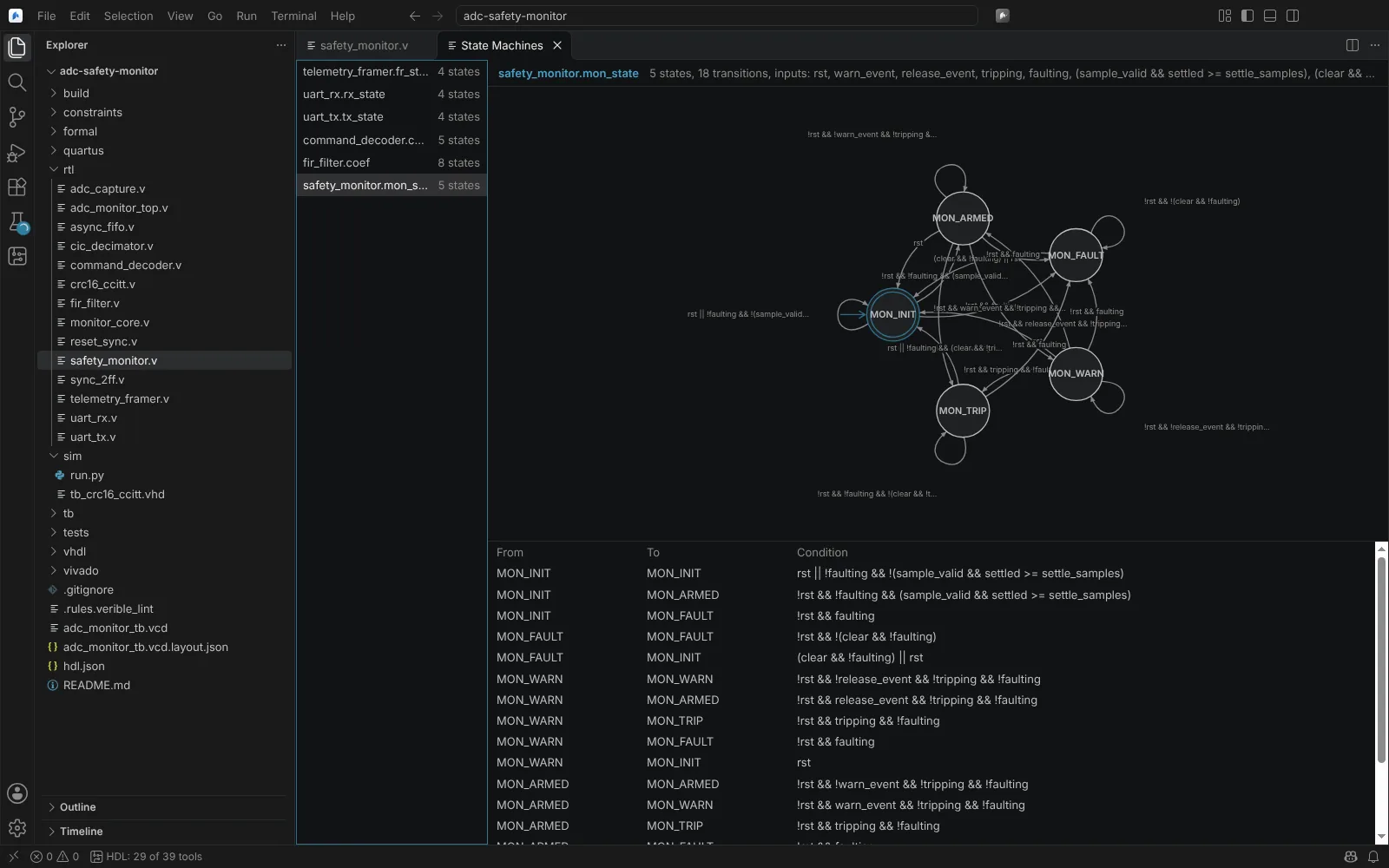 A state machine extracted from the RTL, as a diagram and a table of transitions
State: verified (Linux) with Yosys and the GHDL plugin.
Design documentation
Generate Design Documentation (from the Command Palette or the Design Hierarchy view) writes a documentation set to docs in the build folder, as Markdown and SVG that render in the Markdown preview and on Git hosts:
- an index with the instance hierarchy, the modules and the state machines;
- a page per module or entity with its ports (direction, width, type as written), its parameters or generics (default and elaborated value), the comments above and after its declarations, its instances and the modules that instantiate it;
- a state diagram and state and transition tables for each state machine, linked to the source lines.
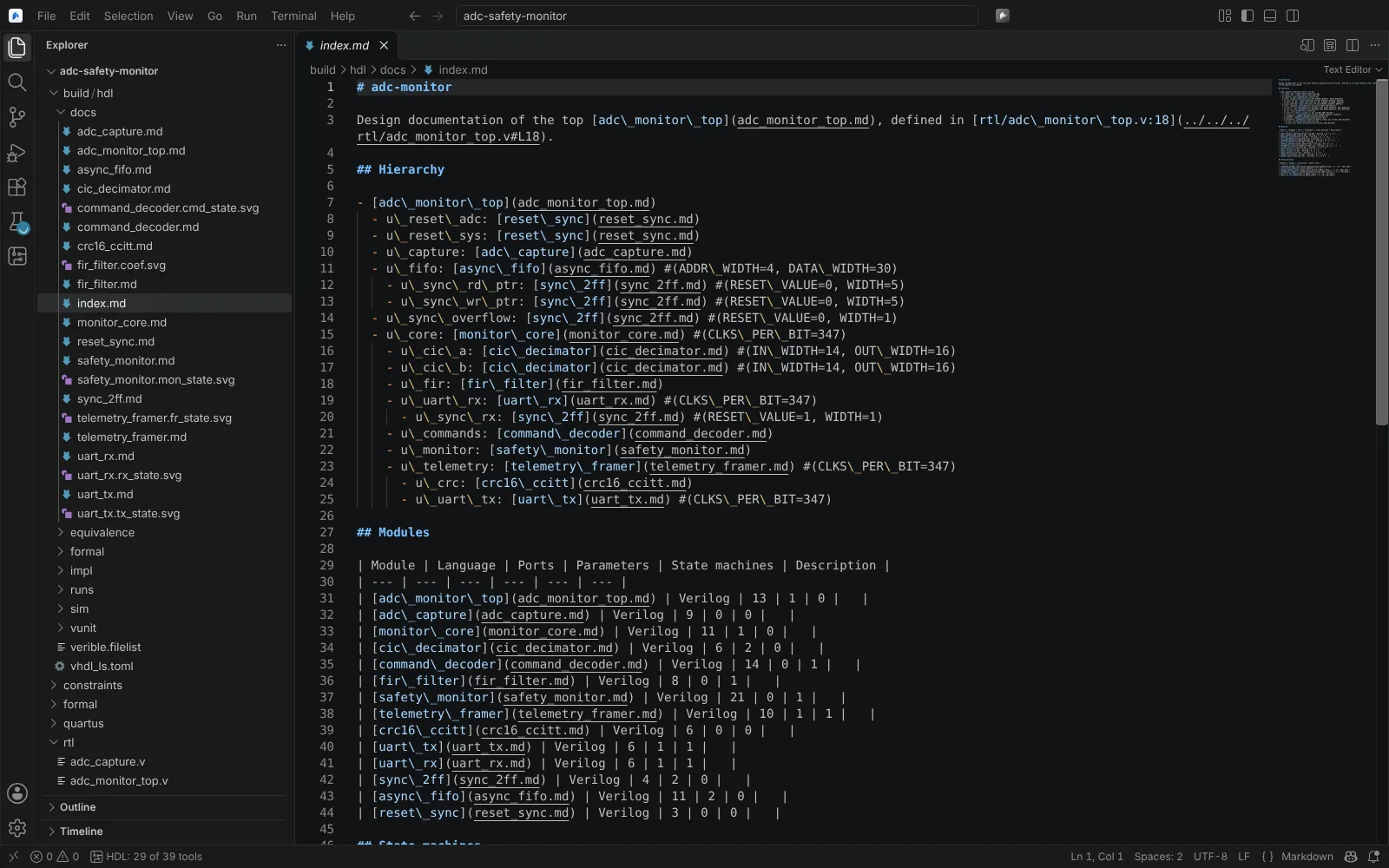 The generated documentation index: hierarchy with parameters, and a table of modules
State: verified (Linux) with Yosys and the GHDL plugin.
Vendor netlist views
The same schematic editor draws the vendors' synthesised or fitted netlists, one level at a time with breadcrumbs, cross-probed from timing paths.
| Command | What it shows | State |
|---|---|---|
| Show Vivado Netlist | A level of the synthesised or implemented netlist, exported from the checkpoint open in the Vivado design session; from a timing path, the path's cells and each cell's source line | Kit shipped |
| Show Quartus Technology Map (Post-Fitting) | The fitted netlist the EDA Netlist Writer writes, as schematic levels with the worst path overlaid | Kit shipped; parsers on real .vo netlists. No post-mapping level |
| Libero: Show Synplify Pro Technology View (Synthesized Netlist) | Synplify Pro's .vm (pin directions from the install's polarfire_syn_comps.v) or .edn netlist, with level navigation; SmartTime paths drawn as schematics; each state machine with the encoding Synplify chose (from .srr and .fse) | Modelled; EDIF and Verilog readers checked against Yosys's own netlists. Synplify's RTL view is not shown: its files are protected |
| Radiant: Open Netlist Analyzer (Synthesized) | A level of LSE's synthesised netlist | Modelled on an excerpt of a real LSE netlist |
The Vivado design session that serves these views is described on Timing analysis and constraints.
Known limits
- The SystemVerilog front end is Yosys's, so the SystemVerilog these views understand is what Yosys reads. When elaboration fails, a view can stay blank: lint the design and check Problems.
- Measurements at realistic size (tens of thousands of cells) have not been made.