Build with one key
Press Cmd+Shift+B (Ctrl+Shift+B on Windows and Linux), click Build in the title bar, or run Build Firmware. With a vendor keymap, F7 (Keil, IAR) or Ctrl+B (Eclipse) does the same. The module builds the configuration selected in the status bar (see Choose the build configuration):
| Configuration | What runs |
|---|---|
| CMake preset | cmake --preset and cmake --build --preset, as a native task |
| IAR configuration, in place | iarbuild <project> -make|-build|-clean <configuration> -log info [-varfile]; the workspace's .custom_argvars is passed with -varfile |
| Keil target, in place | uVision's batch mode, UV4 -b|-r|-c <project> -j0 -t <target> -o <log>, the only builder Keil provides for .uvprojx. It runs through a generated batch file in the target's output folder that waits for UV4 and prints its log; no vendor window opens. Windows only, as uVision is |
| STM32CubeIDE configuration, in place | STM32CubeIDE's headless builder (org.eclipse.cdt.managedbuilder.core.headlessbuild) in a temporary workspace of its own, so your STM32CubeIDE workspace is not touched |
Clean Firmware Build cleans the configuration. STM32CubeIDE's headless builder has no clean-only mode, so for those projects a rebuild cleans.
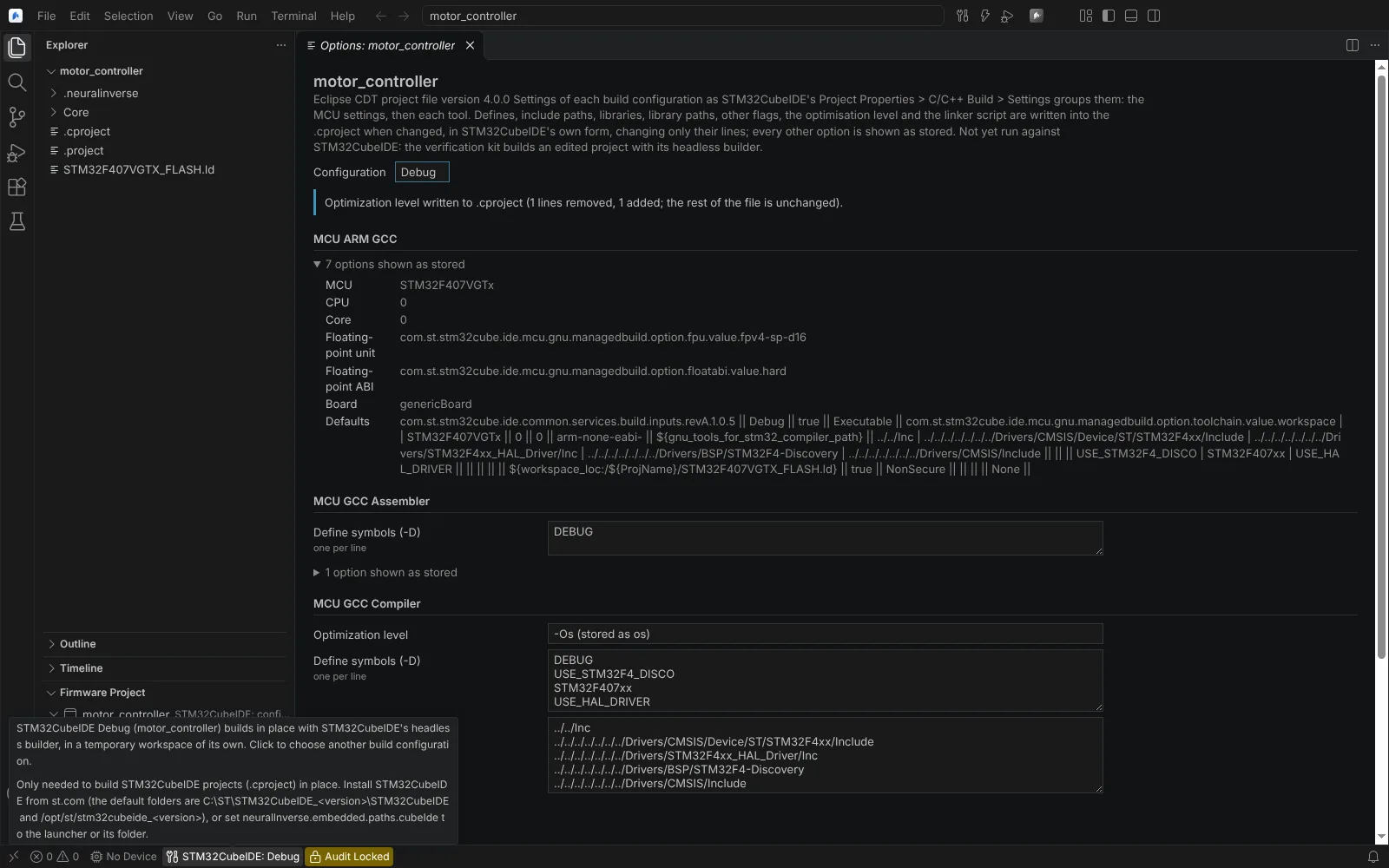 The STM32CubeIDE Debug configuration in the status bar, with its tooltip saying it builds in place with STM32CubeIDE's headless builder in a temporary workspace.
Compiler and linker errors go to Problems at their line. The vendor build, rebuild and clean tasks carry problem matchers for iccarm, ILINK, armclang, armcc, armasm and armlink messages; uVision's own log is read too. Flash, debugging and the size report use the configuration's image (.elf, .out, .axf).
| Path | State |
|---|---|
| CMake and Ninja with the Arm GNU Toolchain | Task and problem-matcher generation unit-tested; the integration test exists and has not run in a verified audit |
IAR iarbuild in place | Tested on build output captured from published IAR logs; kit shipped (iar-keil-build); not yet run against IAR |
Keil UV4 in place | Tested on published uVision logs; kit shipped (iar-keil-build); not yet run against Keil |
| STM32CubeIDE headless build | Option ids checked on real .cproject files; kit shipped (stm32cubeide-build); not yet run against STM32CubeIDE; the stm32cubeidec.exe launcher options are unverified |
| IAR or Arm Compiler 6 through CMake presets | Detected in unit tests on CMake snippets; no real IAR-only or Arm Compiler-only CMake project configured |
Each build task builds one configuration or target.
Size report
After a successful build the status bar shows flash and RAM use, for example Flash 1.6% · RAM 19.1%, with a per-region table in its hover. A region that overflows is reported ("does not fit"). Analyze Firmware Memory opens the Firmware Memory editor: memory regions, sections and the largest symbols, each linked to its source line, and per-function stack frames where .su files exist.
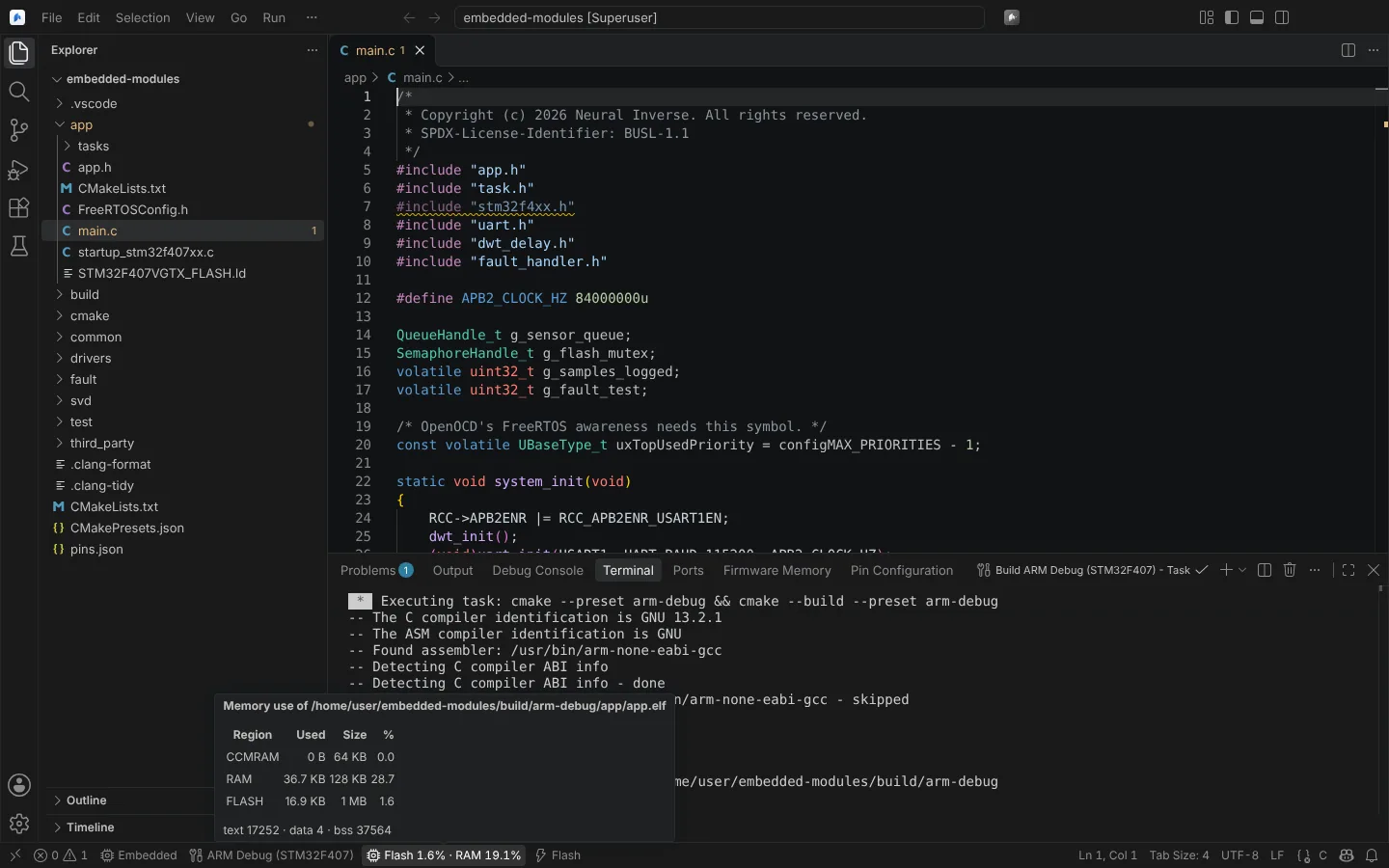 A CMake preset built as a task, with flash and RAM use in the status bar and its hover.
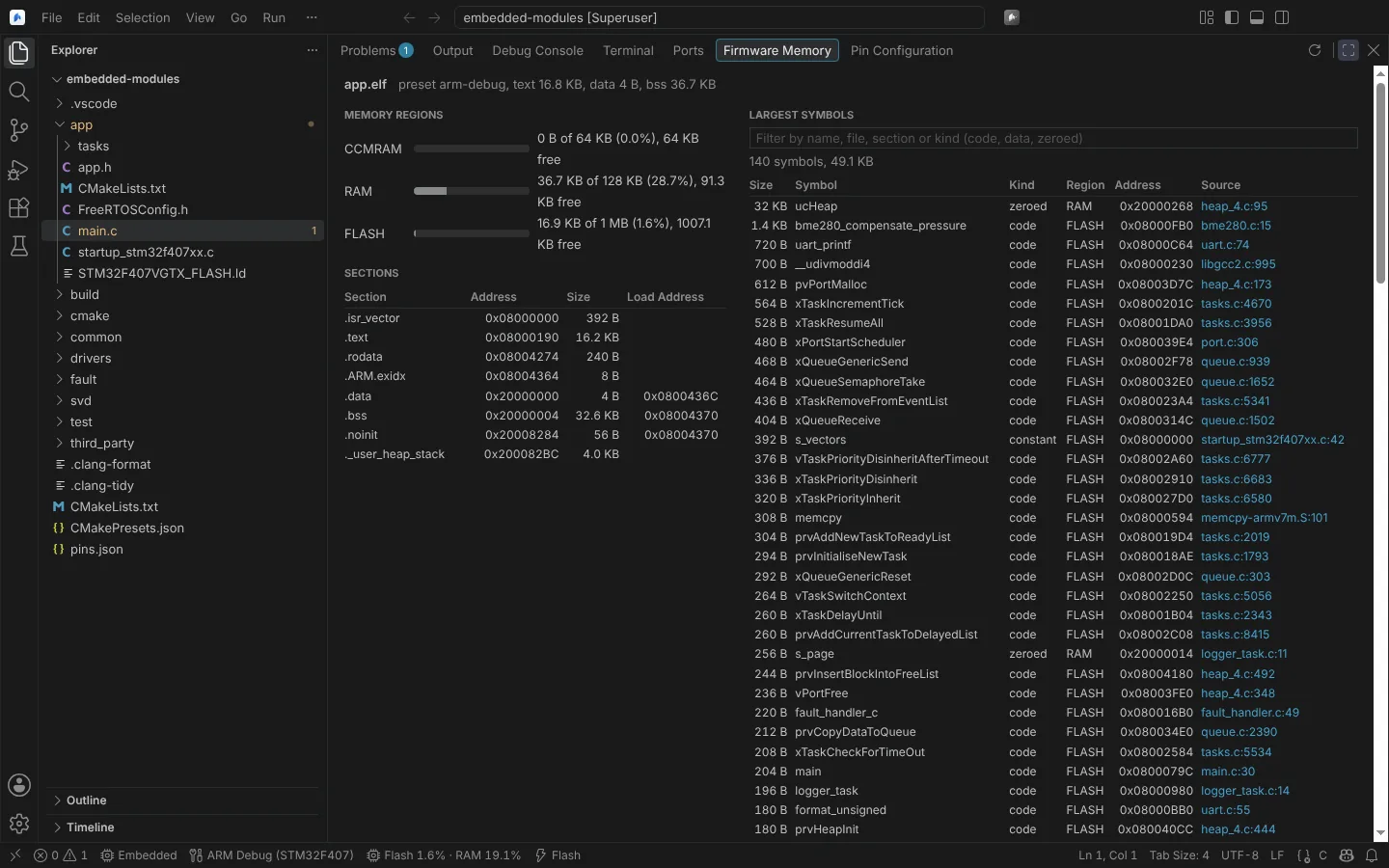 The Firmware Memory editor: memory regions, sections and the largest symbols, each linked to its source line.
- Regions come from the GNU linker script's
MEMORYcommand. The module takes the-Tscript from the build; setneuralInverse.embedded.linkerScriptto use another. - Section and symbol sizes come from
size,objdumpandnmoutput on the image. - For Keil projects built in place, uVision's Program Size line becomes the size report, with the IROM and IRAM regions; region use is shown only when the target dialog sets one flash and one RAM region.
- The image is the newest
.elfin the preset's build folder unlessneuralInverse.embedded.elfFilenames it. Vendor builds use the configuration's image.
State: verified only on fixtures; not on a firmware of realistic size.
Build record
After every successful CMake build the module writes neuralinverse-build-record.json in the preset's build folder; an in-place vendor build run by an agent writes one next to the image. It records, with sorted keys:
- the CMake, build tool and compilers used, with versions, from CMake's own detection and the toolchain;
- the preset and its cache variables;
- the distinct compiler options from
compile_commands.json; - the image with its SHA-256;
- the start and end times.
A later flash logs whether its image is the recorded one, by SHA-256. Keep the record with your release evidence; it is evidence toward the build reproducibility your process requires, not a certification. State: unit-tested.
Vendor licence failures
When an Arm Compiler 6, Keil MDK or IAR build stops at the licence, the module puts a Problem on the project and shows one notification that names the product, the licensed feature, where the tool looked for its licence (the licence server, licence file or IAR License Manager settings folder, and the environment variable that named it) and what to check, such as lmutil lmstat -a -c <port@host>, armlm inspect or lightlicensemanager setup --host <server>. Nothing is retried. Covered: FlexNet floating licences, Arm user-based licensing (guidance only), IAR LMS2, the IAR License Server and network licences.
The recognised forms come from build output that engineers published and from the vendors' own repositories. This is not yet run against Arm Compiler 6, Keil MDK or IAR. The vendor-licences kit prints your tools' licence status and captures their real failure output so it can be checked.
Agents can read the last build's licence failures and diagnose a licence failure in build output (Read the Last Build's Licence Failures, Diagnose a Licence Failure in Build Output).
Agents and the vendor build
An agent can build an IAR, Keil or STM32CubeIDE configuration in place with Build Vendor Project (build, rebuild or clean) after you confirm. It gets the exit code and its meaning, the image, the size report and the build record.