All of these work in a debug session through whichever GDB server it uses. Reading while the core runs depends on the probe path:
| GDB server | Reads while the core runs |
|---|---|
| OpenOCD | Yes, through its TCL port |
| SEGGER J-Link GDB Server | Yes, through a second connection to its GDB port that reads memory with GDB Remote Serial Protocol m packets, as SEGGER describes; it never halts or resumes the core |
| ST-LINK GDB server | No: its manual documents one GDB client and no background memory access, and the session says so |
| TRACE32 | No: only while halted |
| QEMU | Only while halted |
State of the running reads: the Remote Serial Protocol client is verified against QEMU 9.1.1's GDB stub on macOS (reading 2 KiB of RAM in several packets); the read while the core runs is not yet run against the J-Link GDB Server, and through OpenOCD it is unit-tested only.
Memory windows
Open Memory Window opens a Memory editor tab; Open in Memory Window on a variable in the Variables view opens one at its address. Several windows can be open at once.
- Address or expression: an address (
0x20000000), a variable (rx_buffer) or an expression (&motor_state), then Enter. - Bytes to show, up to 16 KiB; Display format: bytes, 16-bit or 32-bit hex, 16- and 32-bit signed or unsigned, 32- or 64-bit float; Byte order: little or big endian.
- Each row shows its address, the symbol of the image it starts in (such as
s_looporrx_buffer+24), the values and ASCII. Values that changed since the previous read are highlighted. - The window reads at each halt; Read While Running also reads while the core runs where the GDB server can (table above). Read Again reads now.
- Bytes the target cannot read show as
??. Peripheral registers whose read changes the peripheral (such as a data register that clears a flag), as the SVD file describes them, are not read and show as--.
Toolbar actions:
| Action | What it does |
|---|---|
| Edit a value | Writes the new value after a confirmation that names the range and bytes, the image, and what the range is: the section of the image, the linker script's memory region, or the SVD registers it touches. Writes to flash are refused. The value is read back after writing |
| Go to Symbol... | Jumps to a variable, buffer or constant of the image |
| Fill Range... | Fills an address range (such as 0x20000000 1024 or 0x08060000 128K) with a pattern of hex bytes (DE AD BE EF) or one value, after the same confirmation |
| Save Range to File... | Saves a range as Intel HEX or raw binary |
State: read, write, read-back and save checked on Linux on QEMU 8.2.2 with gdb-multiarch 15.1 on the reference firmware; fill and the symbol column are covered by unit and rendering tests only. Probe paths kit shipped (jlink, stlink-gdbserver, stm32cubeprogrammer). Agents can read, write, fill and save target memory (Read Target Memory, Write Target Memory, Fill Target Memory, Save Target Memory to File); writes and fills wait for the same confirmation.
Log a value without halting
Add a log point (right-click in the editor gutter, Add Logpoint..., with a message such as report at {done_ms} ms: speed {s_loop.speed_rpm} rpm). The module uses GDB's dprintf where it can, else a breakpoint that logs and continues. The message appears in the Debug Console and the session does not stop.
The core still halts briefly at each hit while GDB reads the values: a probe round trip, typically milliseconds. The breakpoint's hover states this cost and, after hits, the measured halt time per hit, so you can keep log points out of timing-critical code such as control loops and communication interrupts.
State: checked on QEMU 8.2.2 with gdb-multiarch 15.1 on Linux; not on a probe.
Live Watch
The Live Watch view in Run and Debug reads global variables and expressions while the firmware runs, every neuralInverse.embedded.debug.liveWatchInterval milliseconds (default 500). Type an expression in its box, or run Add Live Watch Expression; structures expand into their fields. Remove All Live Watch Expressions clears the list, which is kept with the workspace.
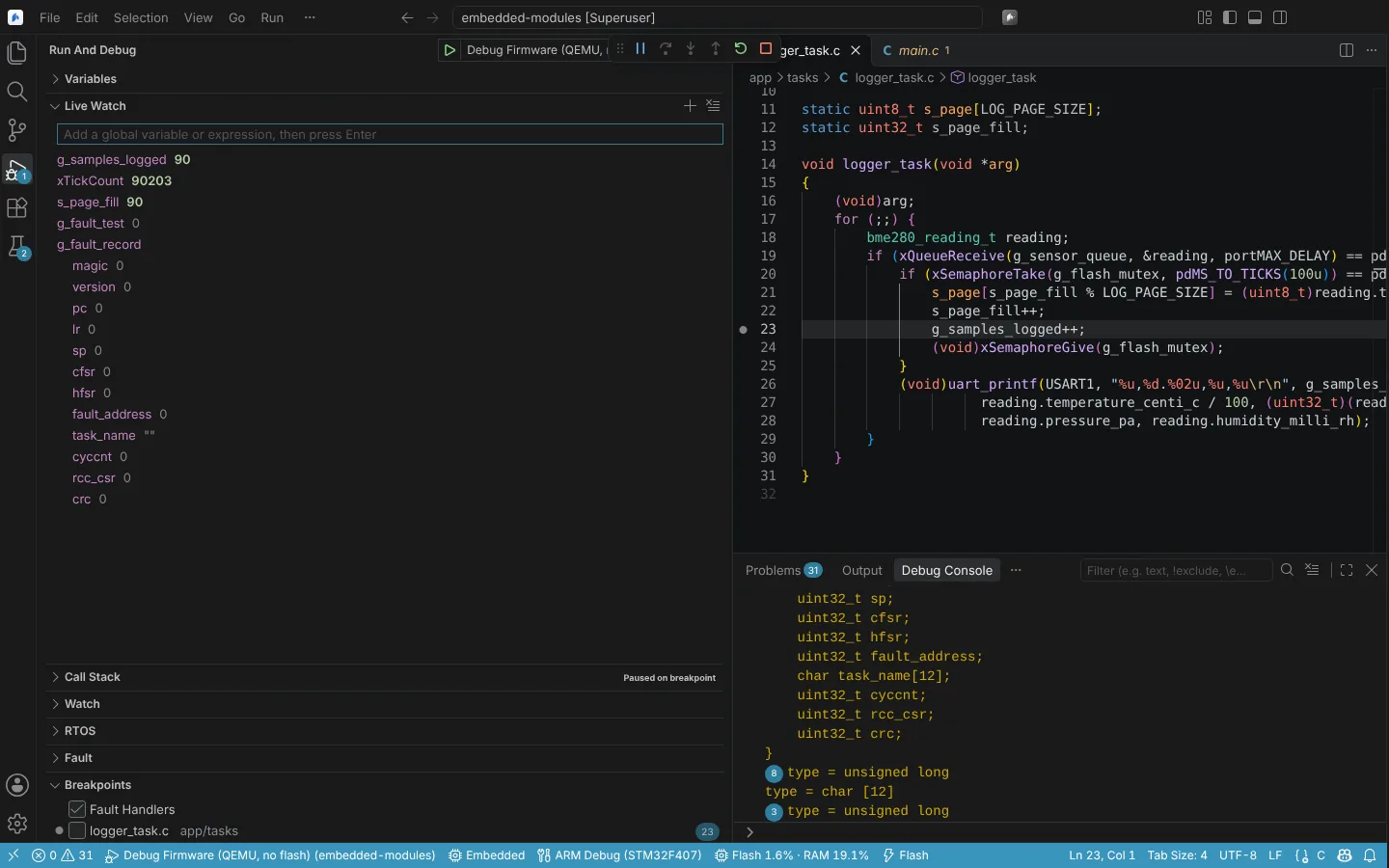 The Live Watch view reading global variables and the fields of a fault record while the target runs.
State: unit and rendering tests with fake memory reads; the integration tests against OpenOCD exist and did not run in the audit.
Live Plot
Open Live Plot opens the Live Plot editor. Type a global variable or expression in its box, or use Plot Expression on an entry of the Live Watch view. It samples global variables every neuralInverse.embedded.debug.livePlotInterval milliseconds (default 50, at least 10) and plots up to six of them over the time shown (seconds to minutes), with each one's current value. Pause, Resume, Clear Samples and Export CSV... are in the toolbar.
State: verified with fakes only, including the CSV export.
Graph a buffer: waveform and spectrum
Graph Buffer (Waveform and FFT) opens the Buffer Graph: an array in target memory, such as the ADC DMA buffer of the phase currents, as waveforms and their spectrum.
| Field | Meaning |
|---|---|
| Buffer | An array, pointer or address, such as adc_dma_buffer |
| Type, Elements | The element type and count; "From the debugger" takes them from the image's debug information |
| Interleaved channels | Channels stored one after the other in the buffer, shown as separate traces |
| Sample rate per channel | In Hz, for the time and frequency axes |
| Read | At each halt; at each halt and every 0.5 s or 1 s while running (where the GDB server reads while running); or only on Read Buffer |
| Gain, Offset, Unit | Convert counts to units, such as amperes |
| Window | Rectangular, Hann, Hamming, Blackman, Blackman-Harris (4-term) or flat top |
| Scaling | Amplitude (peak), dBFS (peak) with its full scale, or power spectral density |
| Remove DC, Show | Remove the mean before the FFT; show the waveform, the spectrum or both |
Below the graphs, each channel's minimum, maximum, mean, AC RMS and largest tones are listed. The FFT is the module's own; the header says its length, bin width, window and noise bandwidth. The samples export as CSV.
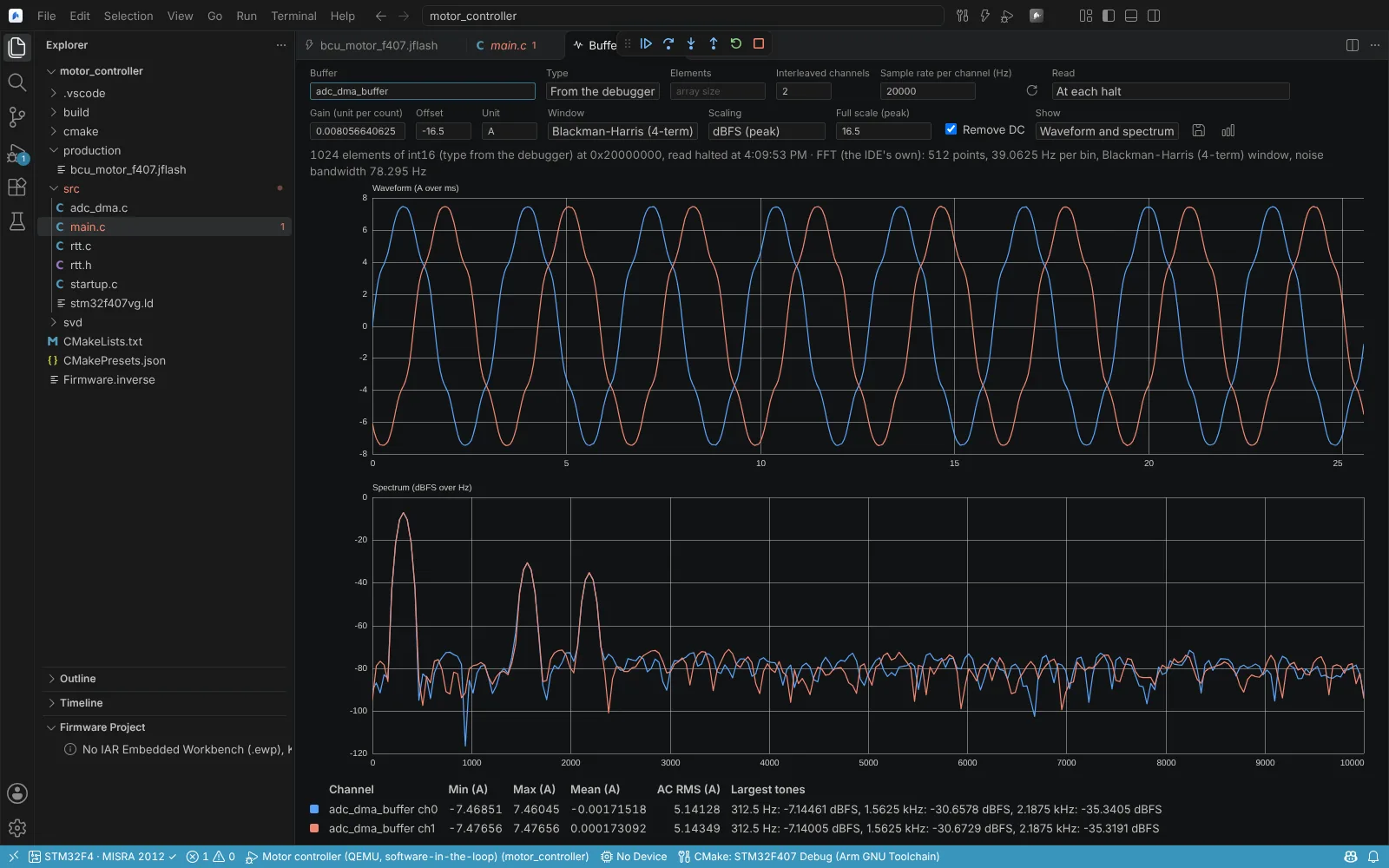 The Buffer Graph of a two-channel interleaved int16 ADC buffer: the phase currents as waveforms in amperes and their spectrum in dBFS with the largest tones listed.
State: the FFT checked against a direct DFT for 9 lengths, and windows and scaling checked with NumPy; QEMU 8.2.2 with gdb-multiarch on Linux: an interleaved int16 buffer read, its tones found, a change seen at the next halt, and a read while running refused there; used in the app. Reads while running through a J-Link or OpenOCD on a board are not verified. Agents can graph a buffer and capture its spectrum (Graph Buffer, Capture Buffer and Spectrum).