Verification state: modelled, not yet run against z/OS Debugger. The generated JCL, the job flow against the z/OSMF-shaped server, and INSPLOG parsing on hand-written fixtures to the documented shapes are tested; no INSPLOG has been captured from a real run. The full-screen option form (MFI%) is not confirmed by the sources collected. The Debug Profile Service client is tested against a service shaped from public sources only. The verification kit compiles with TEST, runs a batch debug job capturing INSPLOG, and lists, creates, reads and deletes debug profiles.
To debug interactively at source level on the workstation with GnuCOBOL and GDB, see Debug on the workstation.
Configure
host.debug in mainframe.json:
| Key | Meaning |
|---|---|
compileOptions | Options the debug compile uses in place of TEST or NOTEST of host.compile. Default: TEST(SOURCE) |
mode | batch or fullScreen; asked each time when not set |
terminal | For full-screen mode, the terminal ID or user ID the Terminal Interface Manager knows your 3270 session by |
testOptions | The TEST runtime option written to CEEOPTS, per mode (batch, fullScreen); ${TERMINAL} is replaced by the terminal |
debuggerLibrary | z/OS Debugger's load library (such as EQAW.SEQAMOD), added to STEPLIB; leave it out when it is in the link list |
profileService | The site's Debug Profile Service (see below) |
Batch mode
Debug on z/OS on a COBOL program, or Debug JCL Step on z/OS... on a step:
- compiles the program with TEST(SOURCE) through the project's compile profile;
- writes your job again with a CEEOPTS DD holding the TEST runtime option, the commands file on CMDS, INSPLOG to SYSOUT and the debugger's library on STEPLIB, to
<buildDirectory>/host/debug/<JOB>.<STEP>.jcl; - submits it after the usual confirmation;
- reads INSPLOG into the job editor's z/OS Debugger Trace: statements reached, variables listed with their values, EQA messages.
This is z/OS Debugger's batch mode as IBM's EQAWIVPT installation check runs it.
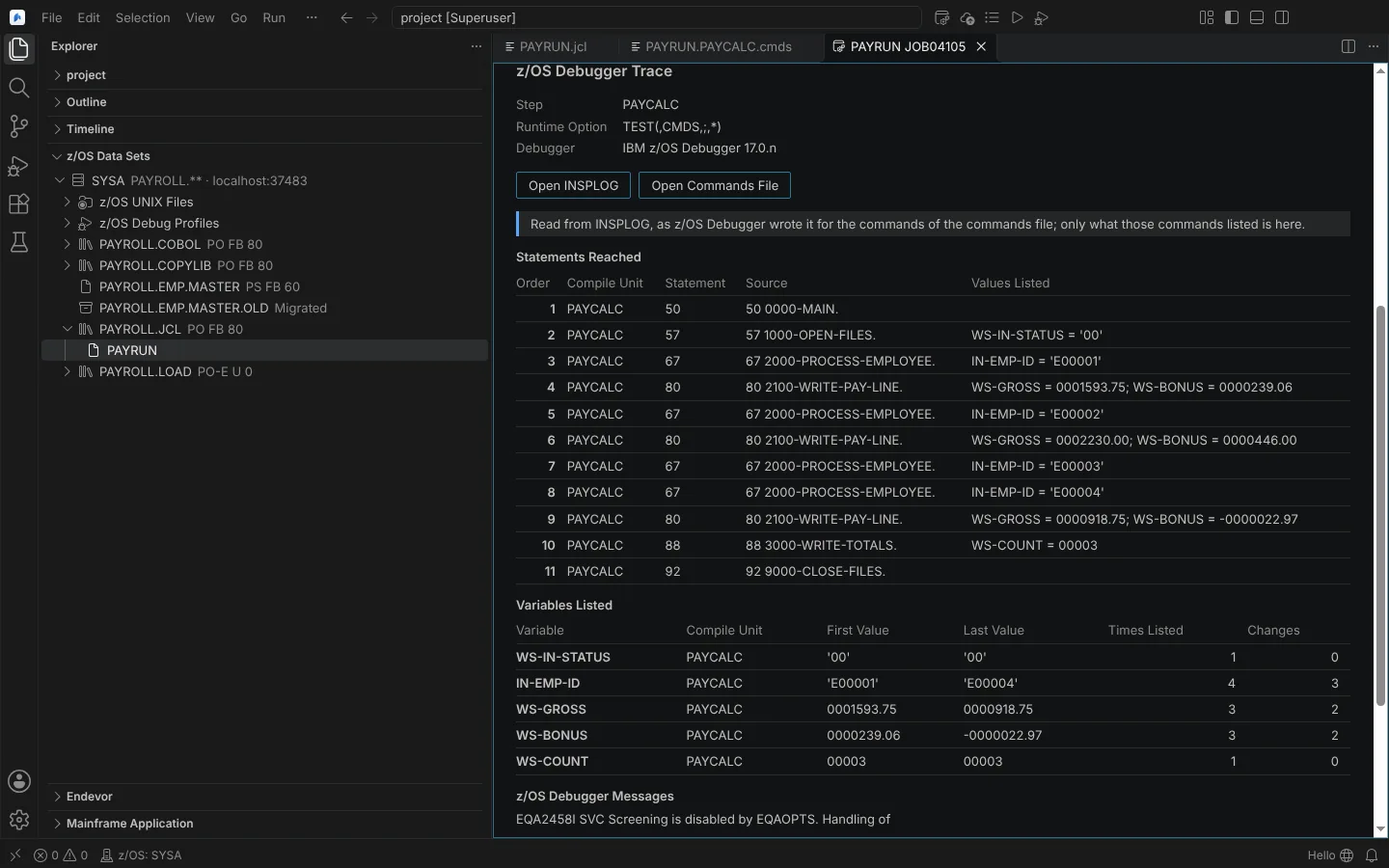 The z/OS Debugger Trace in the job editor: statements reached and variables with their first and last values (from a modelled INSPLOG).
Full-screen mode
The same debug job with TEST(,,,MFI%<terminal>:*) (replaced by host.debug.testOptions.fullScreen when set). The Editor's 3270 session to your TN3270 server opens first, where you log on to the Terminal Interface Manager. When no 3270 session is available, a message names your own emulator as the alternative.
Debug profiles
z/OS Debug Profiles under each connection in the z/OS Data Sets view (IDz's Debug Profiles view) lists the DTCN profiles of each CICS region and the EQAUOPTS profile of batch, TSO and IMS programs.
| Command | Confirmation |
|---|---|
| Create Debug Profile... | Names the system; fields checked against the service's form |
| Activate Debug Profile | z/OS Debugger then takes over the programs it names when they run |
| Deactivate Debug Profile | Names the system |
| Delete Debug Profile | Names the system |
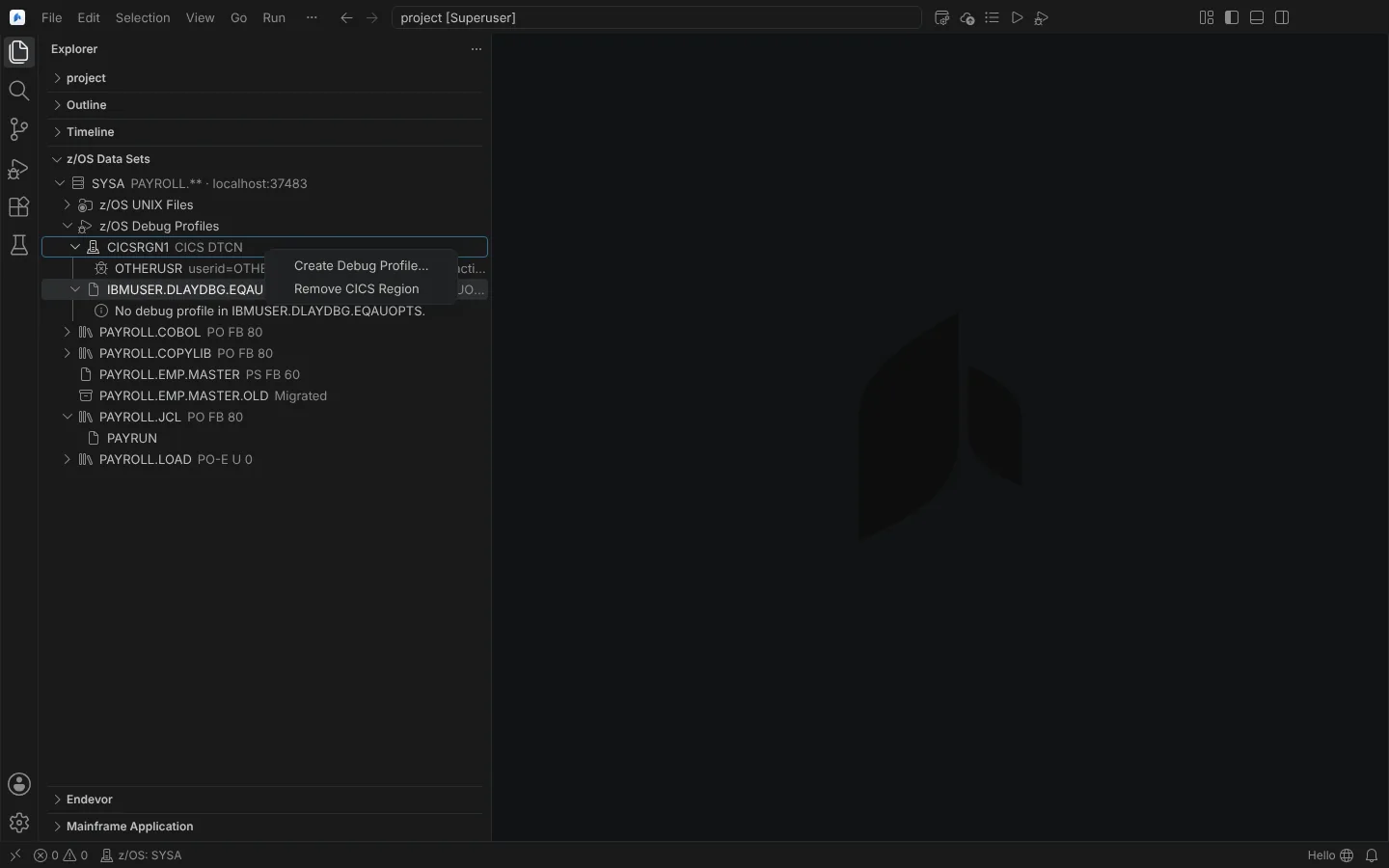 z/OS Debug Profiles under a connection, with a CICS region's context menu offering Create Debug Profile (against a modelled service).
The Debug Profile Service is configured by a zOpenDebug profile of the Zowe team configuration for the same host, or host.debug.profileService (port, contextRoot, secured, authentication as basic or token, regions, profileDataset, apiDocument); values given in mainframe.json win. DTCN fields and activation are offered only as the site's Swagger 2 or OpenAPI 3 document (default path /ibm/api/docs) describes them; without it they are refused with the reason. The EQAUOPTS data set defaults to <USER>.DLAYDBG.EQAUOPTS.