Runtime tests and ptest
State: modelled: all 120 runtime test ids of poky's meta layer equal to OEQA's own loader; a real bitbake -c testimage started from the module (BitBake 2.8.1, poky scarthgap 5.0.21, meta-freescale, imx8mp-lpddr4-evk) against a BusyBox stand-in board over OpenSSH, with testdata.json written by OE-Core; resulttool comparing two real runs; real run-ptest output read per test. No image was built, testimage on QEMU (TEST_TARGET = "qemu") was not run, and ptest-runner itself was not run. Not run on a real board, on Windows, against a real build server or on Wind River Linux.
On the build host, add IMAGE_CLASSES += "testimage" and build the image so its test data is written; for ptest, add ptest-runner and the ptest distro feature to the image.
- Run Select Runtime Test Image and Select Runtime Test Target (a board of the Targets view, or QEMU).
- The Testing view lists the image's runtime tests (Embedded Linux Runtime Tests), read from TEST_SUITES and each layer's
lib/oeqa/runtime/caseswhen you expand the image. Clicking a test opens its case at the line that declares it. - Run testimage runs
bitbake -c testimageafter a confirmation that shows TEST_TARGET (simpleremotefor a board), TEST_TARGET_IP, TEST_SERVER_IP and the command. Only those settings and TEST_SUITES are passed; no build directory changes, though the first run with new settings reparses every recipe into a second parse cache. testresults.jsonis read back; each failure appears at its line.- Run ptests on Target runs
ptest-runneron a board over SSH after a confirmation; results are read per package and per test, with each package's log (Open ptest-runner Log). - Open Runtime Test Results opens a
testresults.json; Compare Runtime Test Results compares two runs withresulttool reportandregression, with the module's own comparison by resulttool's rules where poky 5.0's resulttool stops with an error.
Agent tools: five read-only, two that ask first.
Structural coverage on the board
State: modelled with GCC 13.3 and 14.2 with gcov, gcovr 8.6 and lcov 2.0 on a C and C++ library with tests run on a stand-in BusyBox board over OpenSSH: all three engines agree, and the totals equal gcovr's own Cobertura; a real stamp mismatch set aside; condition outcomes equal to gcov's summary; an aarch64 cross GCC 13.3 on a QEMU arm64 board with Dropbear; the running app from build to gutters. The kernel path was modelled on a folder in gcov-kernel's layout; no kernel with CONFIG_GCOV_KERNEL was booted. Not run with a real Yocto, Wind River or vendor SDK, with devtool and BitBake, on Windows, against a real build server or at realistic size. Coverage here is not qualified MC/DC.
- Install gcovr or lcov on the build host, or list their folders in
neuralInverse.embeddedLinux.coverage.toolFolders. - Build Application with Coverage... adds
--coverage -fprofile-update=atomic, plus-fcondition-coveragewhen the SDK's GCC is 14 or later (said plainly when it is not), and builds through the SDK into a-coveragebuild folder, after a confirmation with the exact flags. Set or Remove Coverage Flags of a devtool Recipe... writes the same flags into the devtool workspace's bbappend instead. - Run Tests with Coverage on Target... copies the program, runs a command or
ptest: <package>with GCOV_PREFIX and GCOV_PREFIX_STRIP, packs the counters, copies them to the build host with their SHA-256 and removes them from the board. Stop Coverage Run stops it. - Each counter file is paired with the build's notes by gcov version and stamp; mismatches are named and left out.
- The report is read with the SDK's cross gcov through gcovr, lcov or gcov alone. Open Coverage Report... opens the Structural Coverage editor: the build and board identity, what gcov does not measure (decision coverage and MC/DC), and per file and function the lines, branch edges, GCC condition outcomes and calls.
- The working copy gets line, branch and condition gutters with hovers.
- Export Coverage for the Safety Record writes Cobertura XML, an HTML summary and a JSON record with tool versions and build identity.
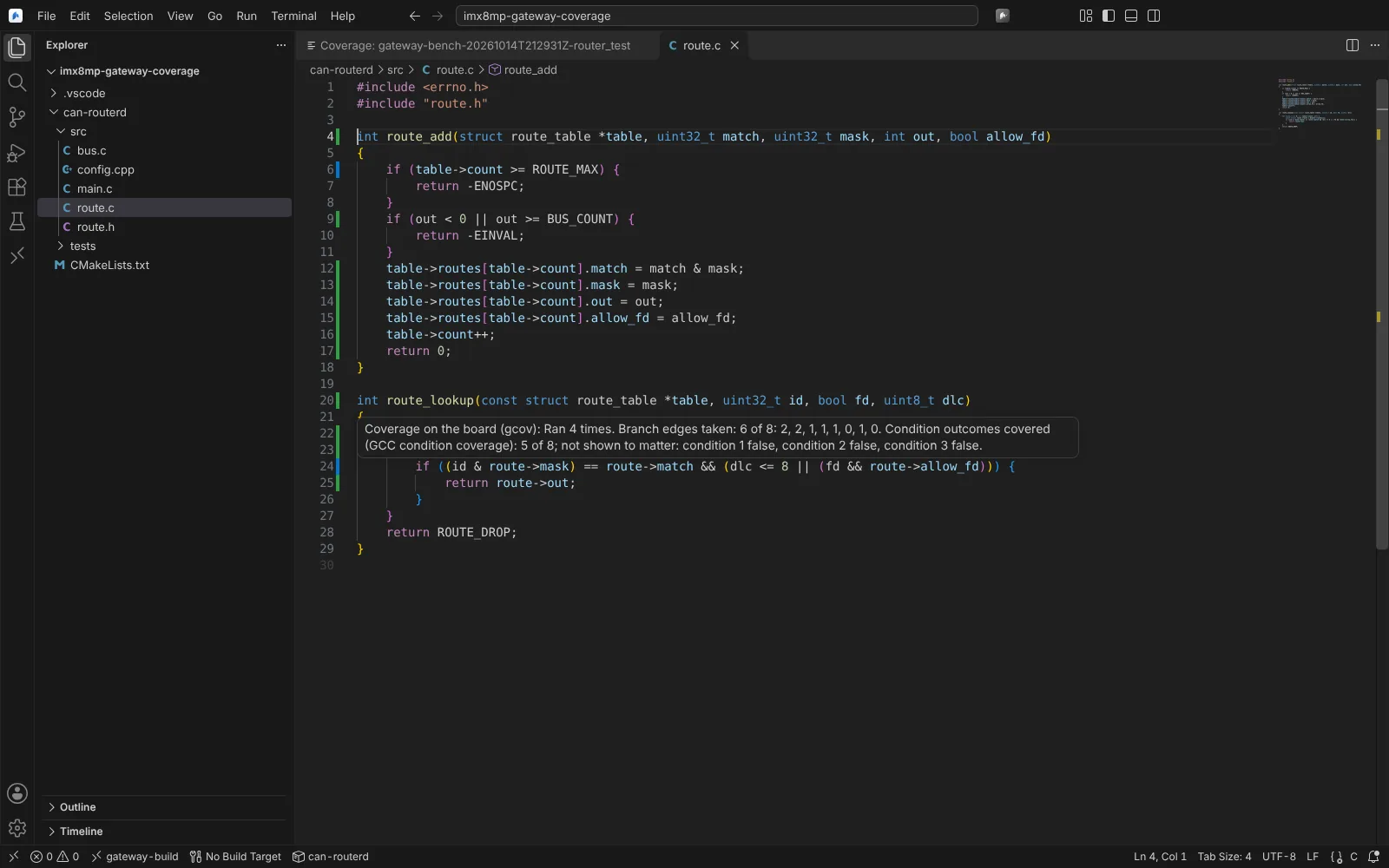 A coverage hover in the source: how often a line ran, the branch edges taken and the GCC condition outcomes covered.
Collect Kernel Coverage on Target... reads gcov-kernel's debugfs tree for a driver folder after a test command.
Agent tools: four read-only; building, writing recipe flags, running and collecting ask first.