The Embedded module brings the work of IAR Embedded Workbench, Keil MDK, STM32CubeIDE and the vendor debuggers into the Editor: open the vendor project as it is and edit it in place, build it, flash it, debug it with peripheral registers and RTOS awareness, measure it, read faults, and run static analysis with MISRA C:2012 checks. The compilers, probes and probe software stay the ones your company standardised on. The module drives them as separate processes and bundles none of them.
Vendor paths come first: IAR (iccarm, iarbuild, cspybat), Keil MDK (UV4) and Arm Compiler 6 (armclang), STM32CubeIDE's headless builder, Lauterbach TRACE32, SEGGER J-Link and J-Flash, ST-LINK and STM32CubeProgrammer, NXP LinkServer and PEmicro. The Arm GNU Toolchain, CMake, OpenOCD, Cppcheck and QEMU are the second path, for continuous integration and for engineers without a vendor seat.
Verification state: read this first
The domain modules are pre-release. A capability moves to verified only from a report of a real run, with the tool versions, operating system and hardware recorded. The states (modelled, kit shipped, verified, verified by a customer) are explained in Domain modules.
What has actually run, as of the October 2026 audit:
| Verified | Not verified | |
|---|---|---|
| Operating system | macOS 14.4.1 on Apple silicon for the audit; later capabilities on Linux | Windows 10 and 11. Most real-tool integration tests skip on Windows by design, so Windows has no real-tool test path yet |
| Vendor tools | None | IAR compiler, iarbuild and cspybat, Keil MDK and Arm Compiler 6, STM32CubeIDE, Lauterbach TRACE32, SEGGER J-Link software and J-Flash, the ST-LINK GDB server, STM32CubeProgrammer, NXP LinkServer, PEmicro, SEGGER Ozone |
| Open tools | QEMU 9.1.1 (emulator launch and Run in Emulator); later work on Linux used QEMU 8.2.2, gdb-multiarch 15.1 and arm-none-eabi-gcc 13.2 for the memory window, log points, set-up scripts, the cycle stopwatch, Heap and Stack, ORTI, benchmark counters, the buffer graph and the release comparison | Most other real-tool integration tests (CMake builds, clangd 17, CTest, OpenOCD, Cppcheck, the serial monitor) exist and skip when the tool is absent; they did not run in the audit |
| Hardware | None | Every probe (J-Link, ST-LINK, Lauterbach PowerDebug, CMSIS-DAP, MCU-Link, Multilink) and every board, including the STM32F4-Discovery of the reference project |
| Projects | Unit-test fixtures; public demo and vendor example projects for the file readers and writers | A firmware project of realistic size; a real customer Keil, IAR or STM32CubeIDE project |
In short: nothing in this module has been run on a board or against a vendor tool yet. Flashing, probe debugging, RTT, SWO and the serial monitor have only been tested against fakes and recorded tool output. The only real tools any capability has run against are QEMU, GDB (gdb-multiarch) and the Arm GNU compiler: Run in Emulator end to end, and the later debug views in debug sessions on QEMU. Do not rely on a capability for production work until it is verified for your tools, versions and operating system.
Each vendor path has a verification kit that runs the exact commands the Editor runs, on your installation, and returns an archive. See Verification kits. No kit report has come back yet.
How the module starts
There is no setting or switch. The module starts by itself in a trusted workspace that contains a firmware project, and stops when the project is removed. A firmware project is:
- an IAR
.ewp, Keil.uvprojxor STM32CubeIDE.cprojectproject; - an STM32CubeMX export;
- a CMake project whose presets,
CMakeLists.txt, the toolchain file they name, or a.cmakefile next toCMakeLists.txtor incmake/sets up an Arm bare-metal compiler: the GNU Arm toolchain (arm-none-eabi), IAR's Arm compiler (CMAKE_C_COMPILERnamingiccarm) or Arm Compiler 6 (armclangwith itsarm-arm-none-eabitarget).armclangwithout that target is Arm Compiler for Linux, a host compiler, and does not count.
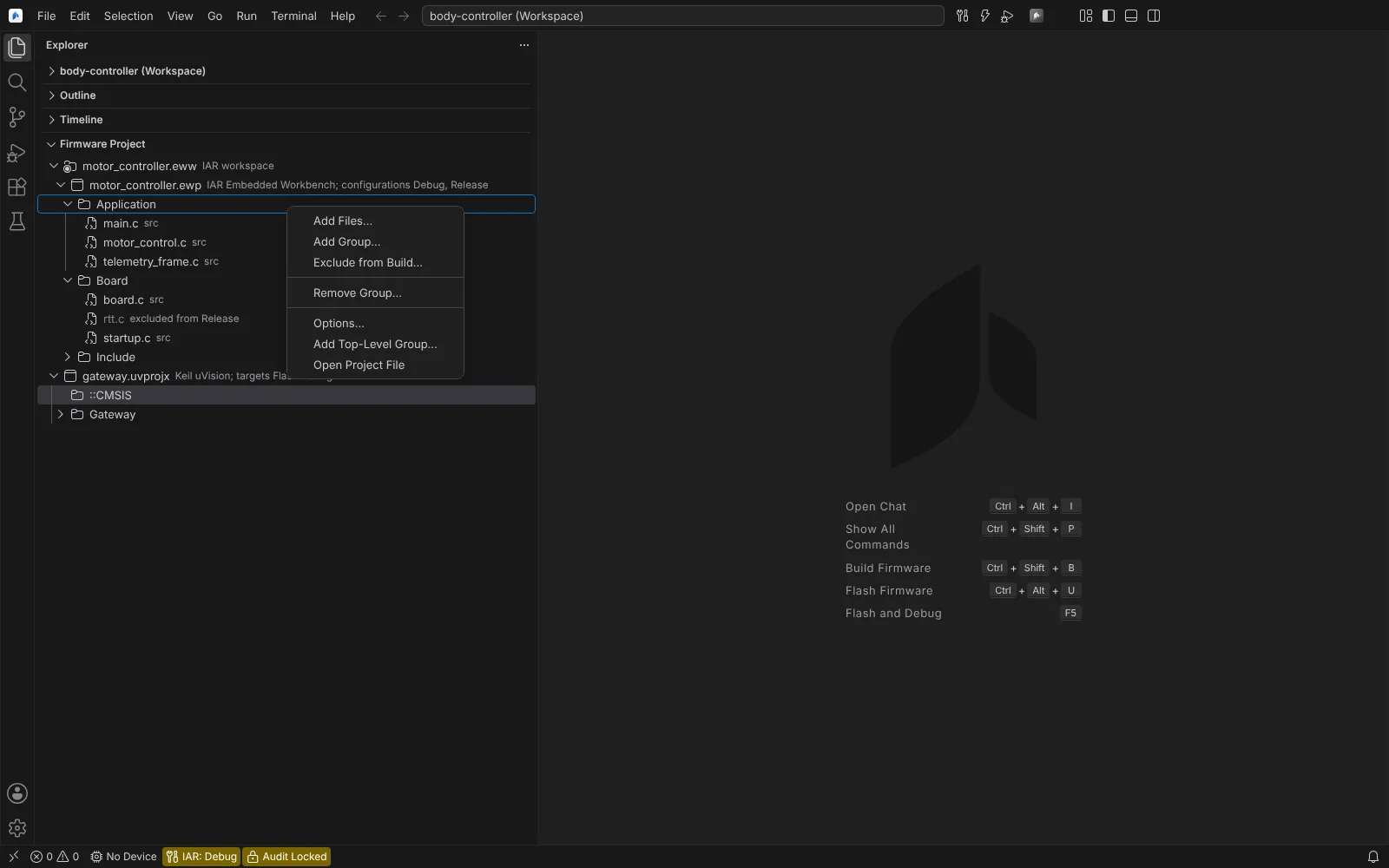 The Firmware Project view listing an IAR workspace and a Keil uVision project, with the context menu of a source group.
Elsewhere the Editor is unchanged. In Restricted Mode nothing runs, because the module runs the tools the workspace configures. TRACE32 PRACTICE scripts (.cmm) are coloured in every workspace, because that runs no process.
Where things appear
| Surface | What |
|---|---|
| Title bar, next to search | Build, Flash (Cmd/Ctrl+Alt+U) and Flash and Debug (F5) |
| Empty editor area | The same three, with their keys |
| Status bar | Target device and system clock; CMake preset or vendor configuration; image size; C Language Support (clangd); Cycle Stopwatch while debugging; Toolchain, only when a tool is missing |
| Explorer | The Firmware Project view: IAR workspaces and projects, Keil projects and STM32CubeIDE projects with their groups and files |
| Editor tabs | Registers (.svd files), Pinout (.ioc files and the pin configuration file), Firmware Memory, Options of a vendor project, Configuration Wizard, Memory windows, Live Plot, Buffer Graph, Firmware Profile, Option Bytes, J-Flash projects |
| Problems | Compiler diagnostics, clock configuration errors, stack frames without a bound, static analysis and MISRA C:2012 findings, coding standards, vendor licence failures, IAR C-RUN messages |
| Hover in C and C++ | Peripheral, register and field details from the device's SVD file |
| Explorer context menu | Flash to Target and Compare with Device Memory on images; Import into CMake on vendor projects; Import Pin Configuration on .ioc files; Use as SVD File for Debugging on .svd files; Import Ozone Project on .jdebug files |
| Run and Debug | RTOS, Live Watch, Fault, Heap and Stack, Benchmark Counters and TRACE32 Breakpoints views; peripheral registers as a Peripherals scope in Variables |
| Testing | Embedded Unit Tests (CTest and Unity) and IAR C-SPY Tests |
| Terminal | Serial Monitor |
| Welcome page | The "Get Started with Firmware" walkthrough; it never opens by itself, and checks off a step only when the build, flash or connection really worked |
All commands are in the Command Palette under Neural Inverse Embedded.
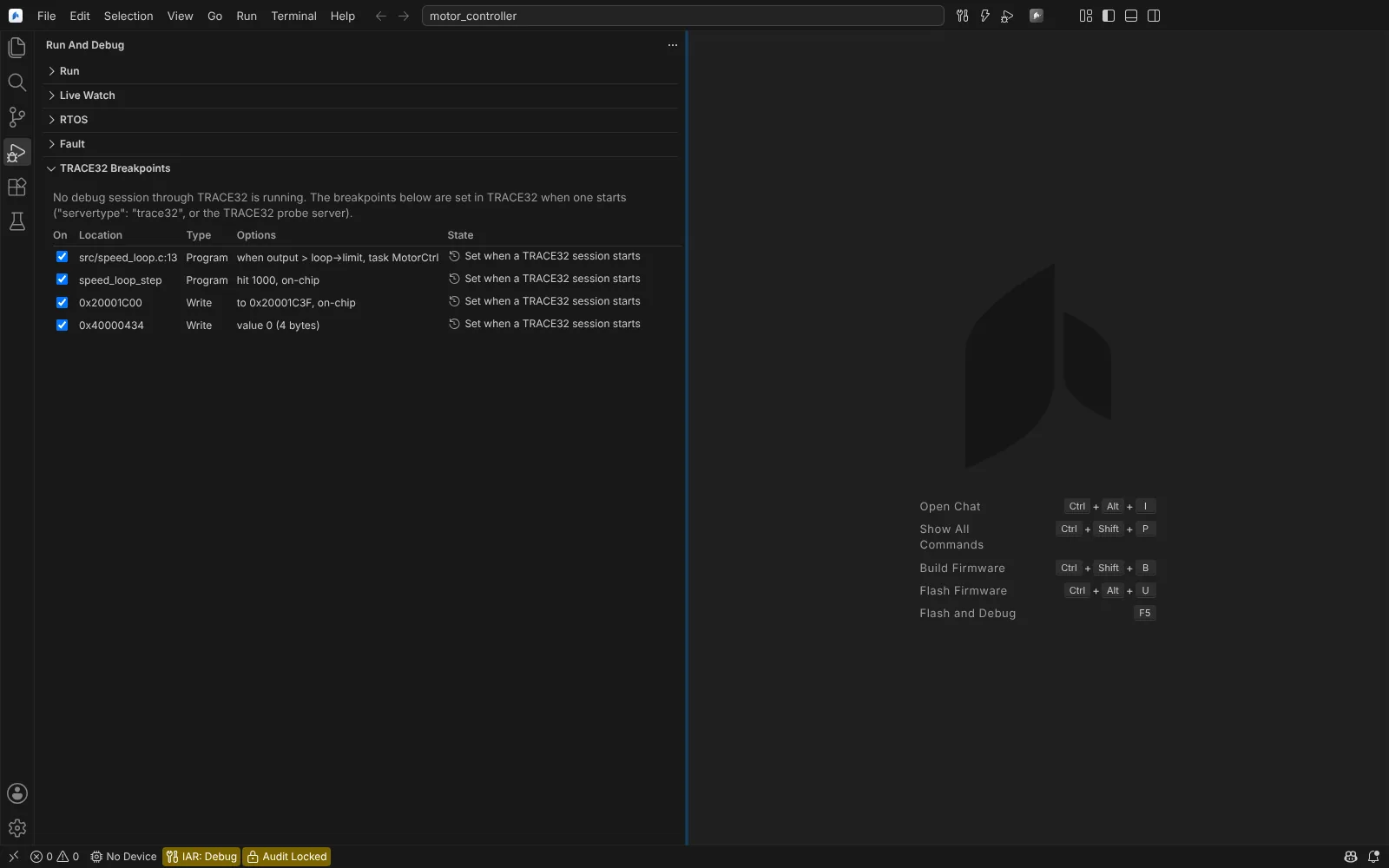 The Run and Debug views of the module beside the empty editor area, which lists Build Firmware, Flash Firmware and Flash and Debug with their keys.
Pages in this section
Project and configuration:
- Requirements and tools: the tools driven, licences, discovery, version pinning, offline use.
- Open, import and create projects: opening vendor projects as they are, build configurations, import into CMake, new projects, the walkthrough.
- Edit IAR, Keil and STM32CubeIDE projects: the Firmware Project view and the Options editor, written in place.
- Vendor keymaps and debug layouts: Keil, IAR and Eclipse keys and debug windows.
Code, build and test:
- Code intelligence: clangd for GCC, IAR and Arm Compiler 6 projects.
- Build, size and build records: CMake presets and in-place vendor builds, size report, build record, licence failures.
- Unit tests: CTest and Unity, IAR C-SPY tests, IAR C-RUN.
- Static analysis, MISRA C and stack usage.
Target, flash and production:
- Flash, erase and probes: probe software, flashing, erasing.
- STM32 option bytes, bootloader and external flash.
- Production programming and release checks: J-Flash production runs, comparing a device with the release file.
Debug and analysis:
- Debug sessions: F5 without
launch.json, launch configurations, Cortex-Debug, faults. - Debug state from Keil, IAR and Ozone: breakpoints, watches, set-up scripts.
- Lauterbach TRACE32: sessions, flashing, complex breakpoints, PRACTICE scripts.
- RTOS and OS awareness: FreeRTOS, Zephyr, ThreadX, ORTI.
- Memory, live values and buffers: Memory windows, log points, Live Watch, Live Plot, Buffer Graph.
- Timing, profiling, heap and stack: cycle stopwatch, benchmark counters, SWO profiling, Heap and Stack.
- Target output and serial monitor: semihosting, RTT, SWO, serial ports.
- Emulator and continuous integration: QEMU runs and debugging.
Device data:
- Peripheral registers: SVD files, hovers, overlays.
- Device packs, pins and clocks.
- Configuration Wizard: CMSIS-annotated configuration files as forms.
Governance and reference:
- Confirmations, records and agents.
- Reference and troubleshooting: settings, file formats, kits, common problems.
- What's next: what the vendor IDEs do that the module does not do yet.
The same tools in the CLI
The CLI has a firmware environment with the same build, size, test, flash, serial, fault, debug and import tools, and flashing there always needs a person's approval. See CLI environments.