The module bundles no compiler, probe software or SDK. It runs what is installed on your machine, as your company installed it for daily work.
Tools and licences
Vendor tools first, then the open-source alternatives. "Minimum accepted" is what the Editor's tool catalogue checks; it is not a verified version. Every tool in this table is not yet verified in a real run, except QEMU (see the last column).
| Tool | Used for | Licence or seat | Minimum accepted | Verified |
|---|---|---|---|---|
IAR C/C++ Compiler for Arm (iccarm) and IAR Command Line Build Utility (iarbuild, IarBuild.exe) | In-place builds of .ewp projects; language support through clangd | Licensed IAR product | Any; iarbuild -jsondb (compile commands for clangd) needs Embedded Workbench 9 | No (kits iar-keil-build, iar-clangd) |
IAR C-SPY batch (cspybat) | Unit tests on the C-SPY simulator or the target; C-RUN runtime checks | Licensed IAR product; C-RUN needs its own licence | Any | No (kit iar-keil-build) |
Keil uVision (UV4.exe) in batch mode | In-place builds of .uvprojx projects (Windows only) | Licensed Keil MDK | Any | No (kit iar-keil-build) |
Arm Compiler 6 (armclang) | Builds through CMake presets | Licensed Arm Compiler for Embedded | Any | No |
STM32CubeIDE headless builder (stm32cubeidec.exe, stm32cubeide) | In-place builds of .cproject projects | ST licence, no seat | Any | No (kit stm32cubeide-build) |
Lauterbach TRACE32 PowerView for Arm (t32marm) | Debug and flash through TRACE32 | A PowerDebug module and licence | SETUP.API.GDB.Enable from 09/2024; earlier releases with "t32GdbSetup": "config" | No (kit trace32) |
| SEGGER J-Link software (J-Link Commander, J-Link GDB Server), J-Flash | Flash, debug, RTT, production programming | A J-Link probe; J-Flash needs J-Link PLUS or higher, or a J-Flash licence | Any | No (kit jlink) |
ST-LINK GDB server, STM32CubeProgrammer (STM32_Programmer_CLI) | Flash, debug, option bytes, external flash, the STM32 bootloader | No seat (ST licence) | Any | No (kits stm32cubeprogrammer, stlink-gdbserver) |
NXP LinkServer, PEmicro GDB server (pegdbserver_console) | Flash and debug through MCU-Link, LPC-Link2, Multilink and Cyclone | Vendor terms | Any | No (kit nxp-probes) |
Arm GNU Toolchain (arm-none-eabi-gcc, arm-none-eabi-gdb) or gdb-multiarch | Builds; GDB for every debug session; nm for symbols | GPL-3.0 | 12.0 | No (gdb-multiarch 15.1 and arm-none-eabi-gcc 13.2 used on Linux for some later capabilities) |
| CMake, Ninja | Builds through presets | BSD-3-Clause, Apache-2.0 | CMake 3.20 | No |
| clangd | Language intelligence; install it yourself | Apache-2.0 with LLVM exception | 17 | No (clangd 15 run directly in one test, below the Editor's minimum) |
| OpenOCD | Flash and debug, second path | GPL-2.0 | 0.12.0 | No |
| Cppcheck | Static analysis and MISRA C:2012 (needs Python 3 for the MISRA addon) | GPL-3.0; MISRA rule texts are licensed by MISRA | 2.10 | No |
| cpackget | CMSIS device packs | Apache-2.0 | Any | No |
QEMU (qemu-system-arm) | Software-in-the-loop runs, CI | GPL-2.0 | 4.1 | Yes: QEMU 9.1.1 for Run in Emulator |
Run Show Toolchain to see every tool found, with its version, and the optional vendor tools. Check the Toolchain Again looks again after you install something. The status bar shows a Toolchain item only while a tool the project needs is missing or older than the minimum; its tooltip says which tool and how to install it.
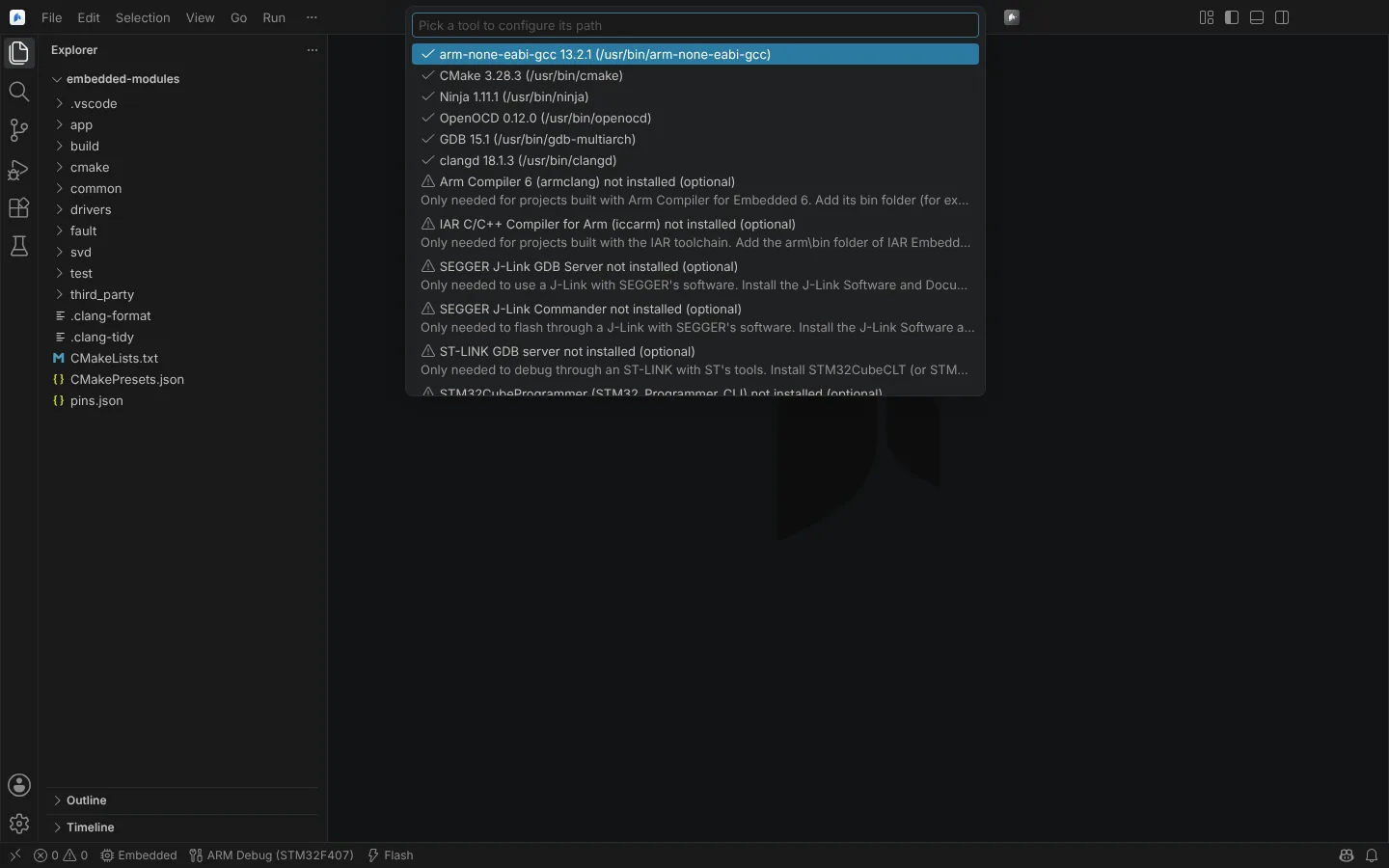 Show Toolchain listing the tools found with their versions and the optional vendor tools that are not installed.
How tools are found
- A path setting wins:
neuralInverse.embedded.paths.<tool>names the executable or the folder that holds it. These settings are restricted, so a workspace that is not trusted cannot set them. - Otherwise the tool is looked for on
PATH, then in the vendors' usual install folders. On Windows that covers the default layouts under both Program Files folders, with several versions side by side: IAR Embedded Workbench, Keil MDK (C:\Keil_v5), Arm Compiler for Embedded, SEGGER J-Link, STM32CubeProgrammer, STM32CubeCLT and the tools bundled in STM32CubeIDE (C:\ST), TRACE32 (C:\T32), the Arm GNU Toolchain, CMake, xPack OpenOCD and QEMU. On Linux,/optis searched. NXP LinkServer and PEmicro are found in their Windows and Linux install folders. - The Windows registry is not read. A tool installed elsewhere needs its path setting.
No administrator rights and no PATH changes are needed for the vendor layouts above.
Tool ids for neuralInverse.embedded.paths.<tool>: armGcc, cmake, ninja, openocd, gdb, clangd, armCompiler6, iarArm, jlinkGdbServer, jlinkCommander, stlinkGdbServer, stm32Programmer, cppcheck, cpackget, qemu, trace32, iarBuild, keilUv4, cubeIde, linkServer, pemicroGdbServer, jflash.
State: unit-tested, with Windows layouts given as path strings. Discovery on a real Windows or Linux installation of any vendor tool is not yet verified.
Hold a programme to its qualified tool versions
Set neuralInverse.embedded.toolVersions in the workspace settings to pin a version per tool:
{
  "neuralInverse.embedded.toolVersions": { "iarArm": "9.50", "jlinkGdbServer": "7.94e" }
}
Of the copies installed side by side, the one with this version is used (9.50 matches 9.50.x). When it is not installed, the tool is reported missing; another version is never used in its place. A path in neuralInverse.embedded.paths.* must then be that version. Without a pin, PATH comes first, then the newest installed version.
Offline and air-gapped use
Nothing is downloaded unless you run a command that says so: Update Device Pack Index, Install Device Family Pack... and Select Device... (through cpackget), and Download STM32 Pin Data (through Git). These get the Editor's proxy (http.proxy, else the system or PAC proxy, with http.noProxy) as HTTPS_PROXY, HTTP_PROXY and NO_PROXY. A failed download names the host and the offline route.
Offline, these settings replace every download:
| Setting | What to point it at |
|---|---|
neuralInverse.embedded.packs.root | An installed pack folder: a Keil MDK or CMSIS-Toolbox pack root, or a copy IT provides. Its packs, and those in .Local/local_repository.pidx, are read in place |
neuralInverse.embedded.packs.indexUrl | A company mirror of the pack index (default https://www.keil.com/pack/index.pidx), used when a pack root is first set up |
neuralInverse.embedded.pins.dataPath | A copy of STM32_open_pin_data, or the db folder of an installed STM32CubeMX |
neuralInverse.embedded.pins.repository | A company Git mirror of STM32_open_pin_data |
A pack's embedded licence is extracted by cpackget and shown for your agreement before it is installed. Packs and pin data are fetched at your request and are not redistributed by Neural Inverse.
State: the proxy and offline settings are unit-tested; cpackget, the pack index and a corporate proxy have not been exercised in a verified run.
Logs
Show Log opens the Embedded log. Every flash is recorded there with the image's SHA-256, and imports and set-up script translations list there what they did not carry over.