Yocto, Wind River Linux and vendor BSP builds run on a Linux build server; the laptop is often Windows. The module reaches the server through the OpenSSH client the operating system ships (ssh.exe in System32\OpenSSH on Windows 10 and 11, ssh elsewhere), so your SSH configuration (Host aliases, ProxyJump, ProxyCommand, IdentityFile) and your SSH agent apply. No file is copied to the laptop to build.
State: modelled on Linux with OpenSSH 9.6p1 as client and server on the same machine: host keys, a refused key, a closed port, a passphrase through askpass, streamed output, cancel, and binary file read and write, plus the running app. Not run on Windows (ssh.exe and its askpass), against a real build server through a company proxy or jump host, or on macOS.
Declare the build host
Add the build host to the workspace settings:
{
  "neuralInverse.embeddedLinux.enabled": true,
  "neuralInverse.embeddedLinux.buildHosts": [
    {
      "name": "build",
      "host": "<host or ssh config alias>",
      "buildDirectory": "<the folder with conf/local.conf>"
    }
  ]
}
Each entry of neuralInverse.embeddedLinux.buildHosts takes:
| Field | Meaning |
|---|---|
name | The name shown for the host; unique in the workspace |
host | Host name, address, or a Host alias of your SSH configuration |
user, port | Account and SSH port; your SSH configuration's values when unset |
buildDirectory | The BitBake build directory (where conf/local.conf is), or the Buildroot output directory: absolute, or under ~/ |
identityFile | A private key on this machine; your SSH configuration and agent decide when unset |
kasFile | The product's kas file, absolute or relative to the build directory |
buildEnvironmentScript | A script sourced before the build environment, such as Wind River Linux's or the Yocto Project's buildtools environment-setup script |
petalinuxSettings | AMD PetaLinux: the installation's settings.sh, sourced before every petalinux-* command |
Two machine settings control the client: neuralInverse.embeddedLinux.sshPath (empty: ssh.exe in System32\OpenSSH on Windows, then ssh on PATH) and neuralInverse.embeddedLinux.connectTimeout (seconds before the host is reported unreachable). Never put a password in the settings.
Trust the host key
Host keys are checked strictly. On a first connection the status bar says the key is not trusted.
- Run Trust Build Host Key.... It shows the key type and its SHA256 fingerprint.
- Compare it with the fingerprint your administrator gives you, for example the output of
ssh-keygen -lf /etc/ssh/ssh_host_ed25519_key.pubon the server. - Choose Trust and Add. The key is added to your
known_hosts.
A changed host key is reported, never accepted silently.
Keys and passphrases
When your key has a passphrase and no SSH agent runs, run Set Build Host Key Passphrase.... The passphrase is kept in the editor's secret storage and handed to the OpenSSH client through SSH_ASKPASS; it is never a setting. Remove Build Host Key Passphrase deletes it.
The status bar
The status bar shows the build host and whether a session to it works: connected, not checked, host key not trusted, key refused, host key changed or unreachable. A failure says what to do, for example to check the VPN or add ProxyJump for a jump host. Test Build Host Connection checks again; Show Build Hosts lists the hosts of the workspace.
Run a command on the build host
Run Command on Build Host... (also in the Build Directory view title) runs a command line in the build directory, its output streamed in a terminal. Ctrl+C stops the whole process group on the host, so nothing is left running. An agent can run commands too, always after your confirmation.
Edit the build's files
Files of the build host open in editors over SSH (the ni-buildhost:// file system) and are saved back to the host. Clicking Machine or Distribution in the Build Directory view opens conf/local.conf at the line that sets it.
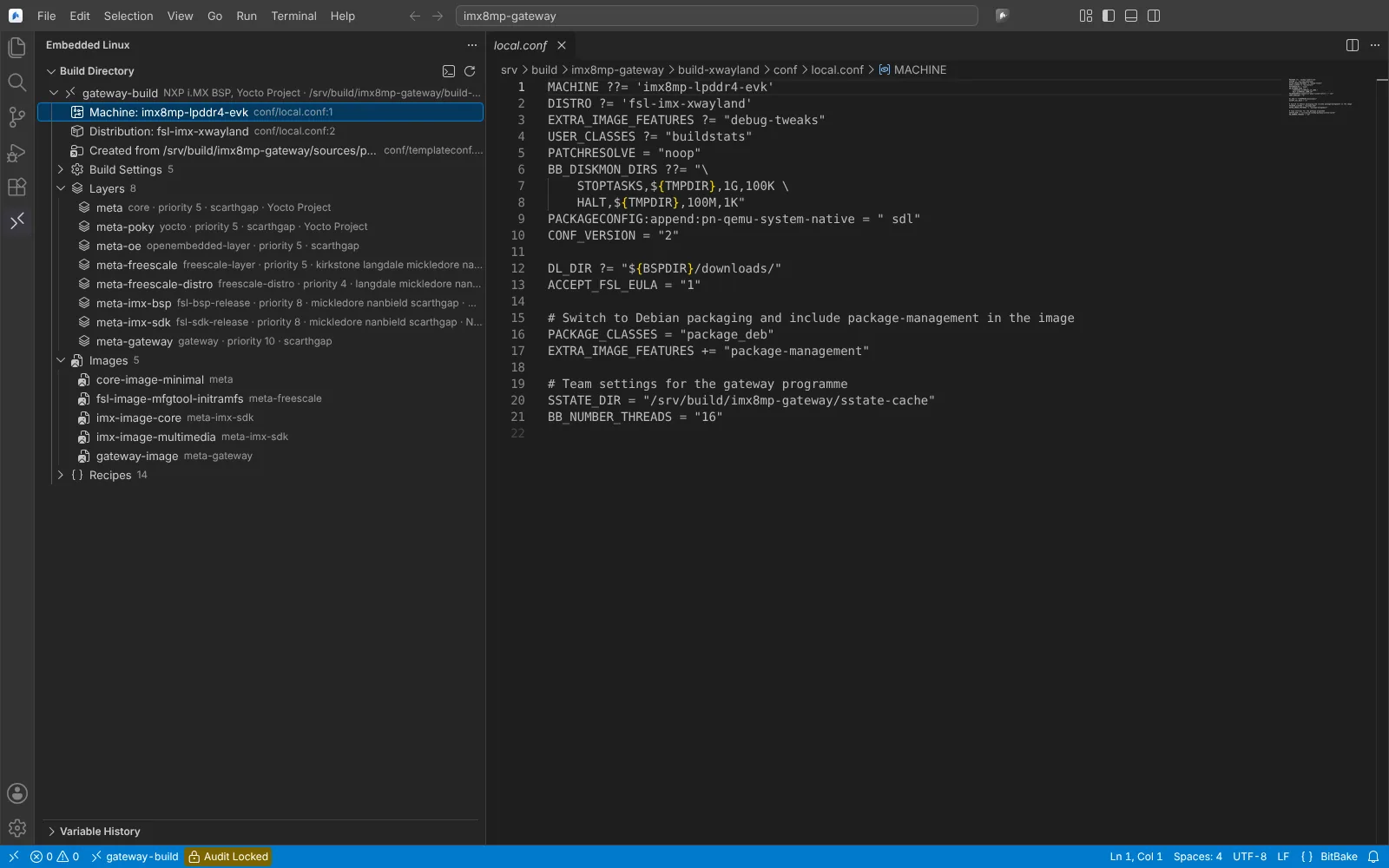 conf/local.conf of the build host open in the editor from the Machine row of the Build Directory view.
What runs on the build host
Commands are sent as scripts to /bin/sh whatever the login shell. The host needs base64, GNU coreutils and findutils, setsid (util-linux) and bash; BitBake and Git where the BitBake and build history features run. The build environment is OpenEmbedded-Core's oe-init-build-env, after buildEnvironmentScript when it is set.