The vendor's own IP catalogue and parameter checks are used: every value you set is sent to the tool, which answers with the values, which parameters are enabled, and its messages. State: not yet run against Vivado, Quartus, Platform Designer, Libero or Radiant; kit shipped unless marked. Open-flow PLLs are on Build with the open FPGA flow.
IP Catalog
Open IP Catalog lists the IP for the target's family, with search, categories and hidden IP:
| Vendor | Where the catalogue comes from |
|---|---|
| Vivado | get_ipdefs in the persistent Vivado session, filtered to the part's family, plus your IP repositories |
| Quartus | The install's .ipx index files, families from each IP's _hw.tcl |
| Libero | The project's component scripts and .prjx; any other core by its VLNV (Libero documents no batch catalogue listing) |
| Radiant | The modules of the Radiant install's ip folder |
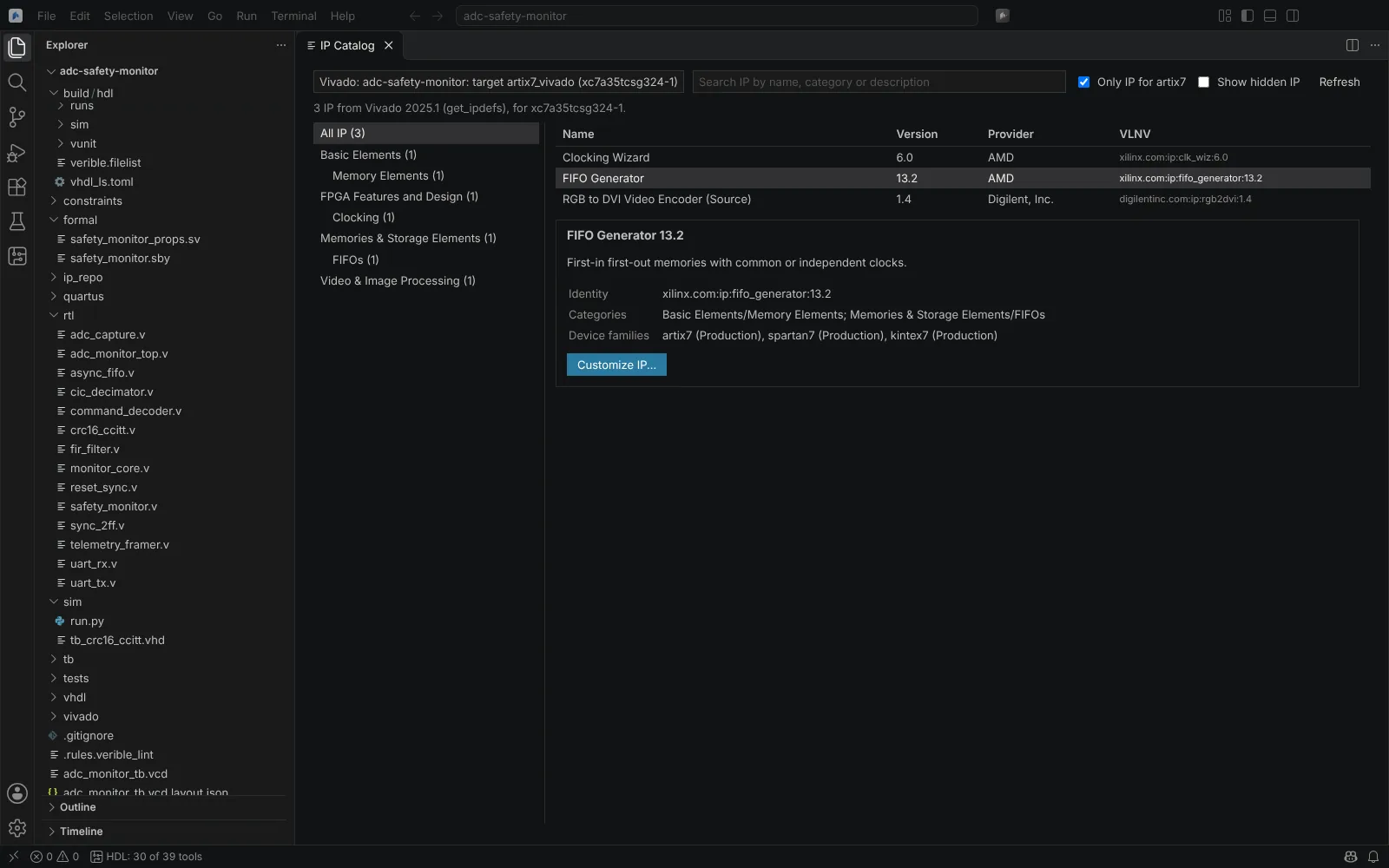 The IP Catalog for an Artix-7 target, filtered to the part's family
Customize IP
Choosing an IP opens Customize IP:
- Vivado: the form is laid out from the IP's own
component.xmland XGUI. Each change is set on the IP in the Vivado session; a value Vivado refuses is shown with its message (with the message ID) while the form keeps the valid configuration. When the IP'scomponent.xmlis not in your install, its parameters are shown by name. - Quartus: one
qsys-scriptcall per change, with every parameter property andvalidate_system's messages; the form uses Platform Designer's groups, ranges and computed values. - Libero: catalog cores (PF_CCC, PF_DDR, PF_XCVR and any other by its VLNV) are configured through Libero in batch (
create_and_configure_core,configure_core,export_component_to_tcl), each value checked by Libero. - Radiant:
ipgenfromradiantcon a scratch copy of the module's.cfg; parameters by their.cfgnames,ipgen's messages as validation.
Create asks you to confirm, then:
| Vendor | Writes | Adds it to |
|---|---|---|
| Vivado | The .xci in the project's IP folder (create_ip) | hdl.json, and optionally the .xpr |
| Quartus | The .ip (ip-deploy) | hdl.json and the .qsf |
| Libero | Libero's component script | The target's libero.cores in hdl.json, which the build sources before linking |
| Radiant | The .ipx | The .rdf or the target's radiant.ip |
Re-customize IP... opens an existing Vivado .xci, Quartus .ip, Libero component script or .cxf, or Radiant .ipx, and saves it in place (for Radiant, the .cfg is put back if ipgen fails).
State: readers verified on Linux on real component.xml, XGUI, .xci, .ip, .ipx and _hw.tcl files from public projects; the services and kit flows tested on stand-ins. Libero cores and Radiant IP: kit shipped.
Builds regenerate IP in the build folder; locked or out-of-date IP is handled as described on Open and edit vendor projects.
Create and Package IP (Vivado)
Create and Package IP... (from a module in the Explorer) packages the module and the files it instantiates with Vivado's IP Packager (ipx::package_project) in the IP Catalog's Vivado session:
- Set the identity (vendor, library, name, version, display name, description, categories), the supported families and the IP repository.
- Package IP: Vivado writes
component.xml. - The Editor reads it back into a form: identification, compatible families, customisation parameters, ports and bus interfaces (such as
FREQ_HZon a clock), file groups and review. Changes are queued and applied together asipxcommands that Vivado saves.
The repository is added to the target's vivado.ipRepositories in hdl.json, or to the .xpr's IP repository paths, so the IP Catalog lists the IP for other teams. Edit Packaged IP opens any component.xml.
State: kit shipped; the component.xml reader tested on a real public IP.
Vitis HLS
C and C++ functions listed in hls in hdl.json are synthesised into RTL with the Vitis HLS of your install, for a Vivado target:
"hls": [
  { "name": "fir_hls", "top": "fir_hls", "target": "artix7_vivado", "clockPeriod": 25 }
]
Each component also takes its sources and testbenches, cflags and csimflags, the rtl language, clockUncertainty, and an export block with the IP's identity and ipRepository (ip_repo by default, added to the target's vivado.ipRepositories).
| Command | Runs |
|---|---|
| Run Vitis HLS C Simulation | C simulation |
| Run Vitis HLS C Synthesis | C synthesis |
| Run Vitis HLS C/RTL Co-simulation | C/RTL co-simulation |
| Export Vitis HLS RTL as IP | Export to the IP catalogue; the exported IP is added to the project |
| Run Vitis HLS: C Simulation to Export | All four in order |
They run in batch with the Editor's Tcl (vitis_hls -f, or vitis-run from 2024.2). Open Vitis HLS Component... opens the HLS view: latency, interval, estimated clock, resources, loops with achieved and requested II, and the RTL interface. Problems go to Problems.
State: kit shipped; readers tested on real Vitis HLS 2020.2 and 2022.1 reports. The vitis-run form comes from search results and is checked by the kit.