Language support, lint and constraint checks use open tools and are verified on Linux with the versions given. Templates and keymaps are modelled. Nothing is verified on Windows. Vivado's own linter and RTL DRC are on Timing analysis and constraints.
Language support
Colouring for Verilog, SystemVerilog and VHDL ships with the Editor, with no extension to install. With the environment on, a built-in language client starts per language when its server is found:
- Verilog and SystemVerilog: Verible's
verible-verilog-ls, orsvls.neuralInverse.hdl.verilog.languageServerchooses;autouses Verible when it is installed. Extra arguments go inneuralInverse.hdl.verilog.languageServerArguments. - VHDL:
vhdl_ls(neuralInverse.hdl.vhdl.languageServer,neuralInverse.hdl.vhdl.languageServerArguments). Avhdl_lswithout its standard libraries is not started; its status explains how to install them or pass--libraries.
You get diagnostics, completion, go to definition, references, symbols, hover and formatting. The servers are told the project's sources (the design's and its testbenches', from hdl.json), so a module or entity is found from another file: Verible through a file list with the include folders and defines, vhdl_ls through a configuration with the VHDL sources in one library. Both are written to the build folder, never to the repository, and the servers restart when hdl.json changes. Restart HDL Language Servers restarts them.
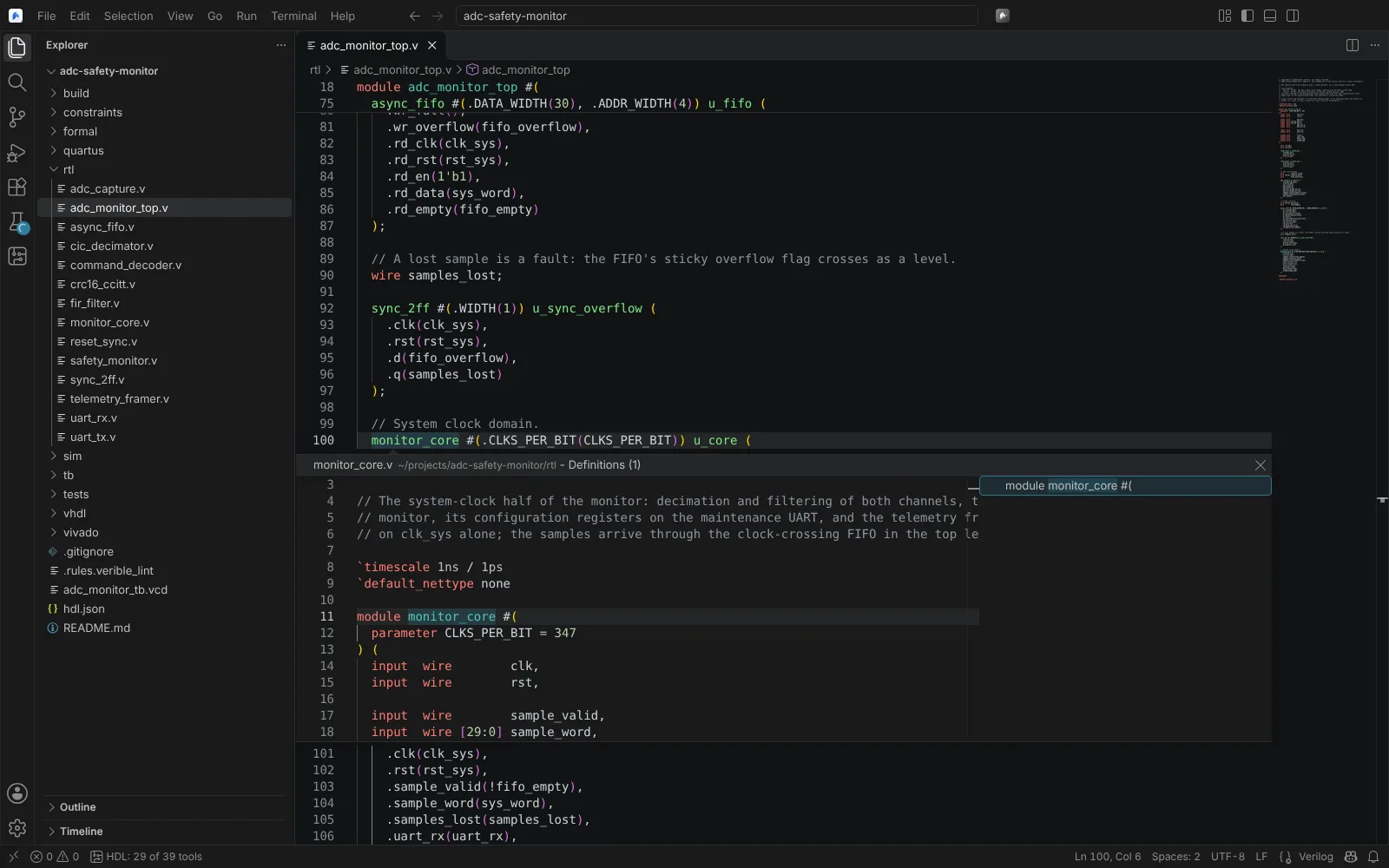 Go to Definition showing a module declared in another file, through Verible
State: verified (Linux) with Verible 0.0-3622 and vhdl_ls 0.88.0: Peek Definition opens a module and an entity from another file.
Lint
Verilator --lint-only checks Verilog and SystemVerilog, and GHDL analysis checks VHDL (importing the sources and analysing them in dependency order), over the project's sources with its top.
- Lint runs on save (
neuralInverse.hdl.lint.onSave, defaulttrue) and with Lint HDL Design. - A source outside any project is linted on its own, with its folder searched for the modules it uses.
- Findings go to Problems with their warning codes, linked to the tool's documentation.
- Clear HDL Lint Results clears them.
- Extra arguments:
neuralInverse.hdl.lint.verilatorArguments(for example-Wallor-Wno-UNUSED) andneuralInverse.hdl.lint.ghdlArguments(for example-fsynopsys).
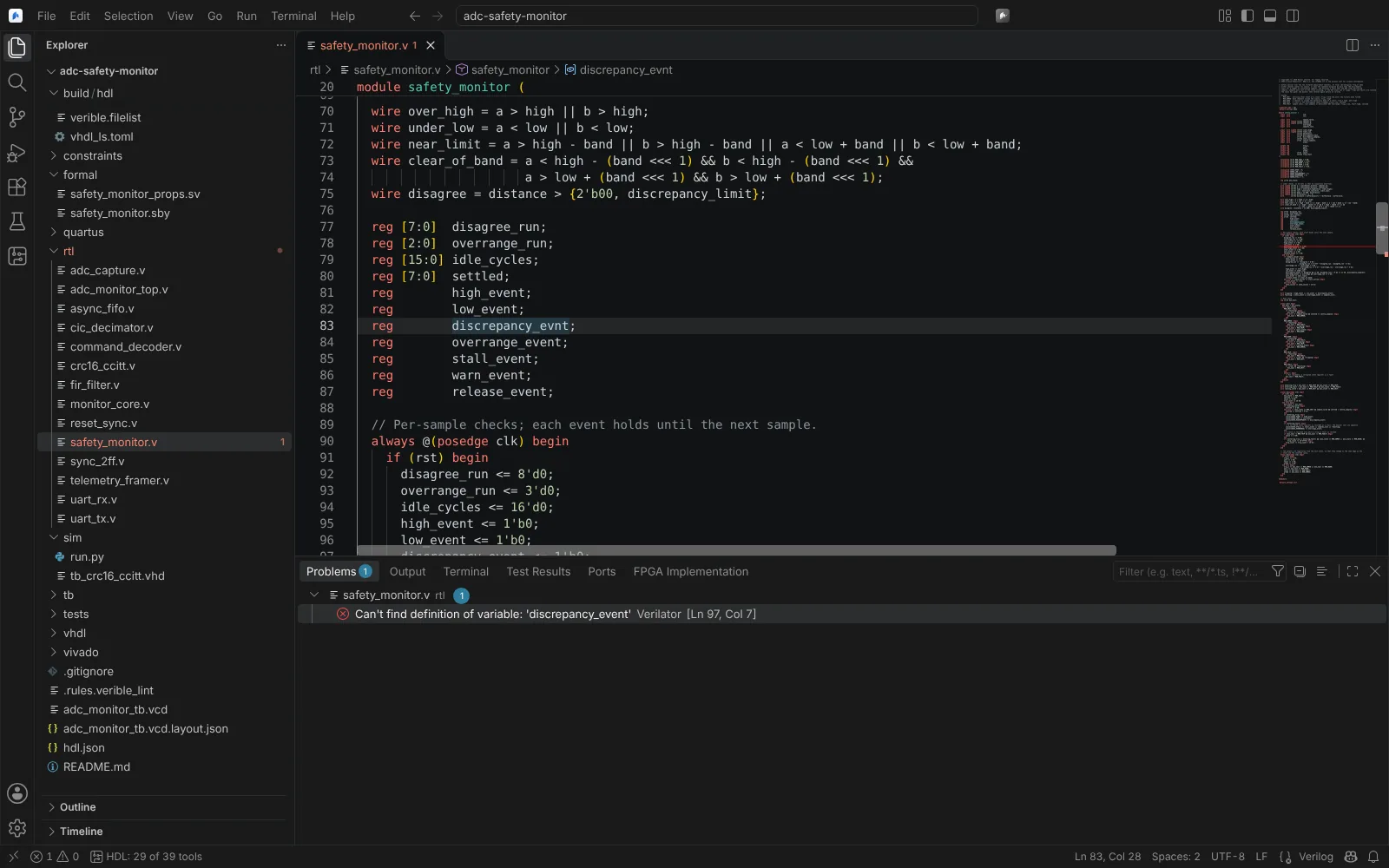 A Verilator lint error for a misspelt signal name in Problems
State: verified (Linux) with Verilator and GHDL.
Constraint files
PCF, LPF, CST and SDC/XDC are built-in languages with colouring. A target's constraints file is checked as you edit it, against the elaborated top:
- names that are no port of the top;
- ports placed twice;
- ports placed on no pin (an error for iCE40, whose place and route stops at them).
Port names and bits complete as you type.
State: verified (Linux). Only placement constraints are checked; clocks, delays and exceptions are not. Editing constraints as tables, and the vendors' constraint editors, are on Timing analysis and constraints. Placing pins graphically is on I/O planning.
Formal property templates
In Verilog and SystemVerilog files, typing formal- offers asserts, assumes and covers that Yosys reads. See Formal proofs and equivalence.
Language templates
The Language Templates view in the HDL side bar, and Insert Template, offer templates in Vivado's and Quartus's categories (Verilog, VHDL, SystemVerilog, XDC timing and physical constraints, device configuration, debug, Quartus's Timing Analyzer SDC and Tcl):
- Neural Inverse's own templates, each labelled as ours;
- XPM instantiation templates (Vivado) and altera_mf megafunctions (Quartus), read from your vendor install; a template file that could not be read is listed as not read;
- your company's template folders, set in
neuralInverse.hdl.templates.folders.
Select a template to preview it; Insert puts it at the cursor.
State: modelled. Templates have not yet been read from a real Vivado or Quartus install.
Vendor keymaps
For engineers moving from Vivado or Quartus, Select Vendor Keymap (Vivado, Quartus) sets neuralInverse.hdl.keymap:
| Value | Shortcuts |
|---|---|
none (default) | The Editor's own |
vivado | Vivado's, such as F11 for Run Synthesis and F6 for Validate Design in IP Integrator |
quartus | Quartus Prime's, such as Ctrl+L for Start Compilation and Ctrl+Shift+N for the Pin Planner. Ctrl+K is not bound, because it is a chord prefix in the Editor |
Show Vendor Keyboard Shortcuts lists each shortcut, the command it runs here, where the shortcut was read, and whether that source was checked against the vendor's documentation. Pick one to run it.
State: modelled. Vivado's F6 comes from AMD's tutorials; the other shortcuts come from secondary sources and are marked unverified.