Verification state: every compile and check job on this page is generated by the module and tested statement by statement, and run end to end against the local z/OSMF-shaped server with fixture listings written to IBM's documented formats, on Linux. None has been submitted to a real z/OS. The Db2 and CICS compile JCL was also expanded against AWS CardDemo's own compile procedures, never submitted. The verification kit's compile steps are what move them to verified.
Compile on z/OS
Compile on z/OS needs a project with host.compile (see Project files) and a connection.
- Open the program.
- Press Ctrl+Alt+Shift+B, or Ctrl+Shift+B (the build key runs Compile on z/OS while the project sets
host.compileand a connection exists), or click Compile on z/OS in the title bar. - The module generates the job from
host.compile: the job card with${PROGRAM}, JCLLIB, the procedure with PARM.COBOL, the program in-stream as COBOL.SYSIN, the workspace's copybooks sent with the job through IEBUPDTE into a temporary library first in COBOL.SYSLIB, then the host copybook libraries, and LKED.SYSLMOD into the load library. - It writes the job to
<buildDirectory>/host/<PROGRAM>.jcl, so you can rerun it by hand, and submits it. - Every IGY message of the compile step lands in Problems on its line in the program or the copybook, nested and REPLACING copies included. A message from a host-only copybook lands on its COPY statement. The next compile replaces them. Copybooks the workspace does not have are listed.
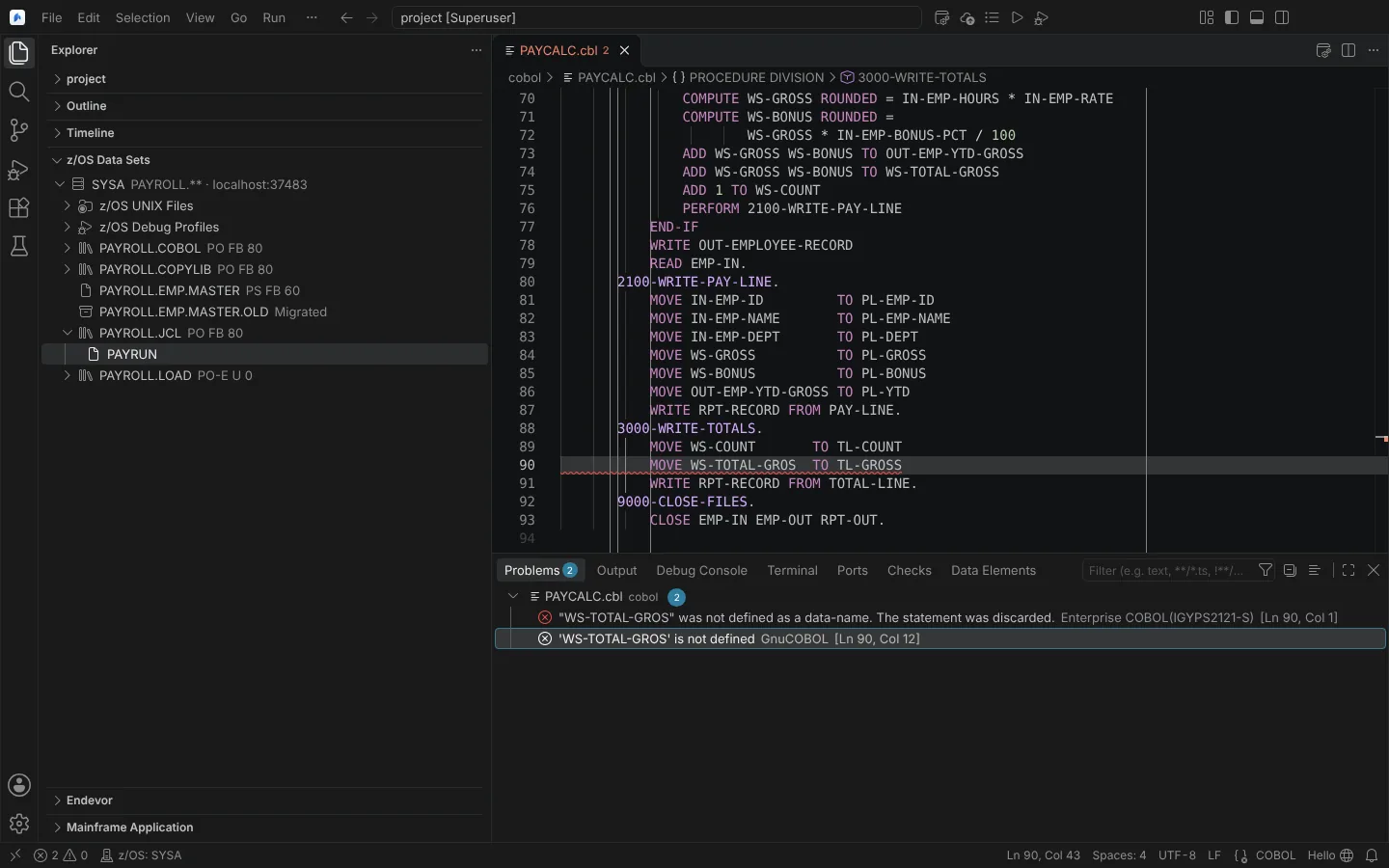 Compile on z/OS with a planted error: Problems shows the Enterprise COBOL message from the listing beside the GnuCOBOL check on the same line (listing from a modelled server).
The job editor shows each step's return code (precompile, translate, compile, link, BIND). A failed compile gives one notification with Show Job.
The generated compile and check JCL is yours: its header says it is yours to use, change and share without restriction.
Db2 and CICS programs
host.compile.profiles holds the shop's procedure for each kind of program, chosen by the program's EXEC SQL and EXEC CICS: batch, db2, cics and db2cics. Each profile names the procedure, its step names, PARM and DD overrides and additions per step (DBRMLIB, STEPLIB with SDSNLOAD or SDFHLOAD), symbolic parameters, either separate precompile and translate steps or the compiler's SQL and CICS options, and an optional BIND (DSN under IKJEFT01) after the link.
Messages from every step reach Problems: IGY, the coprocessor's and integrated translator's from the listing; DSNH and DFH from a separate step's SYSPRINT; DSNT from BIND in the result. The DSNH, DFH and DSNT formats come from IBM's documentation; their fixtures are written by hand.
PL/I and HLASM
With host.compile.profiles.pli and .hlasm, Compile on z/OS and Check on z/OS work for Enterprise PL/I and High Level Assembler (IBM's IBMZCB and ASMACL unless you name the shop's procedure), with IBMnnnn and ASMA messages at their local lines. Modelled; the listings read are fixtures in IBM's documented layout.
Check on z/OS
Check on z/OS, from the COBOL editor's context menu or the Command Palette, gives Enterprise COBOL's verdict on a program without building it: the program is compiled with its profile, compile only. The link step (and any check.bypass steps) is bypassed with COND=(0,LE), or check.procedure is used; no BIND runs, and the DBRM goes to a temporary library. Its messages land in Problems. Use it where GnuCOBOL is not installed or only approximates Enterprise COBOL.
Abend to source
When a step of a host job abends, the Language Environment message in its spool (CEE3207S and the other CEE condition messages, "From compile unit ... at statement ... at compile unit offset ...") is added to the step. Its statement or offset is mapped, through the OFFSET or LIST table of that program's listing from Compile on z/OS, to the local line, which becomes the step's failing statement. When no listing, no offset table or a changed program prevents it, the step says why instead of guessing. Spool files over 50,000 records are not read for it.
DBB user build
Run DBB User Build runs a user build with IBM Dependency Based Build and zAppBuild, as IDz runs it.
- Configure it with the ZAPP
dbbprofile, orhost.userBuildinmainframe.json(application,workspace,hlq,logs,buildScript,command,dbbHome,arguments,dependencyFile,additionalDependencies,logFilePatterns,jobCard). - Run Run DBB User Build on the program. A confirmation names the system, the uploads, the sandbox data sets and the log directory.
- The program, its copybooks and the additional dependencies are uploaded to the z/OS UNIX work directory, tagged IBM-1047.
- A BPXBATCH job runs
groovyz build.groovy --userBuildas dbb-zappbuild documents it. The console is read from STDOUT. - The listing and BuildReport come back to the build folder, compiler messages land in Problems on the program's and copybooks' local lines, and the job editor shows a DBB User Build section.
A sandbox covered by a read-only pattern is refused. DBB 3's zBuilder (dbb build) is refused with the reason. Error feedback through --errPrefix data sets is not read.
State: modelled, not yet run against DBB, zAppBuild or z/OS. Checked against the real dbb-zappbuild repository: every option written is one build.groovy defines, the command line equals the documented user-build examples word for word, the console lines and log names come from zAppBuild's own scripts, and the dependency file for MortgageApplication equals zAppBuild's own sample. The verification kit runs the build and cleans up. How zAppBuild's application-conf is read without running DBB is on Project files.
Deploying a compiled CICS program to its region is on CICS regions and New Copy; debugging on z/OS on Debug on z/OS; change management on Endevor.