Both tools run as separate processes on the board; their output is read on the build host with the build's symbols.
Performance profiles with perf
State: modelled with perf 6.8.12 over SSH against a stand-in board and build host: fp and DWARF recordings, the SHA-256 copy, a build ID mismatch, stop early, refusal by perf_event_paranoid, a board without perf, cancel; in the running app a 5-second DWARF recording (41 MB) copied and checked, with the call tree's totals equal to perf report on all 8 functions. Not run on a real board, with aarch64 cross annotate and objdump, with kernel samples (the stand-in had perf_event_paranoid 2), with sources from an SDK sysroot, with a real Yocto image's debug file system, or on Windows.
In the image set EXTRA_IMAGE_FEATURES += "tools-profile" and IMAGE_GEN_DEBUGFS = "1". On the build host, install the distribution's perf or set neuralInverse.embeddedLinux.perf.path.
- In Targets, on the board, run Record Performance Profile on Target...: a process by PID, a command or every CPU, with fp or DWARF call graphs, for a duration. The confirmation names the board and the exact
perf recordline. Stop Performance Recording stops early; cancel is in the notification. perf.datacomes back with its SHA-256 checked, through this computer or the build host's own ssh, and the board's copy is removed.perf report --symfsreads a link folder built from the image's rootfs and rootfs-dbg, an SDK, or a folder added with Add Symbol Folder for Performance Profiles.... A file is linked only when its build ID matches the one recorded on the board; a mismatch names both build IDs.- The Performance Profile editor (Open Performance Profile... for an earlier one) shows Hottest Functions (self and children), Call Tree, Flame Graph and Symbols and Build IDs. Annotate opens the source with each line's share of the samples.
- Export Performance Record writes Markdown or CSV.
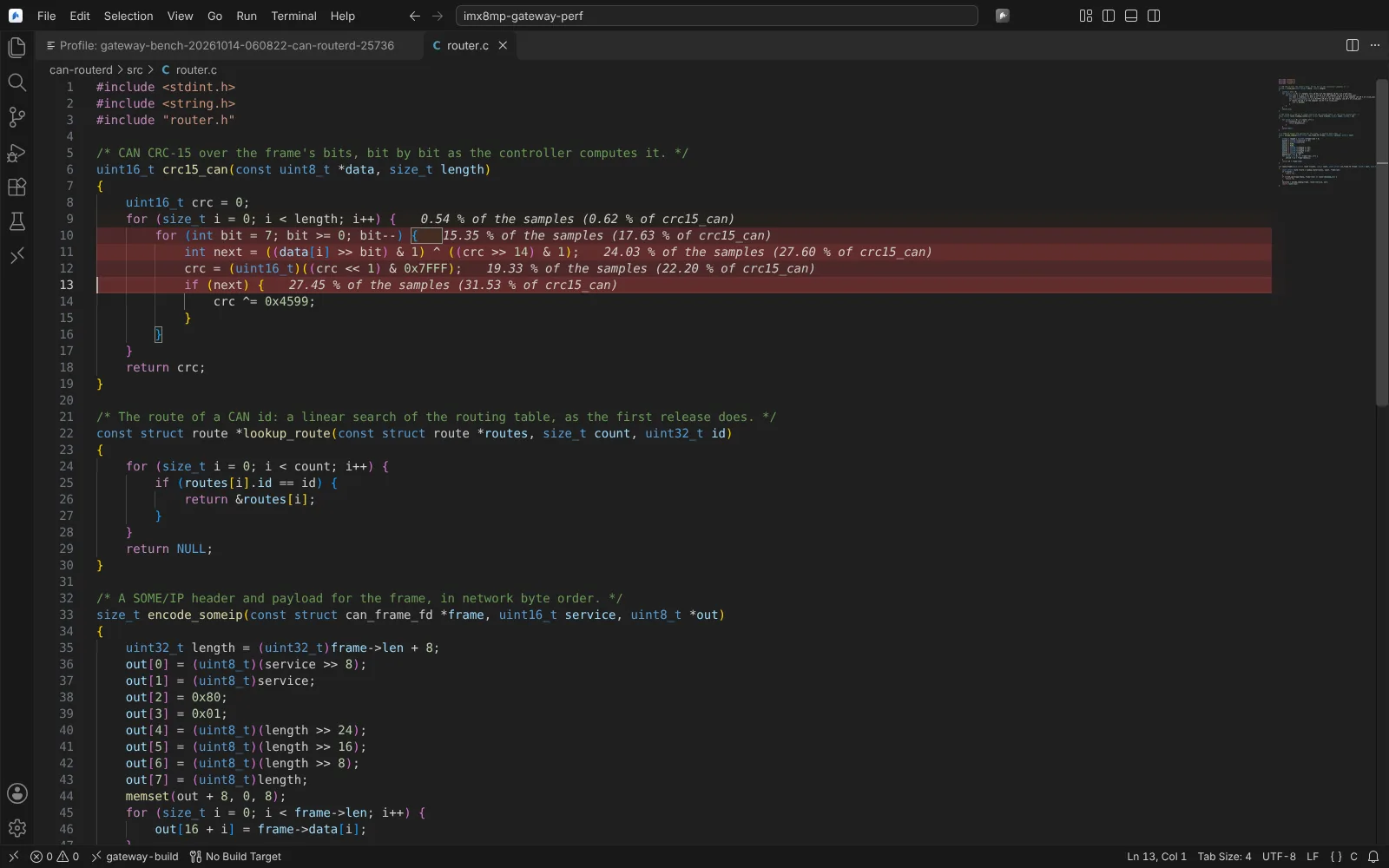 perf's per-line shares of the samples shown in the source of the hottest function.
Agent tools: five read-only; recording asks first.
Memory checking with Valgrind
State: modelled with Valgrind 3.22.0 over SSH against a stand-in BusyBox board and build host, on a C++ daemon with planted defects: frames resolved on the build host equal to Valgrind's own with the -dbg package for all 9 findings; Massif equal to ms_print; a build ID mismatch refused; stop and cancel; a board without Valgrind, a missing program or tool; a service from its unit files; one release compared with the next. Not run on a real board, with aarch64 cross addr2line, with systemctl on a real systemd board, with a real Yocto image's debug file system or SDK, on Windows or on Wind River Linux.
Add valgrind to IMAGE_INSTALL and set IMAGE_GEN_DEBUGFS = "1".
- In Targets, on the board, run Check Memory with Valgrind on Target.... Pick Memcheck (leaks and memory errors, as XML with full leak checking; track origins optional) or Massif (the heap over time), and what to run: an application, a command or a systemd service. For a service, its ExecStart is read from its unit files with drop-ins, EnvironmentFile, Environment and WorkingDirectory, and the service is stopped and restarted with systemctl when active.
- The confirmation names the board and the exact command. Stop Valgrind Run stops early (Memcheck still checks for leaks); cancel leaves nothing running.
- The report comes back with its SHA-256 checked. Frames Valgrind left as addresses are resolved on the build host with addr2line from the image's rootfs-dbg or an SDK, only where the build ID matches the board's file (Add Symbol Folder for Valgrind Results... adds a folder).
- Memcheck findings land in Problems at the program's source lines (invalid reads and writes, uninitialised values, mismatched frees, leaks by kind with bytes and blocks), with the full stacks in the results editor. Massif shows the heap over time and a snapshot's allocation tree.
- Compare With... compares two runs (fixed and new findings, leak bytes, peak change); export Markdown or CSV for a defect or test record. Open Valgrind Results... opens an earlier run.
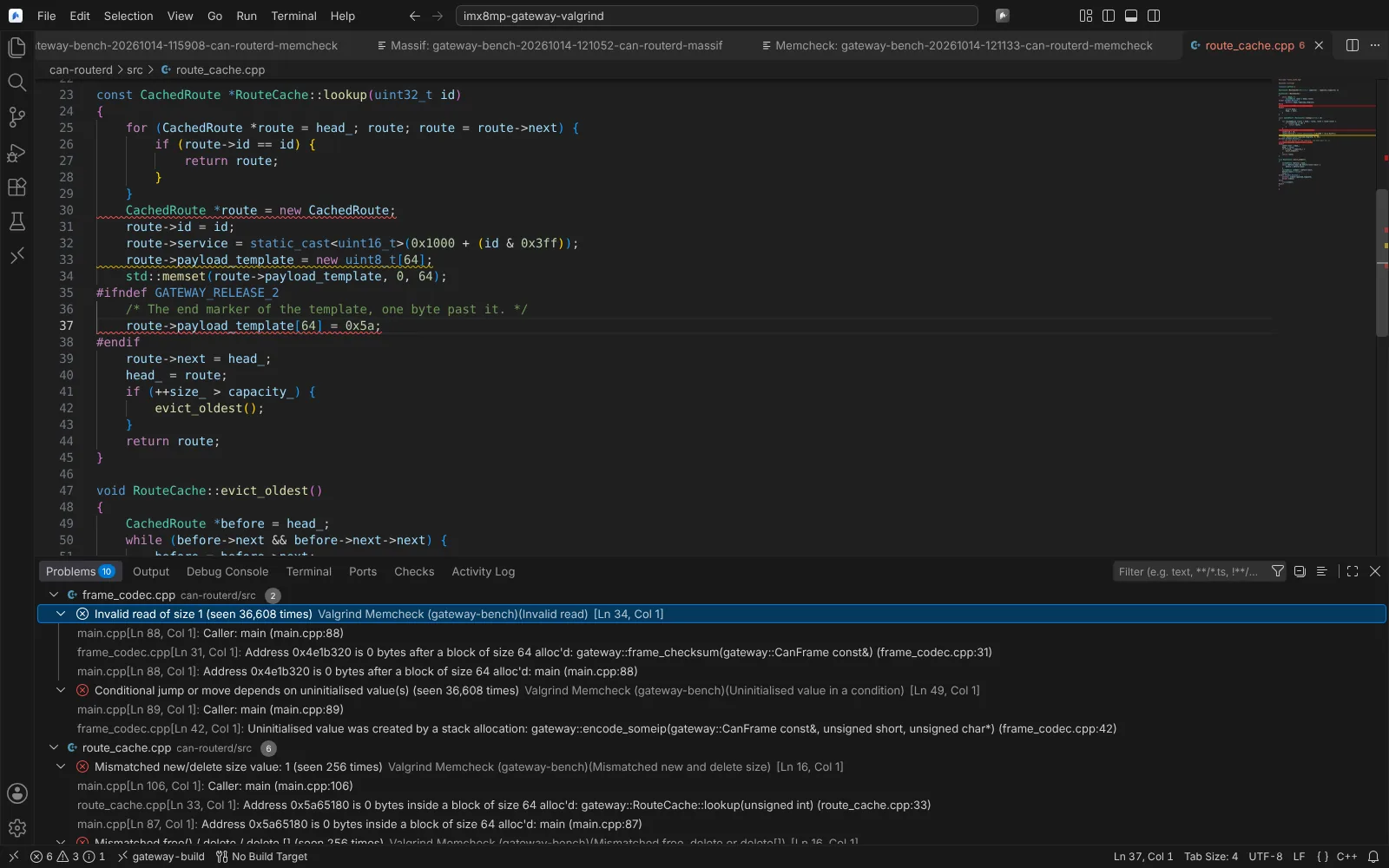 Valgrind Memcheck findings in Problems at the program's source lines, with their callers and allocation sites.
Agent tools: six read-only; running asks first.
Next: Kernel and system traces.